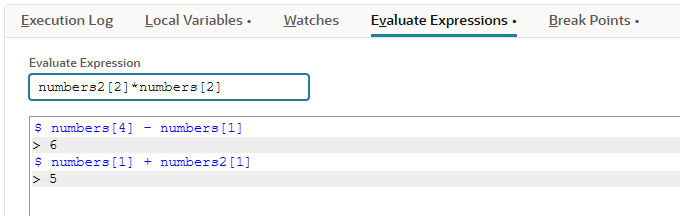
Evaluate Expressions Debugger Subtab
Note:
The Evaluate Expressions subtab isn't used for SuiteScript 2.1 scripts. SuiteScript 2.1 script logging is done on the Chrome DevTools debugger console. For more information about debugging SuiteScript 2.1 scripts, see Chrome DevTools for SuiteScript 2.1 Script Debugging.
Use the Evaluate Expressions subtab to run code at break points during the current program. This lets you access and even change the program's state.
Enter an expression in the Evaluate Expression field and hit the Enter key to evaluate the expression at the selected call stack. The results of an evaluated expression (if any) are displayed in the window below. Any change to the program's state is immediately reflected in the Local Variables and Watches subtabs.