Watches Debugger Subtab
The Watches subtab isn't used for SuiteScript 2.1 scripts. Variable watches in SuiteScript 2.1 scripts are done on the Chrome DevTools debugger console. For more information about debugging SuiteScript 2.1 scripts, see Chrome DevTools for SuiteScript 2.1 Script Debugging.
The Watches subtab lets you add or remove variables and expressions to a list that's kept up-to-date ("watched") during the time that your script executes.
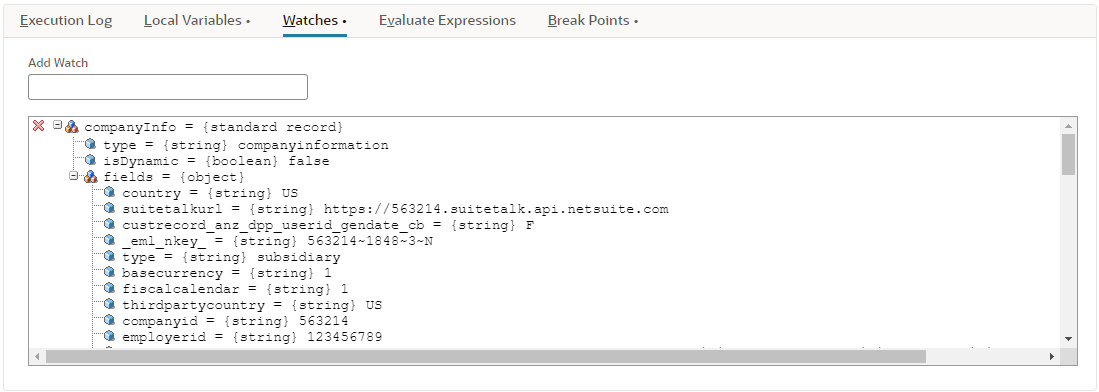
The variables and expressions are always evaluated in the current call stack. This means that by default, they're evaluated at the current line of script execution. However, if you switch to a different function in the call stack, they're re-evaluated at that location.
-
To add a variable or an expression, type it into the Add Watch field and press the Enter key.
-
To remove a watched variable or expression, click on the red x icon to the left of the expression.
-
To browse sub-properties of a user-defined object, an array, or a NetSuite object expression, click the expand/collapse icon next to the property name.
You can also use the Watches subtab to view object properties with a command-line interface. Any property that is viewable from the property browser can be added as a watch expression by referencing the property using dot ( . ) notation, even if the property is private in the script. For example, to watch the ID of a record object (referenced by a variable called record), type record.id in the Add Watch field.