Adding, Removing, or Reordering Report Columns
The Report Builder lets you add, remove, or move report columns.
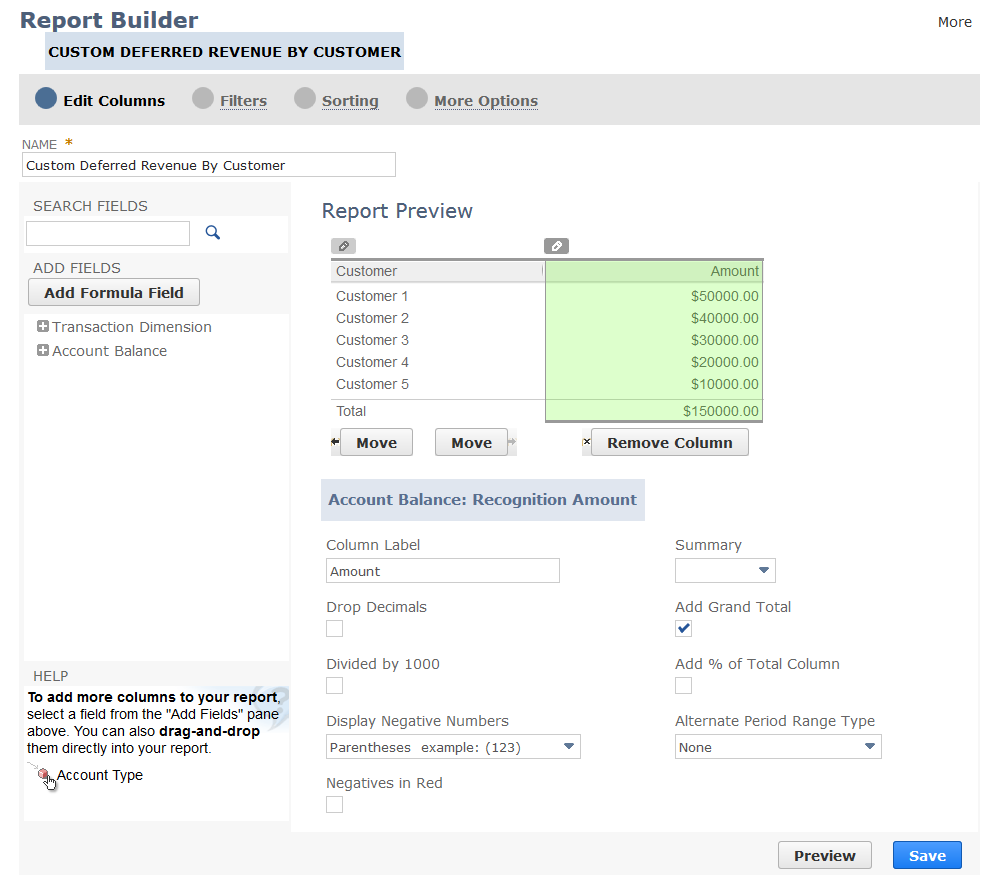
Click Edit Columns on the Report Builder (or Financial Report Builder) page to view the Report Preview pane. The preview shows each column on the report. You can select the column in the preview pane and then move it, remove it, or choose column options for it. You can also change the column heading.
Note:
For financial statements, use the Financial Report Builder to edit columns. See Financial Report Builder Edit Columns Page.
Click one of the links below to view step-by-step instructions:
Related Topics
- Report Customization
- Report Builder Interface
- Report Customization Permission
- Formatting Numbers on Reports
- Filtering Data on Reports
- Sorting Data on Reports
- Setting Additional Options for Custom Reports
- Arranging Data on Summary Reports
- Setting Up Cash Basis Reporting
- Sharing Custom Reports with Other Users
- Exporting a Saved Report as an Excel Web Query
- Example Report Format Changes
- Saving a Custom Report
- Deleting a Custom Report