The Icon Sprite Image File for Custom Records
This topic describes the icon sprite image file for creating custom icons. For information about the four icon versions, see The Four Icon Versions for Custom Records For an overview of general requirements and file specifications, see Creating Icons for Custom Records.
The four icon versions reside, side-by-side, in a single image file known as a sprite. Using coordinates and other data stored in CSS, NetSuite displays the proper icon version needed and crops out and hides the rest of the sprite image. Therefore, for your icons to display properly, they must be an exact size and at an exact location within the image file.
Each icon must be no larger than 16 pixels by 16 pixels. Any artwork that goes beyond the 16x16 boundary will not be displayed.
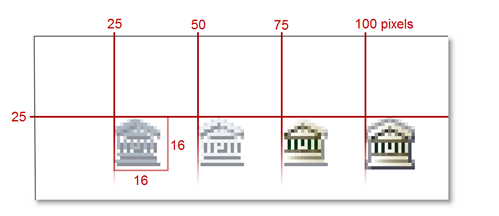
Each icon version must be located at the following locations within the image file, as measured from the upper-left corner of the image:
|
Icon Version |
x Coordinate |
y Coordinate |
|---|---|---|
|
Grayscale icon for dark backgrounds |
25 |
25 |
|
Grayscale icon for light backgrounds |
50 |
25 |
|
Color icon for dark backgrounds |
75 |
25 |
|
Color icon for light backgrounds |
100 |
25 |
Most image-editing applications have guides that you can set up to help you keep track of these spacing requirements. You can also download the sample icon file pack at the bottom of this topic, which contains various template files that will help keep your icons in order.