The Four Icon Versions for Custom Records
This topic describes the versions of icons available creating custom icons. For an overview of general requirements and file specifications, see Creating Icons for Custom Records.
A custom record icon is made up of a set of four slightly varied versions of your icon, ranging from grayscale to full-color. These four versions are required so that the icon can be displayed with maximum clarity and contrast on a variety of backgrounds.
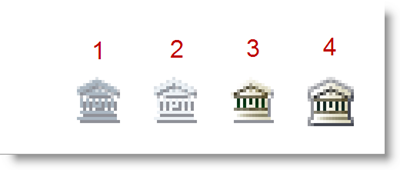
Image 1: Grayscale icon for dark backgrounds. This icon is an outline version of the full-color icon, used on dark color themes. Because the default color theme is dark-colored, this version is used most often.
Image 2: Grayscale icon for light backgrounds. This is another outline version of the icon, used on light color themes. This version is used less often because most color themes have dark backgrounds.
Image 3: Color icon for dark backgrounds. This is a full-color version of the icon, optimized for use on dark backgrounds. This version is used as the color icon that replaces the grayscale version when a cursor is nearby.
Image 4: Color icon for light backgrounds. This is another full-color version of the icon, optimized for use on light backgrounds. This version is used in menus, which always have a light background.