Forms
NetSuite offers standard forms for entering business-related data, and you can use them to store various types of records. There are forms for every record you can store in your NetSuite account, including transactions, entities (for example, Customers and Vendors), Items, and CRM activities. For a complete list of supported record types, see NetSuite Record Types.
You can tailor standard forms to meet your business needs using customization options.
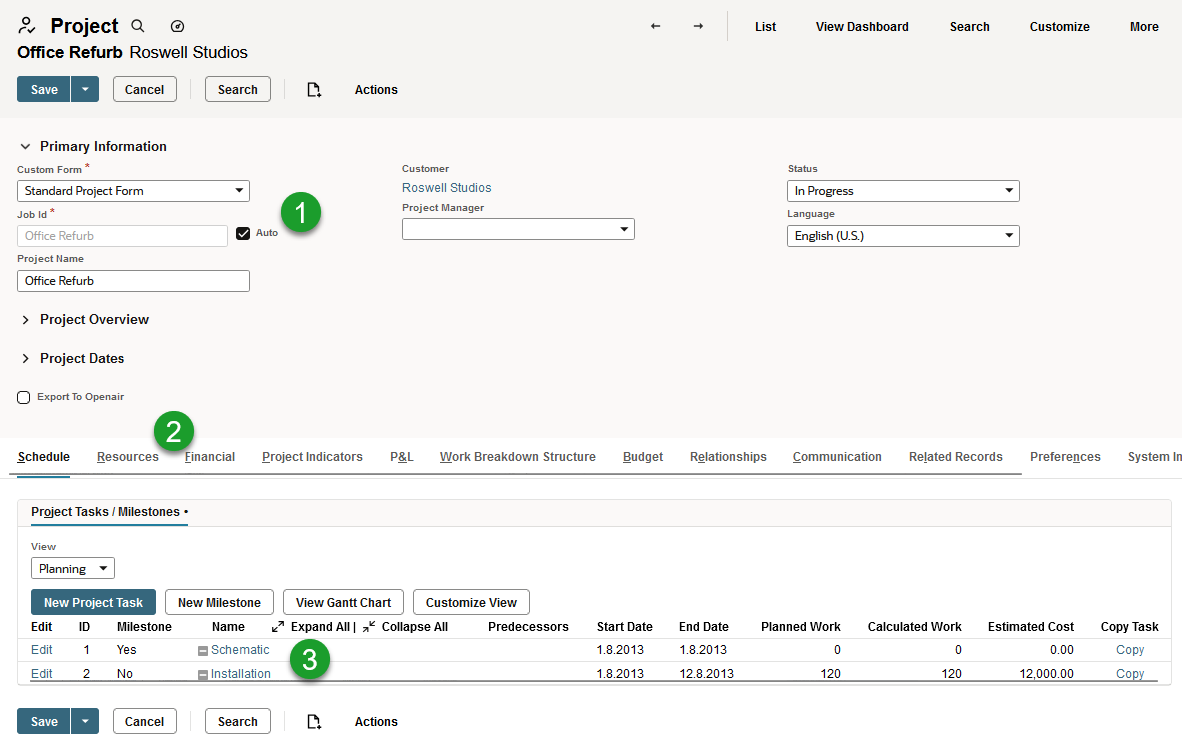
Forms consist of the following key components:
-
Fields - Fields are used to display and enter data. If you don't see the information you need on a form, you're able to create custom fields and add them to the form. After the form is submitted, custom field information is stored in the same way as standard field information. For more information, see Custom Fields.
-
Subtabs - Most forms are divided into subtabs, which group similar fields together. For example, the Schedule subtab contains project tasks and milestones. Custom subtabs let you to organize custom fields on records in a way that makes sense for your business. Note that the field area displayed at the top of a form by default is considered to be on the Main subtab. For more information, see Creating Custom Subtabs
-
Sublists - You can also add custom sublists to your forms. Sublists can display either saved search results relating to the record on which they're shown, or can display child record instances related to parent record using the relationship field. For example, you can add a custom sublist to track specific milestone details. For more information, see Custom Sublists.
For an example use case, see Forms Use Case.
For more information, see Custom Forms.