Finding Internal IDs of Record Fields
Internal field IDs must be used when referring to a field using SuiteScript APIs. The following sections show different ways to view a field's internal ID:
Not all fields are visible to NetSuite users. You can use the SuiteScript Records Browser to find the internal ID of any field.
Internal IDs for Standard and Custom Fields in Field Level Help Window
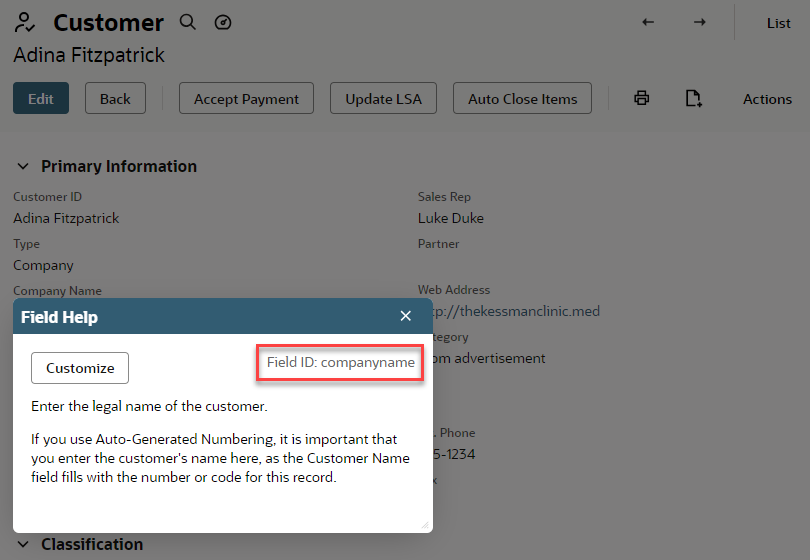
When the Show Internal IDs preference box is checked, you can view internal field IDs for both standard and custom fields by clicking the field label in the UI.
The following screenshot shows the Field Level Help window that opens when you click a field label. In the example, the Company field label is clicked. The internal ID for the Company field is companyname, which appears in the bottom-right corner of the Field Level Help window.
When creating custom fields, you can specify your own field ID or use the default ID assigned by NetSuite. To ensure that the field IDs make sense in the context of your business environment, you should define your own custom field IDs. For detailed information about creating custom fields and assigning custom field IDs, refer to Custom Fields.
Internal IDs for Custom Fields on List Pages
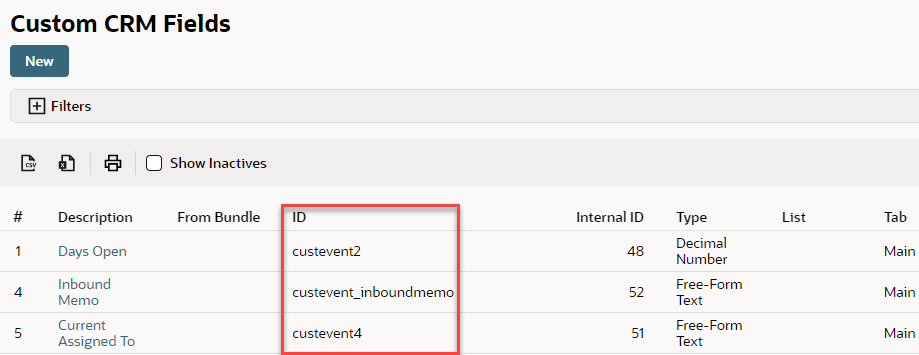
When the Show Internal IDs preference box is checked, internal IDs for each custom field are shown in the Internal ID column of a custom field page.
For example, to see the internal IDs for custom CRM fields, go to Customization > Lists, Records, & Fields > CRM Fields (Administrator). The ID column appears in the list of custom fields as shown in the following screenshot.