Enabling SuiteScript 2.1 at the Account Level
SuiteScript 2.1 is now the standard scripting version. Update scripts that use SuiteScript 1.0 or the SuiteScript 2.0 or 2.x version annotations to SuiteScript 2.1 by the 2028.2 release to ensure continued compatibility. For more information, see Transitioning To SuiteScript 2.1.
You can use account-level preferences to run SuiteScript 2.0 and 2.x server scripts in the SuiteScript 2.1 runtime without changing the @NApiVersion JSDoc tag in the script file. This lets you test compatibility and expected behavior before updating the script annotation.
The available preferences are:
-
Execute SuiteScript 2.0 Server Scripts as 2.1
-
Execute SuiteScript 2.x Server Scripts as 2.1
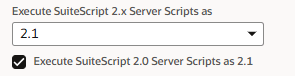
Use these options when:
-
The script is a server script.
-
The script uses the version annotation
@NApiVersion 2.xor2.0. -
You want to test runtime compatibility before changing the script file.
-
You need a lower-risk way to identify scripts that already work in SuiteScript 2.1.
Enabling the Preferences
To enable SuiteScript 2.1 at the account level for SuiteScript 2.0 and 2.x server scripts:
-
Go to Setup > Company > Preferences > General Preferences.
-
For SuiteScript 2.x server scripts, select 2.1 from the Execute SuiteScript 2.x Server Scripts as 2.1.
-
For SuiteScript 2.0 server scripts, select Execute SuiteScript 2.0 Server Scripts as 2.1.
-
Click Save.
Considerations
Only script types supported on SuiteScript 2.1 will run when the Execute SuiteScript 2.0 Server Scripts as SuiteScript 2.1 preference is enabled. Scripts not yet supported in 2.1 will not be affected by this preference.
When the preferences are set to 2.1, scripts annotated with @NApiVersion 2.x or 2.0 still use SuiteScript 2.0 syntax rules when uploaded. As a result, a script that contains syntax supported only in SuiteScript 2.1 returns a syntax error.
This behavior preserves compatibility while testing existing scripts with the preference enabled. To use SuiteScript 2.1 syntax or features, explicitly update the script annotation from @NApiVersion 2.x to @NApiVersion 2.1. You can also upload new scripts with the @NApiVersion 2.1 annotation.
Validating Scripts in SuiteScript 2.1
Successful validation means NetSuite can evaluate the SuiteScript 2.0 server script in the SuiteScript 2.1 runtime and does not find compatibility issues.
Validation is successful when:
-
The script runs with the applicable preference enabled.
-
NetSuite does not return a validation error for the script.
-
The script completes its expected behavior during testing.
-
No related SuiteScript 2.1 compatibility errors appear in the script execution logs.
Actions After Validation
If a script validates successfully, update its script annotation to @NApiVersion 2.1.
If a script does not validate successfully:
-
The script continues to run as SuiteScript 2.0. Scripts with the Execute As field set to 2.0 also continue to run as SuiteScript 2.0.
-
Modify the script to address the identified compatibility issues, and then test the updated script again.
-
You can change either account-level preference back to 2.0 at any time.