Automatically create a new issue when project stage is 'at risk' and prevent project stage from changing until this issue is resolved
This script automatically create a new issue when the project stage is saved as "at risk" and prevents the project stage from changing until the issue is resolved.
-
Enforces documentation trail for critical project concerns
-
More complex variation of simple "project stage" validation example
Follow the steps below or download the solutions file, see Creating Solutions for details.
You will still need to create the custom fields described in Setup 1 - Custom Field
This example consists of a custom field and two scripts:
-
Setup 1 - Custom Field is used by both the scripts.
-
Setup 2 - Project After Save creates an issue with a custom field enabled.
-
Setup 3 - Project Before Save prevents the project stage from changing until the issue is resolved.
This example requires you to create a Project Stage. See the Administrator Guide for more details on Project Stages.
Setup 1 - Custom Field
-
Set up a Checkbox and a Text Area custom field for Issue.

Setup 2 - Project After Save
-
Create a new Project form script deployment.
-
Enter a Filename and click SAVE. The extension '.js' is automatically appended if not supplied.
-
Click on the script link to launch the Scripting Studio.
-
(1) Copy the Program Listing below into the editor, (2) set the After save event, and set proj_at_risk_aftersave as the Entrance Function.
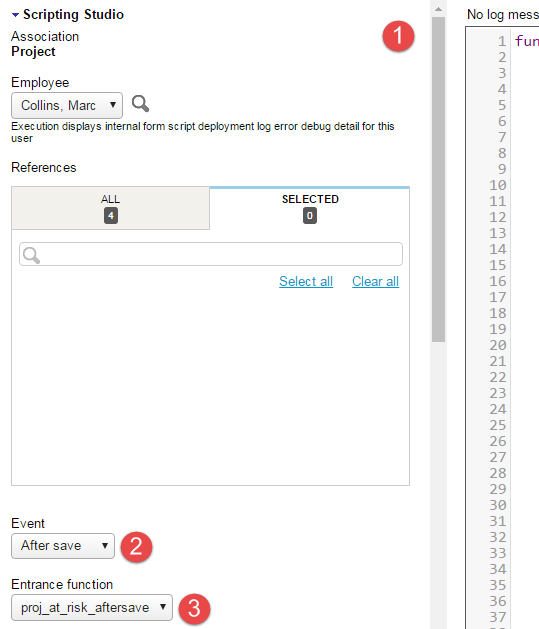
Program Listing for Setup 2
            function proj_at_risk_aftersave() {
   var PROJECT_STAGE_AT_RISK = NSOA.context.getParameter('ProjectAtRiskStage');
   var ISSUE_STAGE_OPEN = NSOA.context.getParameter('IssueOpenStage');

    // return if new stage is changed and "at risk"
    var proj = NSOA.form.getNewRecord();
    var old_stage = NSOA.form.getOldRecord().project_stageid;
    var current_stage = proj.project_stageid;
    NSOA.meta.log("debug", "old=" + old_stage + ", new=" + current_stage);
    if (old_stage == current_stage || current_stage != PROJECT_STAGE_AT_RISK)
        return;

    // Check for an existing at-risk event
    var issue = new NSOA.record.oaIssue();
    issue.project_id = proj.id;
    issue.for_at_risk_project__c = '1';

    var readRequest = {
        type: "Issue",
        fields: "id, name, date",
        method: "equal to",
        objects: [issue],
        attributes: [{
            name: "limit",
            value: "1"
        }]
    };

    var arrayOfreadResult = NSOA.wsapi.read(readRequest);
    if (!arrayOfreadResult || !arrayOfreadResult[0])
        NSOA.form.error('', "Internal error analyzing project issues.");

    else if (arrayOfreadResult[0].errors === null &&
        (!arrayOfreadResult[0].objects || arrayOfreadResult[0].objects.length === 0)) {
        issue.owner_id = NSOA.wsapi.whoami().id;
        issue.description = "Projected reported at risk";
        issue.issue_status_id = 1; // Unassigned
        issue.issue_stage_id = ISSUE_STAGE_OPEN;
        issue.date = (new Date()).toISOString().slice(0, 10);
        NSOA.meta.log('debug', JSON.stringify(issue));
        NSOA.wsapi.add(issue);
    }
}
Setup 3 - Project Before Save
-
Create a new Project form script deployment.
-
Enter a Filename and click SAVE. The extension '.js' is automatically appended if not supplied.
-
Click on the script link to launch the Scripting Studio.
-
(1) Copy the Program Listing below into the editor, (2) set the Before save event, and set proj_at_risk_beforesave_validate as the Entrance Function.
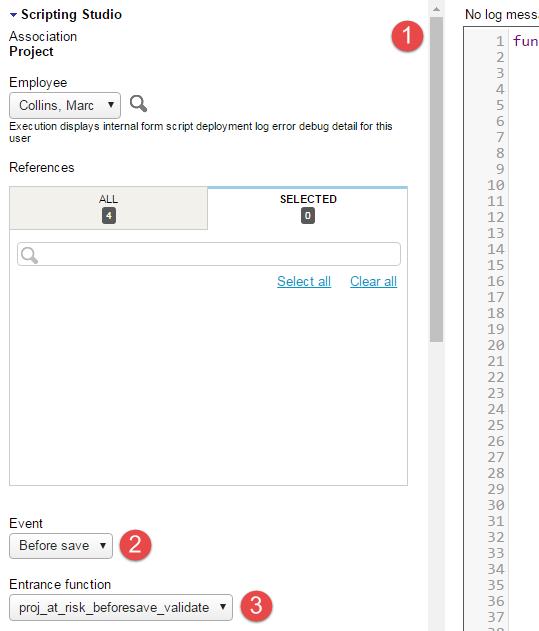
Program Listing for Setup 3
            function proj_at_risk_beforesave_validate() {
   var PROJECT_STAGE_AT_RISK = NSOA.context.getParameter('ProjectAtRiskStage');
   var ISSUE_STAGE_OPEN = NSOA.context.getParameter('IssueOpenStage');

    // return if new stage is not changing from "at risk"
    var current_stage = NSOA.form.getOldRecord().project_stageid;
    var new_stage = NSOA.form.getValue('project_stage_id');
    if (!(current_stage == PROJECT_STAGE_AT_RISK && new_stage != PROJECT_STAGE_AT_RISK))
        return;

    // Load issue data
    var issue = new NSOA.record.oaIssue();
    issue.project_id = NSOA.form.getValue('id');
    issue.issue_stage_id = ISSUE_STAGE_OPEN;
    issue.for_at_risk_project__c = '1';

    var readRequest = {
        type: "Issue",
        fields: "id, name, date",
        method: "equal to",
        objects: [issue],
        attributes: [{
            name: "limit",
            value: "1"
        }]
    };

    var arrayOfreadResult = NSOA.wsapi.read(readRequest);

    if (!arrayOfreadResult || !arrayOfreadResult[0])
        NSOA.form.error('', "Internal error analyzing project issues.");

    else if (arrayOfreadResult[0].errors === null && arrayOfreadResult[0].objects)
        arrayOfreadResult[0].objects.forEach(
            function(o) {
                NSOA.form.error('', "Can't change project stage until " +
                    "the following issue is resolved: " + o.name);
            }
        );
}