2 Getting Started
Prerequisites for Getting Started
Use Enterprise Management to centrally manage OPERA Cloud (and Distribution) configuration across all chains, brands and properties within a single enterprise. In Enterprise Management, you create and update standardized configurations and then efficiently distribute them to properties across multiple locations, ensuring consistency and accuracy. Enterprise Management can be used for provisioning new properties or distributing configuration updates to existing properties on an ongoing basis.
Multiple modes are available depending on your Oracle Hospitality subscriptions. See Switching Modes for details.
-
Channel configuration options for OPERA Cloud Distribution.
-
OPERA Controls (Functions and Parameters). The parameters available are limited to those without additional settings.
-
Configuration types for OPERA Cloud
-
Template Property Roles
-
Customized Stationery Management. See Supported Stationery Templates for details. If localized templates (per profile languages) are needed, enable the Multi Language OPERA Control in the enterprise template before configuring stationery.
Enterprise Management Templates
Enterprise Management uses templates in a two-level hierarchy to manage configuration across your enterprise.
-
Enterprise Templates - Define standard configurations across all properties in a chain (for example, chain-wide standard configuration).
-
For each template created, a Manage Enterprise Template sub task is auto-created in the Enterprise Template task group; assign this task to user groups for user access to the template.
-
Global (chain-level) configuration, applying to all properties in a chain, is indicated with
 and can only be configured in an Enterprise Template.
-
Global and property-specific OPERA Controls are available.
-
Global OPERA Controls are indicated with
-
Complimentary functions are indicated with
 in the Complimentary column.
-
-
Any dependent configuration is fetched from the enterprise template.
-
-
Custom Templates - Linked to an enterprise template, custom templates define standard configuration for a subset of properties (for example, brand-specific or region-specific configuration).
-
For each template created, a Manage Custom Template sub task is auto-created in the Custom Template task group; assign this task to user groups for user access to the template.
-
Any dependent configuration is fetched from both the enterprise template and custom template.
-
Property-specific OPERA Controls are available.
-
Complimentary functions are indicated with
in the Complimentary column.
-
When property-specific OPERA Controls are set up in both enterprise and custom templates, the set up from the custom template takes precedence.
-
-
For each template you create, start by selecting the various configuration types, then adding the configuration items (entries) for these options. The configuration types available for selection are dependent on the lowest version at your properties. For example, a configuration type added in 25.x will not be enabled for selection if some properties are currently operating 24.x. Configuration types with dependencies on other configuration types are indicated, for example - Market Codes is dependent on Market Groups. Any seeded entries are populated when the configuration type is selected for a template. See OPERA Cloud Seeded Configuration for details.
Once configuration types are selected in a template, configuration can be entered; either directly in Enterprise Management or imported from a CSV template file. Configuration values have a Pending status initially, and must be approved by a user with the Approve Configuration task assigned. Configuration values can be rejected and configuration values no longer required are updated to Archive status to prevent distribution to new properties. You also have the option to import all supported configuration from an OPERA Cloud property to an unconfigured enterprise template. You can export the configuration entries in a template to CSV files for use externally.
Distributing Configuration
Note:
Distribution to the pseudo CSP-Central Sales Property is not supported.In order to distribute configuration to properties, a custom template is linked to one or more properties; resulting in the configuration from both the enterprise template and the custom template being distributed and upsert (update or insert) in OPERA Cloud. When the Multi Property OPERA Control is active, configuration is upserted (or “updated or inserted”) to both the template (where applicable) and the properties.
When distributing configuration dependent on an OPERA Control (for example, Alerts Messages for the Alerts OPERA Control), distribution fails when the OPERA Control is inactive at the property. Distribution logs will indicate "<property> does not support <configuration type>". OPERA Controls selected and activated in templates are distributed prior to the configuration entries in the templates.
-
If the configuration is added directly in OPERA Cloud, configuration entries are labeled as "Property Managed".
-
If the configuration was distributed from Enterprise Management, configuration entries are labeled as "Enterprise Managed".
-
If the configuration was distributed from Enterprise Management and overridden by the property, configuration entries are labeled as "Property Overridden" (Requires the Override Enterprise Managed Configuration task). Further updates from Enterprise Manager are declined.
Note:
All Enterprise Management configuration changes are tracked in the OPERA Cloud changes log with the user WS_EM_INTERNAL_CLIENT1_APPID.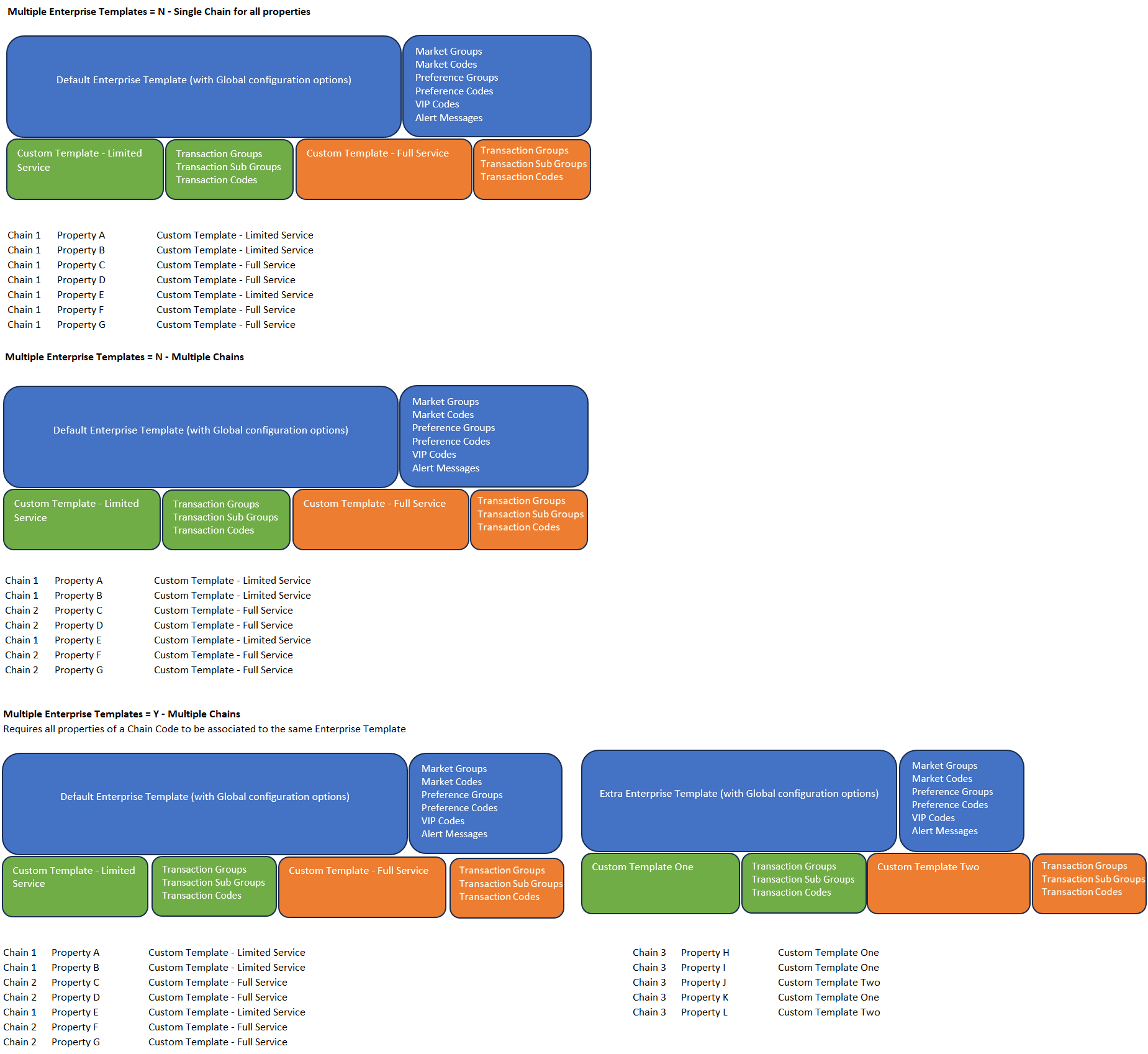
Related Topics
OPERA Cloud Seeded Configuration
The following configuration options and configuration entries are seeded on creation of an Enterprise Template
Configuration types marked Edit Only support editing of the available seeded entries but do not support creation of additional entries. Consequently, the New action is unavailable for these configuration types.
Table 2-1 Seeded Configuration
| Configuration Option | Configuration Entries | Global | Dependent Configuration | Edit Only |
|---|---|---|---|---|
|
Daily Plans (Folio Grouping) |
Lodging Others |
No |
No |
Yes |
|
Delivery Statuses |
1-5 |
Yes |
No |
No |
|
Genders |
|
Yes |
No |
No |
|
Fiscal Guest Types |
|
Yes |
No |
Yes |
|
Folio Copy Legends |
No |
No |
Yes |
|
|
Number to Words |
Yes |
No |
Yes |
|
|
Preference Groups |
|
Yes |
Yes |
No |
|
Report Texts (Stationery) |
No |
No |
Yes |
|
|
Reservation Colors |
|
Yes |
No |
Yes |
|
Room Types |
PM-Posting Master |
No |
Yes |
No |
|
Servings |
|
Yes |
Yes |
Yes |
Switching Modes
You can switch between OPERA Cloud Central and OPERA Cloud Distribution modes to access the template options, tasks and other options applicable to each solution.
Activate OPERA Cloud mode to setup templates for distribution to OPERA Cloud Central properties.
-
Click your user initials icon in the top-right to display additional options.
-
Select Mode: Select OPERA Cloud from the list.
-
Your session will reinitialize.
-
Activate Distribution mode to setup templates for distribution to OPERA Cloud Distribution.
-
Click your user initials icon in the top-right to display additional options.
-
Select Mode: Select Distribution from the list.
-
Your session will reinitialize.
-
OPERA Cloud Configuration Options
BOOKINGS
Table 2-2 Booking
| Configuration Option | OPERA Control | Notes |
|---|---|---|
|
Alert Messages |
Alerts |
|
|
Block Cancellation Reasons |
Business Block |
|
|
Block Conversions Codes |
Business Block |
|
|
Block Destination |
Business Block |
|
|
Block Lost Reasons |
Business Block |
|
|
Block Refused Reasons |
Business Block |
|
|
Block Reservation Methods |
Business Block |
|
|
Block Rankings |
Block Ranking |
|
|
Block Rate Override Reasons |
Allow Rate Editing with Rate Code |
|
|
Block Wash Schedules |
Note: At least one Wash Code Details entry is required before a wash schedule can be distributed. Each detail entry within the same wash schedule must have a unique Days to Prior Arrival value. |
|
|
Booking Types |
Business Block Type |
|
|
Cancel Penalties (Rules) |
Cancellation Handling |
|
|
Cancellation Reasons |
||
|
Catering Menu Classes |
Event Resources |
|
|
Catering Menu Item Classes |
Event Resources |
|
|
Catering Menu Items |
Event Resources |
|
|
Catering Revenue Groups |
Event Resources |
|
|
Catering Revenue Types |
Event Resources |
|
|
Country Entry Points |
||
|
Deposit Rules |
Deposit Handling |
|
|
Discount Reasons |
Reservation Discount |
|
|
eCoupons |
eCoupons |
|
|
Guest Locators |
Guest Locators |
|
|
Guest Messages |
Messages |
|
|
Guest Status |
||
|
Guest Types |
||
|
Item Class |
Event Resources Item Inventory |
Reservationand Events checkboxes are displayed as values in Type list field. |
|
Immigration Status |
||
|
Item Rate Rules |
Event Resources |
|
|
Market Codes |
||
|
Marketing Cities |
||
|
Market Groups |
||
|
Menu Item Container |
Event Resources |
|
|
Marketing Regions |
||
|
Meal Periods |
Catering Events |
|
|
Origin Codes |
||
|
Property Move Reasons |
||
|
Purpose of Stay |
||
|
Reservation Colors |
Seeded Entries |
|
|
Room Move Reasons |
||
|
Reservation Types |
||
|
Servings |
Event Resources |
Seeded Entries |
|
Source Codes |
||
|
Source Groups |
||
|
Trace Texts (Global) |
|
|
|
Turnaway Codes |
Turnaway Functionality |
|
|
Waitlist Codes |
Waitlist |
|
|
Waitlist Priorities |
Waitlist |
CLIENT RELATIONS
Table 2-3 Client Relations
| Configuration Option | OPERA Control | Notes |
|---|---|---|
|
Address Formats |
||
|
Alternate Language Titles |
Multi Language |
Supports multi-byte Unicode characters for Code |
|
Account Priorities |
Sales Information |
|
|
Address Types |
||
|
Birth Countries |
||
|
Business Potential |
Sales Information |
|
|
Business Segments |
||
|
City Postal Codes |
||
|
Company Types |
IATA Company Type |
|
|
Competition Codes |
Sales Information |
|
|
Countries |
||
|
Country Main Groups |
||
|
Communication Types |
||
|
Credit Ratings |
Credit Rating |
|
|
Districts |
||
|
Distance Types |
||
|
Enrollment Groups |
Enrollment |
|
|
Enrollment Codes |
Enrollment |
|
|
Fiscal Regions |
||
|
Fiscal Guest Types |
||
|
Genders |
Seeded Entries |
|
|
Global Action Codes |
Property Action Code |
|
|
Inactive Reasons |
||
|
Industry Codes |
||
|
Identification Types |
||
|
Identification Countries |
||
|
Influence Codes |
Sales Information |
|
|
Keyword Types |
Keyword |
|
|
Languages |
Multi Language |
|
|
Location Types |
E-Certificate Redemption |
|
|
Mailing Action Codes |
||
|
Membership Claim Adjustment Limits |
|
|
|
Membership Claim Origins |
|
|
|
Membership Claim Types |
|
|
|
Membership Classes |
||
|
Membership Market Groups |
|
|
|
Membership Origin Groups |
|
|
|
Membership Rate Groups |
|
|
|
Membership Revenue Groups |
|
|
|
Membership Revenue Types |
|
|
|
Membership Room Groups |
|
|
|
Membership Status Codes |
|
|
|
Membership Source Groups |
|
|
|
Nationalities |
||
|
Payment Due Days |
Payment Due Days |
|
|
Preference Groups |
Seeded Entries |
|
|
Preferences |
||
|
Profile Name Validations |
Profile Name Validations |
|
|
Regions |
||
|
Relationships |
||
|
Restriction Reasons |
Restriction/Flagged Reasons |
|
|
Sales Account Types |
Sales Information |
|
|
Sales Activity Results |
Activity Results |
|
|
Sales Activity Trace Codes |
Activities |
|
|
Sales Activity Types |
Activities |
|
|
Sales Scopes |
Sales Information |
|
|
Sales Scope City |
Sales Information |
|
|
Sales Sources |
Sales Information |
|
|
Sales Territories |
Sales Information |
|
|
States |
||
|
Tax Categories |
||
|
Tax Offices |
||
|
Titles |
||
|
Travel Agent Types |
IATA Company Type |
|
|
VIP Levels |
VIP |
 Membership Claims
ENTERPRISE
Table 2-4 Enterprise
| Configuration Option | OPERA Control | Notes |
|---|---|---|
|
Airports |
||
|
Amenities |
Begin Date is required. |
|
|
Attraction Categories |
||
|
Attractions |
For Longitude and Latitude, enter Degrees, Minutes, and Seconds, and select the applicable Direction. |
|
|
Corporate Brand Codes |
||
|
Corporate Business Units |
||
|
Corporate Department Codes |
||
|
Corporate Divisions |
||
|
Corporate Operating Units |
||
|
Delivery Statuses |
Seeded Entries |
|
|
Departments (Global) |
||
|
Flexible Dynamic Fields |
Flexible Dynamic Fields |
|
|
Hotel Categories |
||
|
Job Titles |
||
|
Note Types |
||
|
Property Details |
||
|
Property Detail Categories |
||
|
Property Types |
||
|
Service Request Codes |
Service Requests |
|
|
Service Request Priorities |
Service Requests |
|
|
Transportation Types |
Transportation |
|
|
Track It Actions |
Track It |
|
|
Track It Locations |
Track It |
|
|
Track It Types |
Track It |
|
|
User Defined Field Groups |
||
|
User Defined Field Values |
FINANCIALS
Table 2-5 Financial
| Configuration Option | OPERA Control | Notes |
|---|---|---|
|
Articles |
Articles |
Article Code accepts numeric values only. |
|
Adjustment Codes |
||
|
AR Restricted Reasons |
||
|
Auto Folio Settlement Types |
Auto Settlement Rules |
|
|
Advanced Authorization Rules |
Authorization Rules is mandatory in Advanced Authorization Rules configuration. | |
|
BAR Rate Groups |
Best Available Rates Rate Groups |
|
|
Calendar Events |
Property Calendar |
|
|
Cashiers |
||
|
Cashier Shift Drop Locations |
Shift Drop Location and Bag Numbers |
|
|
Commission Codes |
|
|
|
Consumable Inventory |
Consumable Inventory |
|
|
Credit Card Types |
||
|
Daily Plan Codes (Folio Grouping) |
Daily Plans |
Seeded Entries |
|
Day Types |
Day Types |
|
|
Display Sets |
||
|
Fiscal Folio Bucket Codes |
Fiscal Folio Printing Fiscal Service Terminals |
|
|
Fiscal Folio Bucket Types |
Fiscal Folio Printing Fiscal Service Terminals |
|
|
Folio Arrangement Codes |
Folio Arrangements |
|
|
Folio Copy Legend |
Folio Copy Legend |
Seeded Entries |
|
Foreign Currency Codes |
Foreign Currency Codes |
|
|
Group Arrangement Codes |
Folio Arrangements |
|
|
No Show Posting Rules |
Post Revenue To No Shows |
|
|
Number to Words |
Seeded Entries |
|
|
Package Arrangements |
Folio Arrangements |
|
|
Package Categories |
||
|
Package Codes (Definition) |
Point Redemption is available in Package Code Definition. Posting Attributes includes Minimum Advance Booking Days. Posting Type options are Included in Rate, Add to Rate - Separate Line, and Add to Rate - Combined Line. |
|
|
Package Code Pricing Schedules |
||
|
Package Groups |
||
|
Package Forecast Groups |
||
|
Payment Methods |
||
|
Period Definition Years |
Period Definition |
|
|
Promotion Codes |
||
|
Promotion Groups |
Promotions Module |
|
|
Rate Categories |
||
|
Rate Classes |
||
|
Rate Codes |
||
|
Rate Code - Daily (Definition) |
Daily Rates |
|
|
Rate Codes - Standard (Definition) |
Note: Does not support Revenue Posting by Room Type/Room Class OPERA Control |
|
|
Rate Groups |
Rate Groups |
|
|
Rate Seasons |
Rate Seasons |
|
|
Revenue Bucket Codes |
Profile Revenue Buckets |
|
|
Revenue Bucket Types |
Profile Revenue Buckets |
|
|
Routing Codes |
Routing |
|
|
Stop Processing Reasons |
Commission Handling |
|
|
Tax Type |
Tax Types |
|
|
Transaction Codes |
||
|
Transaction Groups |
||
|
Transaction Sub Groups |
||
|
Transaction Diversion Rules |
||
|
Transaction Discount Rules |
||
|
Yield Adjustment Codes |
Yield Management |
|
|
Yield Categories |
Yield Management |
|
|
Yield Market Types |
Yield Market Types |
INTERFACES
Table 2-6 Interfaces
| Configuration Option | OPERA Control | Notes |
|---|---|---|
|
Device Areas |
||
|
Printers (Global) |
Available in Enterprise Templates only. Property-specific printers are not supported in Enterprise Management and must be configured in OPERA Cloud. |
|
|
Report Texts (Stationery) |
Seeded Entries |
|
|
Scheduled Leisure Locations |
Scheduled Activities |
|
|
Scheduled Leisure Status |
Scheduled Activities |
|
|
Scheduled Leisure Types |
Scheduled Activities |
INVENTORY
Table 2-7 Inventory
| Configuration Option | OPERA Control | Notes |
|---|---|---|
|
Bed Types |
||
|
Building Groups |
Building Management |
|
|
Buildings |
Building Management |
|
|
Catering Event Types |
Catering Events |
|
|
Floors |
||
|
Function Space Locations |
Catering Events |
|
|
Function Space Rental Codes |
Catering Events |
|
|
Function Space Setup Styles |
Catering Events |
|
|
Function Space Types |
Catering Events |
|
|
Housekeeping Attendants |
||
|
Housekeeping Section Codes |
||
|
Housekeeping Section Groups |
||
|
Housekeeping Tasks |
Task Sheets Housekeeping Task Scheduling |
Credit Weighting is required and accepts numeric values. |
|
Meal Periods |
Catering Meal Periods |
|
|
Out of Order Service Reasons |
Out of Order Out of Service |
|
|
Room Classes |
Room Class |
|
|
Room Conditions |
Room Condition |
|
|
Room Features |
||
|
Room Maintenance Reasons |
Maintenance |
|
|
Room Pool Codes |
Room Pool |
|
|
Room Types |
Seeded Entries |
|
|
Rooms (Pseudo) |
Pseudo Room Type selection |
|
|
Scheduled Task Supplies |
Housekeeping Task Scheduling |
|
|
Unit Statuses |
Unit Status |
MISCELLANEOUS
Table 2-8 Miscellaneous
| Configuration Option | OPERA Control | Notes |
|---|---|---|
|
Telephone Book Categories |
||
|
Telephone Book Entries |
||
|
Report Groups |
Seeded entries The Report Group task is automatically created in Template Property Roles. Seeded Report Group tasks are included in TEMPLATE_ROLES_1.CSV. Tasks for customer-defined Report Groups are not included and must be assigned to the Template Property Role after import. |
CHANNELS

Table 2-9 Channels
| Configuration Option | Notes |
|---|---|
|
Channel Controls |
|
|
Channel Offers Distribution |
|
|
Channel Provisioning |
|
|
Channel Rate Access Codes |
|
|
Channel Rate Plans |
|
|
Channel Room Types |
|
|
Credit Card Types |
|
|
Distribution Attributes |
|
|
Payment Types |
|
|
Property Controls |