Oracle Database Security Assessment Report - Privileges and Roles
The Oracle Database Security Assessment Report - Privileges and Roles section displays the following information:
| Name | Finding ID | Description | Link(s) |
|---|---|---|---|
| Access to Password Verifier Tables | PRIV.ACCESSVERIFIERS | Displays access to password verifier tables granted to users. Users with these privileges can access objects that contain user password verifiers. The verifiers can be used in offline attacks to discover user passwords. | |
| Users with Administrative Privileges SYS* Privileges | PRIV.SYSADMIN | Displays the administrative privileges granted to user accounts. Administrative privileges allow a user to perform maintenance operations, including some that may occur while the database is not open. The | |
| Users with DBA Role | PRIV.DBA | Displays the user accounts that have been granted the DBA or PDB_DBA role. The DBA role is very powerful and can be used to bypass many security protections. It should be granted to only a small number of trusted administrators. Furthermore, each trusted user should have an individual account for accountability reasons. As with any powerful role, avoid granting the DBA role with admin option unless absolutely necessary. | |
| Users with Powerful Roles | PRIV.BIGROLES | Displays the user accounts that have been granted roles with maximum data access privileges. Like the DBA role, these roles ( | |
| System Privilege Grants | PRIV.SYSTEM | Displays the system privileges granted to users. System privileges provide the ability to access data or perform administrative operations for the entire database. Consistent with the principle of least privilege, these privileges should be granted sparingly. System privileges should be granted with admin option only when the recipient needs the ability to grant the privilege to others.
| |
| Schema Privilege Grants | PRIV.SCHEMA | Displays information about user accounts with ANY system privileges and schema-level grants. This will allow reviewing cases where | |
| System Privileges Granted to PUBLIC | PRIV.SYSPUBLIC | Displays the system privileges granted to Privileges granted to | |
| Roles Granted to PUBLIC | PRIV.ROLEPUBLIC | Displays the roles granted to Roles granted to | |
| Column Privileges Granted to PUBLIC | PRIV.COLPUBLIC | Displays the column access privileges granted to Privileges granted to | |
| Objects Accessible by PUBLIC | PRIV.OBJPUBLIC | Displays objects that are accessible by PUBLIC. | |
| Encryption Packages Granted to PUBLIC | PRIV.ENCRYPTPACKAGEPUBLIC | Displays DBMS_CRYPTO, DBMS_OBFUSCATION_TOOLKIT, and DBMS_RANDOM grants to PUBLIC. | |
| Scheduler Job Packages Granted to PUBLIC | PRIV.JOBSCHPACKAGEPUBLIC | Display DBMS_SCHEDULER and DBMS_JOB EXECUTE grants to PUBLIC and Scheduler/Job system privileges (CREATE JOB, MANAGE SCHEDULER, CREATE EXTERNAL JOB, CREATE ANY JOB) grants to PUBLIC. | |
| Credential Package Granted to PUBLIC | PRIV.CREDPACKAGEPUBLIC | Displays EXECUTE grant on DBMS_CREDENTIAL package to PUBLIC. Also checks for privilege grants of CREATE CREDENTIAL and CREATE ANY CREDENTIAL to users. | |
| File System Packages Granted to PUBLIC | PRIV.FILESYSTEMPACKAGEPUBLIC | Displays EXECUTE grant on DBMS_LOB, UTL_FILE, and DBMS_ADVISOR packages to PUBLIC. Also checks for system privilege grants of CREATE ANY DIRECTORY and DROP ANY DIRECTORY to users. | |
| Network Packages Granted to PUBLIC | PRIV.NETPACKAGEPUBLIC | Displays EXECUTE grant on DBMS_LDAP, UTL_HTTP, UTL_INADDR, UTL_SMTP, and UTL_TCP packages to PUBLIC. Also checks for users that are authorized to execute packages via ACLs. | |
| SQL Packages Granted to PUBLIC | PRIV.QUERYPACKAGEPUBLIC | Displays EXECUTE grant on DBMS_XMLQUERY, DBMS_XMLSAVE, DBMS_XMLSTORE, DBMS_REDACT, DBMS_XMLGEN, and DBMS_SQL packages to PUBLIC. | |
| Oracle JAVA Permissions Granted to PUBLIC | PRIV.JAVAPACKAGEPUBLIC | Displays EXECUTE grant on DBMS_JAVA and DBMS_JAVA_TEST packages to PUBLIC. Also checks for grants of JAVA_ADMIN role to users. | |
| Broad Data Access Privileges | PRIV.ANYSYSTEM | Displays information about user accounts that have been granted system privileges (ANY). | No documentation links |
| Access Privilege Grants | PRIV.CONTAINERACCESS | Displays information about common users with set container privilege grants. This check is only for CDB$ROOT. | |
| All Roles | PRIV.ALLROLES | Displays all roles granted to users. Roles are a convenient way to manage groups of related privileges, especially when the privileges are required for a particular task or job function. Beware of broadly defined roles, which may confer more privileges than an individual recipient requires. Roles should be granted with admin option only when the recipient needs the ability to modify the role or grant it to others. | |
| Account Management Privileges | PRIV.ACCOUNTMGMT | Displays account management privileges granted to users. User management privileges ( | |
| Role and Privilege Management Privileges | PRIV.ROLEPRIVMGMT | Displays privilege management privileges granted to users. Users with privilege management privileges ( | |
| Database Management Privileges | PRIV.DBMGMT | Displays database management privileges granted to users. Database management privileges ( | |
| Audit Management Package | PRIV.AUDITMGMTPKG | Displays audit management tool access granted to users. The | |
| Audit Management Privileges | PRIV.AUDITMGMT | Displays audit management privileges granted to users. Audit management privileges ( | |
| Access to Audit Objects | PRIV.ACCESSAUDITOBJ | Displays access to audit objects granted to users. Users with these privileges can directly access and modify objects containing audit information. Access to these objects may allow a malicious user deduce privilege settings for other users and to manipulate the audit information by replacing or deleting audit records. | |
| Access Control Exemption Privileges | PRIV.ACCESSEXEMPT | Displays access control exemption privileges that are enforced. Users with exemption privileges ( | |
| Write Access to Restricted Objects | PRIV.RESTRICTEDOBJ | Displays access to restricted objects granted to users. Users with these privileges can directly modify objects in the | |
| Users Who Can Impersonate Other Users | PRIV.IMPERSONATEUSER | Displays the user accounts that have been granted rights to impersonate other users. The | |
| Privilege for Data Exfiltration in Bulk | PRIV.EXFILTRATION | Displays the user accounts that have been granted rights to access or copy any data from a client or server. These PL/SQL packages ( | |
| Code Based Access Control | PRIV.CBAC | Displays all program units granted CBAC roles. Code Based Access Control(CBAC) can be used to grant additional privileges on program units. CBAC allows you to attach database roles to a PL/SQL function, procedure, or package. These database roles are enabled at run time, enabling the program unit to execute with the required privileges in the calling user's environment. | |
| Oracle Java Permissions | PRIV.JAVAPERMISSIONS | Displays the user accounts that have been granted privileges to run Oracle Java classes within the database. Oracle Java permission grants control the ability of database users to run Oracle Java classes within the database server. A database user running Oracle Java code must have both Oracle Java security permissions and database privileges to access resources within the database. These resources include database resources, such as tables and PL/SQL packages, operating system resources, such as files and sockets, Oracle JVM classes, and user-loaded classes. Make sure that these permissions are limited to the minimum required by each user. | - |
The following figure displays an example of the Oracle Database Security Assessment Report - Privileges and Roles section:
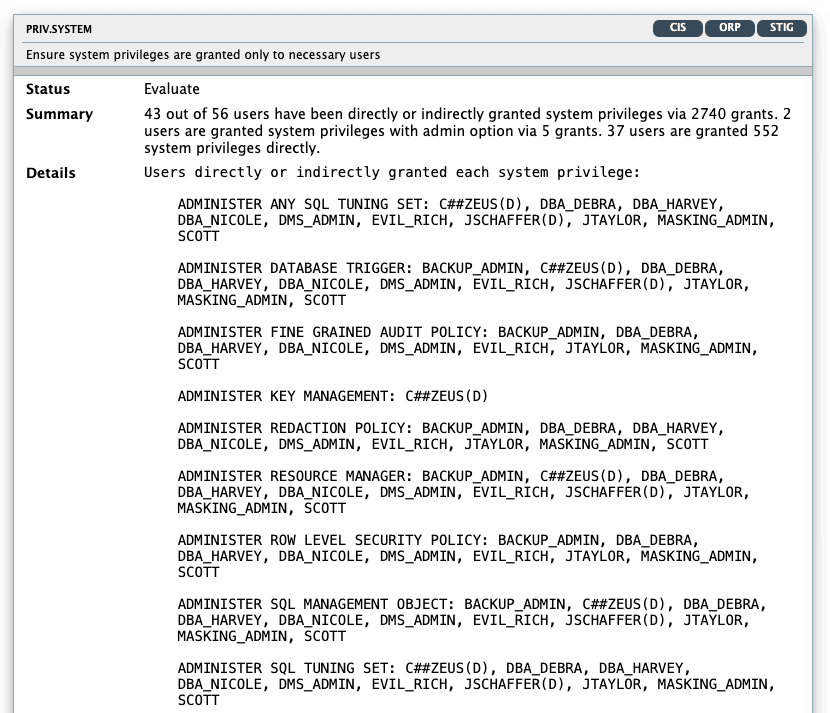
Description of the illustration Oracle Database Security Assessment Report - Privileges and Roles