Oracle Database Security Assessment Report - User Accounts
The Oracle Database Security Assessment Report - User Accounts section displays the following information:
| Name | Finding ID | Description | Link(s) |
|---|---|---|---|
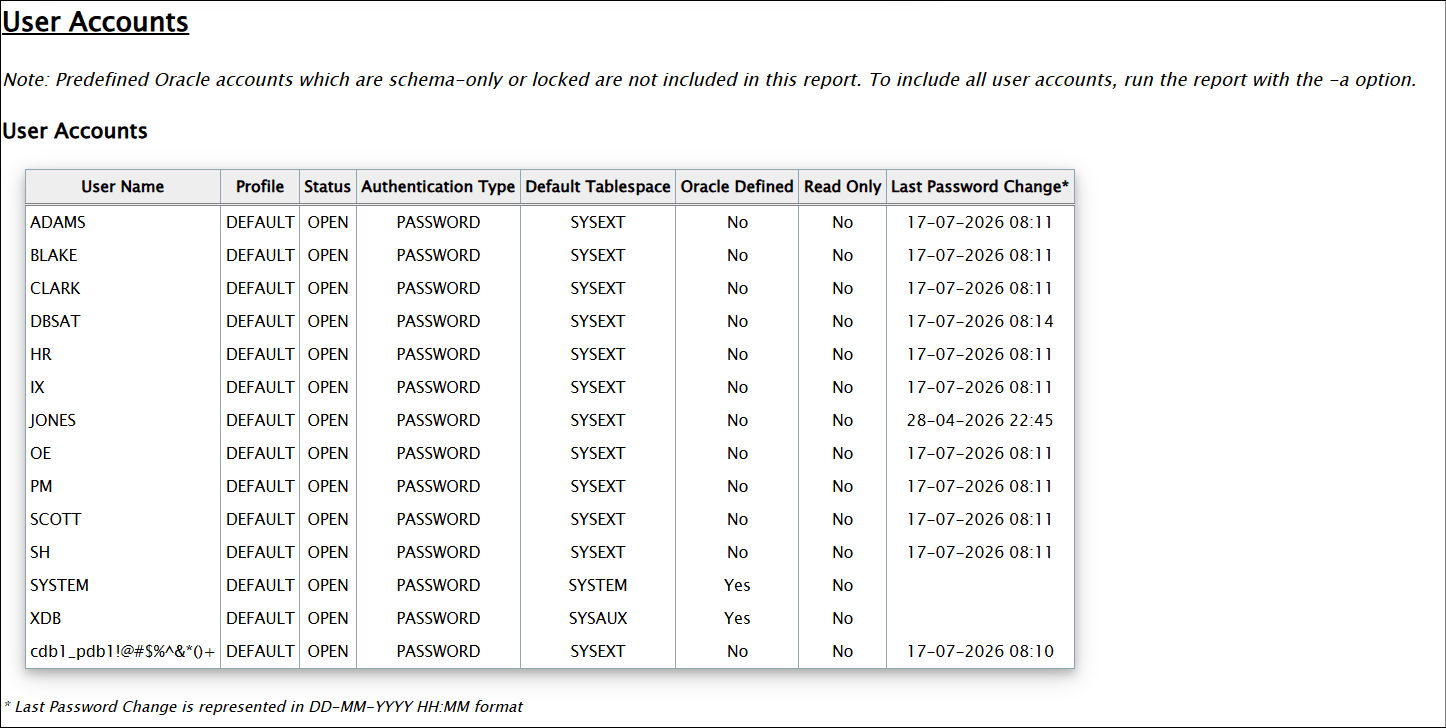
| User Accounts | - | Displays the user accounts and the following information about each account:
| - |
| Users with DEFAULT Profile | USER.DEFAULTPROFILE | Displays the DEFAULT user profile password and resource parameters and the number of users in it. | |
| Users with Default Passwords | USER.DEFPWD | Displays information about the user accounts with default passwords. Default account passwords for predefined Oracle accounts are well known. Active accounts with default passwords provide a trivial means of entry for attackers, but well-known passwords should be changed for locked accounts as well. Note: The | |
| Users with Expired Passwords | USER.EXPIRED | Displays information about the user accounts with expired passwords. Password expiration is used to ensure that users change their passwords regularly. Unlocked accounts with an expired password can present a security risk, especially as those accounts age. Although the password is expired, because the account is unlocked, it can easily be used by anyone who knows the old password. You should investigate accounts that have been unused for an extended period to determine whether they should remain active. | |
| Inactive Users | USER.INACTIVE | Displays information about the user accounts that are not in use and also accounts that are not configured to be locked when inactive. If a user account is no longer in use, it increases the attack surface of the system unnecessarily while providing no corresponding benefit. Furthermore, unauthorized use is less likely to be noticed when no one is regularly using the account. Accounts that have been unused for more than 30 days should be investigated to determine whether they should remain active. A solution is to set | |
| Sample Schemas | USER.SAMPLE | Displays information about potential sample schemas in the database, such as Sample schemas are well-known accounts provided by Oracle to serve as simple examples for developers. They generally serve no purpose in a production database and should be removed because they unnecessarily increase the attack surface of the database. | |
| Application Owner Account | USER.APPOWNER | Checks the database for the account that could be considered the application owner and for objects accessible by the application owner. Any user not "oracle maintained" that owns most objects in the database is considered the Application Owner. This check:
| |
| Shared Accounts | USER.SHARED | Displays users that have multiple administrative privileges and proxy users. | |
| Users with Objects | USER.OBJOWNER | Displays application users who own objects and can grant access to those objects to other users | |
| Users Authorized for Object Ownership | USER.OBJAUTHZ | Displays non-oracle maintained users who own objects | |
| Users with Security Objects | USER.SECURITYOBJS | Displays users who own security objects | |
| Users with Grant Option | USER.GRANTOPTION | Checks for users that have been granted privileges with WITH GRANT OPTION. | |
| Users with Sensitive Data | USER.SENSITVEDATA | Displays users that own tables with columns marked as sensitive with TSDP and users that can access those tables. To ensure secure access to sensitive information, review these users. It is best to grant access to data through roles rather than directly to individual accounts. | |
| User Schemas in SYSTEM or SYSAUX Tablespace | USER.TABLESPACE | Displays information about regular user accounts that use reserved Oracle-supplied tablespaces as their default tablespace or that have objects stored in them. The | |
| Case-Sensitive Passwords | USER.PASSWORDCASE | Displays whether case-sensitive passwords are enabled. Case-sensitive passwords are recommended because including both upper and lower-case letters greatly increases the set of possible passwords that must be searched by an attacker who is attempting to guess a password by exhaustive search. Setting Note: In 21c USER.PASSWORDCASE is not expected to be shown as | |
| Legacy Password Versions | USER.AUTHLEGACY | Displays information about the user accounts with obsolete password verifiers. For each user account, the database may store multiple verifiers, which are hashes of the user password. Each verifier supports a different version of the password authentication algorithm. Every user account should include a verifier for the latest password version supported by the database so that the user can be authenticated using the latest algorithm supported by the client. When all clients have been updated, the security of user accounts can be improved by removing the obsolete verifiers. HTTP password verifiers are used for XML Database authentication. Use the | |
| User Profiles | - | Displays information about the user profiles. | - |
| Users with no Password Complexity Requirements | USER.PASSWORDFUNCTION | Displays information about profiles with and without a password complexity verification function. Users not subject to password complexity verification are also displayed. Password verification functions are used to ensure that user passwords meet minimum requirements for complexity, which may include factors such as length, use of numbers or punctuation characters, difference from previous passwords, etc. Oracle supplies several predefined functions, or a custom PL/SQL function can be used. Every user profile should include a password verification function. |
|
| Account Locking after Failed Login Attempts | USER.NOLOCK | Displays information about user profile failed login attempt enforcement. Attackers sometimes attempt to guess a user's password by simply trying all possibilities from a set of common passwords. To defend against this attack, it is advisable to use the | |
| Users with Passwords About to Expire | USER.TOEXPIRE | Displays information about user accounts that will expire their passwords within 30 days. You should review accounts about to expire and, if appropriate, change their passwords to maintain uninterrupted database access. | |
| Users with Unlimited Password Lifetime | USER.NOEXPIRE | Displays information about user profile password expiration enforcement. Password expiration is used to ensure that users change their passwords on a regular basis. It also provides a mechanism to automatically disable temporary accounts. Passwords that never expire may remain unchanged for an extended period of time. When passwords do not have to be changed regularly, users are also more likely to use the same passwords for multiple accounts. | |
| Users with Unlimited Concurrent Sessions | USER.SESSIONS | Displays all users that have a Profile Resource Limit for SESSIONS_PER_USER set to UNLIMITED. With SESSIONS_PER_USER = UNLIMITED users can have any number of concurrent sessions. | |
| Unlimited Session Idle Time | USER.IDLETIME | This check lists users with UNLIMITED IDLE TIME | |
| Users with Gradual Password Rollover | USER.PASSWORDROLLOVER | Displays information about the Gradual Password Rollover. Gradual Password Rollover allows administrators to change database passwords for applications without having to schedule downtime. Prior to the advent of the gradual password rollover feature, the database administrator needed to take the application down while the database password was being rotated. This was because the password update required changes on both the database and the application side. With gradual database password rollover, the application can continue to use the older password until the new password is configured in the application. To accomplish this, the database administrator can associate a profile having a non-zero limit for the | |
| Temporary Users | USER.TEMP | Displays users associated with the DEFAULT profile. Users specifically created to execute temporary tasks should be on a profile tailored for that purpose. | |
| Development Users in Production Databases | USER.DEV | There should not be developer accounts in production systems. Verify if such accounts exist in your database. | |
| Advanced Replication Users | USER.REPCAT | Checks if Oracle Advanced Replication is being used and lists the dblinks used for replication. Checks to see if | - |
| Minimum Client Authentication Version | USER.AUTHVERSION | Displays information about the user accounts that do not have minimum client version specified in the Over time, Oracle releases have added support for increasingly secure versions of the algorithm used for password authentication of user accounts. In order to remain compatible with older client software, the database continues to support previous password versions as well. The | |
| New Users Who Need to Reset Password | USER.NEW | Displays information about user accounts who have not logged in since account creation. You should verify that the database management system is configured to require immediate selection of a new password upon account creation or recovery. | No documentation links |
| Locally Managed Accounts | USER.LOCALAUTH | This is a STIG specific check. Displays information about non-oracle maintained accounts that are locally managed (use password-based authentication). Under STIG, all user accounts managed by the database need to have explicit approval and be in the system documentation. System documentation should be reviewed for justification and approval of the accounts listed. | No documentation links |
| PKI-based Authentication | USER.EXTERNALAUTH | Displays information about externally authenticated user accounts. | No documentation links |
Note:
Predefined Oracle accounts which are schema-only or locked are not included in this report. To include all user accounts, run the report with the -a option.
The following figure displays an example of the Oracle Database Security Assessment Report - User Accounts section:
Description of the illustration Oracle Database Security Assessment Report - User Accounts