Oracle Database Security Assessment Report - Auditing
The Oracle Database Security Assessment Report - Auditing section displays the following information:
| Name | Finding ID | Description | Link(s) |
|---|---|---|---|
| Audit Management Configuration Parameters | - | Displays information on audit management configuration parameters | - |
| Audit Records | AUDIT.ENABLED | Displays information about audit trails. Auditing is an essential component for securing any system. The audit trail allows for monitoring the activities of highly privileged users. | |
| Unified Audit Policies | AUDIT.UNIFIEDPOLICIES | Displays whether unified audit policies are enabled. Unified Audit, available in Oracle Database 12c Release 1 (12.1) and later releases, combines multiple audit trails into a single unified view. It also introduces new syntax for specifying effective audit policies. | |
| Fine Grained Audit | AUDIT.FGA | Displays whether fine grained audit policies are enabled. Fine Grained Audit policies can record highly specific activity, such as access to particular table columns or access that occurs under specified conditions. This is a useful way to monitor unexpected data access while avoiding unnecessary audit records that correspond to normal activity. | |
| Audit Conditions | AUDIT.CONDITION | Lists all audit policies with conditions and, if enabled, lists users/roles it's enabled for. | |
| Audit Administrative (SYS*) Users | AUDIT.ADMINACTIONS | Displays whether the actions of the It is important to audit administrative actions performed by the | |
| Audit User Logon and Logoff | AUDIT.CONNECTIONS | Displays whether Database connections are audited by enabled audit policies. Successful user connections to the database should be audited to assist with future forensic analysis. Unsuccessful connection attempts can provide early warning of an attacker's attempt to gain access to the database. | |
| Audit Database Management Activities | AUDIT.DBMGMT | Displays whether the actions related to database management are audited by enabled audit policies. Actions that affect the management of database features should always be audited. Each action or privilege listed should be included in at least one enabled audit policy. | - |
| Audit Account Management Activities | AUDIT.ACCOUNTMGMT | Displays whether account management activities are audited. | |
| Audit System Privileges | AUDIT.SYSTEMPRIVS | Displays information on whether system privileges are audited by enabled audit policies. | |
| Audit Roles with System Privileges | AUDIT.ROLESYSTEMPRIVS | Displays information about unified audit policies that audit roles with system privileges. | |
| Audit Privilege Management | AUDIT.PRIVMGMT | Displays whether the actions related to privilege management are audited by enabled audit policies. Granting additional privileges to users or roles potentially affects most security protections and should be audited. Each action or privilege listed should be included in at least one enabled audit policy. | |
| Audit SQL Statements | AUDIT.STATEMENTS | Displays information about SQL statements audited by enabled audit policies. Applies to targets with Traditional Auditing policies. | - |
| Audit Object Actions | AUDIT.SENSITIVEOBJS | Displays information about the object access audited by enabled audit policies. | |
| Audit Synonym Management Activities | AUDIT.SYNONYMS | Displays information on whether synonym management activities (CREATE ANY SYNONYM, CREATE PUBLIC SYNONYM, CREATE SYNONYM, DROP PUBLIC SYNONYM, DROP SYNONYM) are audited. | - |
| Audit Conditions | AUDIT.CONDITION | Lists all audit policies with conditions and, if enabled, lists users/roles it's enabled for. | |
| Audit Shared Accounts | AUDIT.SHAREDPROXY | Checks to see if users listed in USER.SHARED are being audited. | |
| Audit Storage | AUDIT.TABLESPACE | Displays information about tablespaces used by different audit trails. Checks include:
| |
| Audit Trail Cleanup | AUDIT.CLEANUPJOBS | Lists enabled jobs that cleanup audit trails and checks cleanup jobs that are not present | |
| Audit Data Pump | AUDIT.DATAPUMP | Displays whether data pump exports and imports are being audited. | |
| Audit STIG Actions | AUDIT.STIGPOLICY | Oracle provides out-of-the-box audit policies that aim to answer DoD- auditable events requirements - ORA_STIG_RECOMMENDATIONS, ORA_ALL_TOPLEVEL_ACTIONS and ORA_LOGON_LOGOFF. This check will validate if these policies are audited. | |
| Audit Database Vault | AUDIT.DATABASEVAULT | Displays users that can administer Database Vault but are not audited and lists policies enabled to audit Database Vault actions | |
| Audit Oracle Label Security | AUDIT.LABELSECURITY | Displays information regarding enabled audit policies used to audit OLS.
|
Note:
The details of the audit findings can vary depending on whether the database has unified audit or traditional audit in place. Starting in Oracle Database 12c Release 2 (12.2), the best practice is to use Unified Audit. In addition, Traditional Audit has been desupported in Oracle Database 26ai.
The following figure displays an example of the Oracle Database Security Assessment Report - Auditing section:
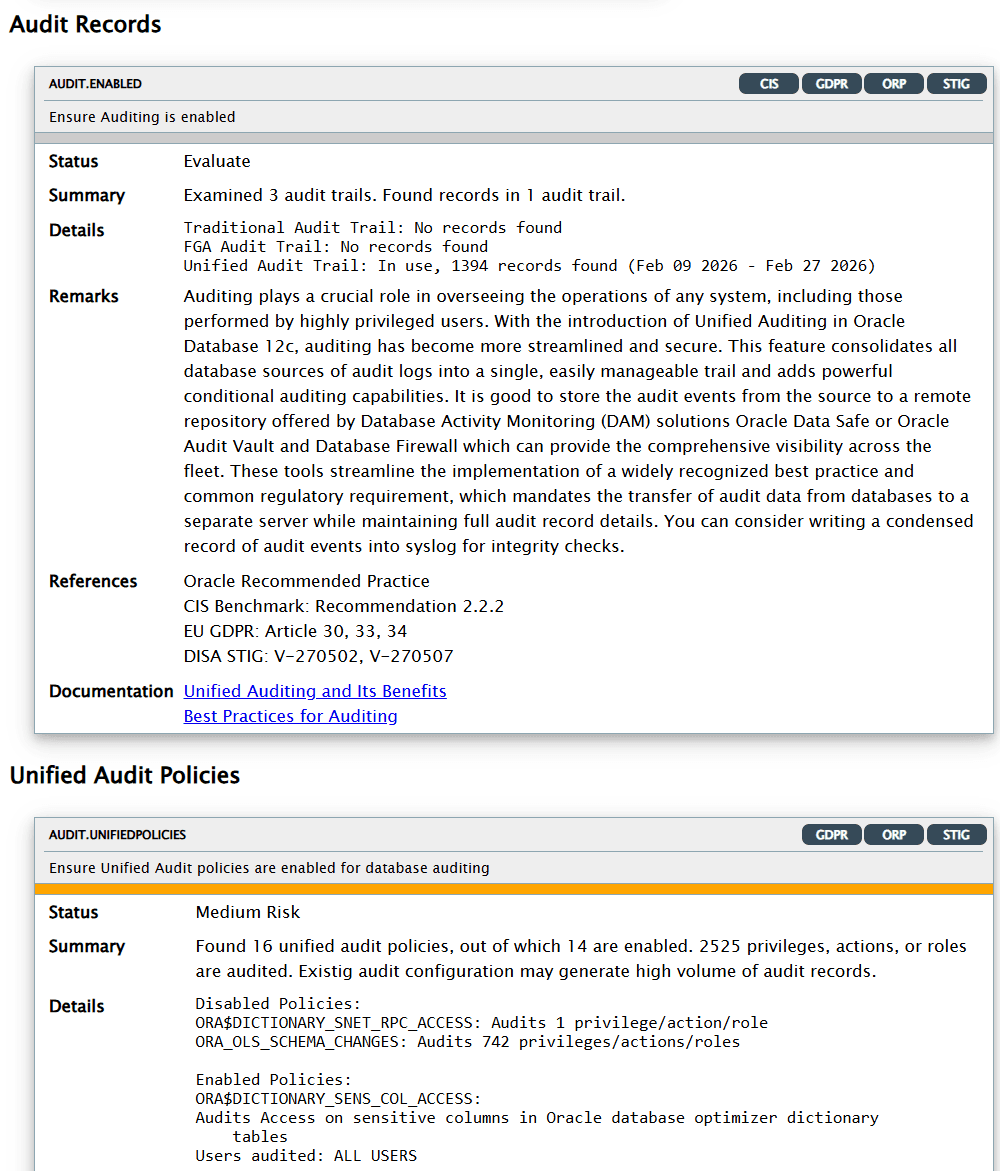
Description of the illustration Oracle Database Security Assessment Report - Auditing