1.4 Oracle AI Database Assistant
The Oracle AI Database Assistant helps you design, validate, execute, and optimize data transformation pipelines through natural language interaction, metadata awareness, and autonomous decision-making while remaining fully governed and auditable.
Use Oracle AI Database Assistant in Oracle Data Transforms to create data flows, workflows, schedules, and jobs. This topic has the following sections:
Prerequisites for using Oracle AI Database Assistant
Before you use Oracle AI Database Assistant, make sure that you have done the following:
- Created an OpenAI connection. See Create an OpenAI Connection.
- Configured the LLM settings that you want to use. See Configure LLM Settings.
Using Oracle AI Database Assistant
Oracle AI Database Assistant in Oracle Data Transforms provides a single-pane chat experience in which you can enter prompts to work with create data flows, workflows, schedules, and jobs. You can use joins, filters, and sort to create transformations. Currently data loads, import and export operations and the use of operators are not supported.
To use Oracle AI Database Assistant,
- In the Home page, click the Oracle AI Database Assistant icon (
 ) in the lower-right corner of the console.
Oracle AI Database Assistant panel opens on the right side of the page.
- Start a conversation by entering your request.
When Oracle AI Database Assistant completes the request successfully, it responds with a View Details link.
- Click the View Details link to see the generated response.
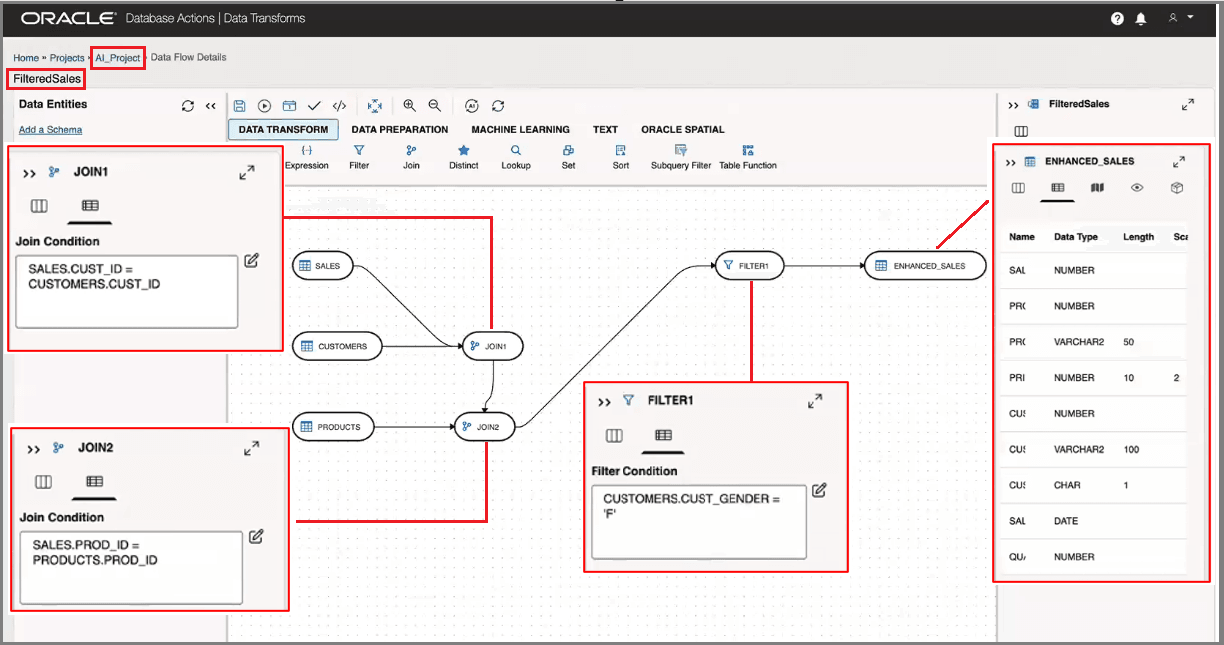
For example, if you had submitted a prompt to create a data flow, the View Details link will open the Data Flow Editor displaying the data flow that was generated using the criteria you had entered. See Example for an example of a data flow generated using Oracle AI Database Assistant.
All existing conversations are persisted in the chat panel. You can perform any of the following actions:
- Click a conversation to resume the session.
- Use
 to start a new conversation.
- Use
 to delete an individual conversation.
- Use
 to clear the conversation history.
Example
Here's an example request to create a data flow.
For a request such as the following
Create a data flow that joins sales data with customer and product data. Get only rows that have gender of 'F', store it in the table ENHANCED_SALES. Save the dataflow as 'FilteredSales' in the AI_Project project.
Oracle AI Database Assistant could generate a data flow similar to the following:
Parent topic: Overview