Iterative AI Recommendation Cards for Faster Resolutions
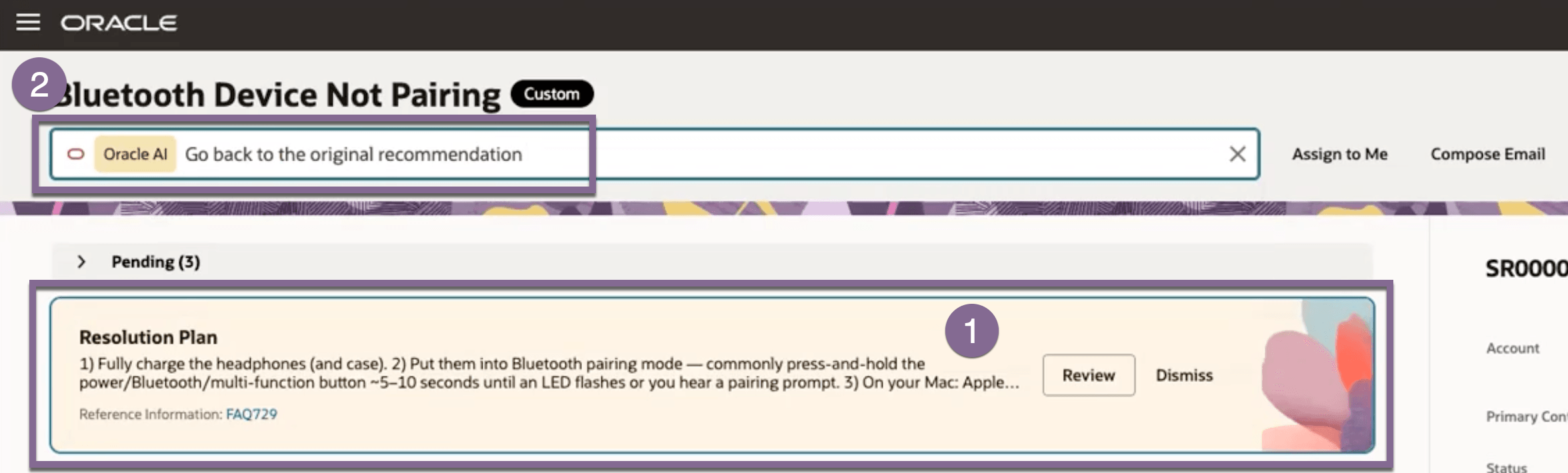
Service representatives can now interact directly with AI-generated recommendation cards (yellow cards) for the Resolution and Triage Agent to refine or improve the suggested answer on the spot. By selecting a card and typing feedback — such as "explain more" or "I don't have this manual" — the card updates instantly with a new AI response, without reloading the page or losing context. Iteration sessions are not persisted until the service rep selects "Resolve," keeping each session clean and isolated per user.
-
To refine an AI recommendation, first click on the card.
-
The focus will move to the Action Bar with the inline chip set to Oracle AI. From there, you can refine it and provide additional context to regenerate the card.
Example Use Cases
- Missing documentation — A service rep receives a step referencing a manual they don't have access to. They type "I don't have the headphone manual" and the card generates an alternative resolution path.
- Incomplete answer — The AI card provides a partial fix. The rep types "add more detail to step 3" and the card expands with clearer instructions.
- Triage refinement — During a triage session, a rep needs a different troubleshooting angle. They type "give me an alternative approach" to get a fresh recommendation before committing to a resolution.
- Reduces handle time by eliminating the need to search elsewhere when a first AI answer falls short
- Improves first-contact resolution by letting service reps refine AI suggestions in real time, tailored to the specific customer context
- Minimizes workflow disruption — service reps stay within the same interface instead of switching tools or repeating steps
Steps to enable and configure
This feature is available out of the box within Oracle Fusion Service for the Resolution and Triage Agent. No additional configuration is required. To verify it is active in your environment, confirm that AI-generated (yellow) cards are rendering in the agent action plan and that the action bar is enabled for your CSR user roles.
Tips and considerations
- Only yellow (AI-generated) cards support iteration — purple system-generated cards do not.
- The standard "Generate" button is still present in some views; warn CSRs to avoid clicking it during an iteration session, as it may overwrite the agent's refined response with a generic AI output.
- Iteration context is not saved between sessions — only the final selection upon clicking "Resolve" is persisted, which prevents cross-user data pollution on shared service requests.
- CSRs can exit iteration mode at any time using Backspace or Escape, or by navigating away from the main card view.
- If a CSR already has a filter message in the action bar, the iteration chip will stack alongside it — both inputs are preserved and sent together to the agent.
Key resources
Access requirements
n/a