Compose Message Field Automation for Service Requests
System implementors can now use CX Service Action Get and Set Field Value or programmatically read and write data in the Compose Message panel within Oracle Fusion Service. Using the UI Events Framework (UEF), extensions can get or set field values — including To, CC, BCC, Subject, Message Body, and custom fields — directly in the compose panel when an agent works on a Service Request (SR).
This capability is supported in Compose CCA (used in Service Request Pages) and in the new Compose Fragment.
Example Use Cases:
- Smart routing/pre-fill: When a service rep opens the message composer, automatically populate the To address and Subject based on the SR's account or contact data
- Compliance logging: Before a message is sent, read the full compose payload (To, CC, BCC, Body) and push it to an external audit or CRM system
- Custom field automation: Use SR data to pre-fill custom message fields (e.g., contract number, SLA tier) added via extensibility, so service reps don't need to type them manually
- Auto-populate message fields based on SR context, reducing manual entry and agent errors
- Read compose data before send to validate or log message content through custom logic
- Support custom field workflows by reading and writing extensibility fields added to the message layout
- Consistent experience — the same framework pattern works for both Get and Set operations, lowering implementation effort
Steps to enable and configure
Leverage the Visual Builder Studio to expose your applications. To learn more about extending your application using Visual Builder, visit Oracle Help Center > your apps service area of interest > Books > Configuration and Extension.
Steps to Enable
- Initialize the UEF framework using uiEventsFramework.initialize()
- Get the active record context via getTabContext() > getActiveRecord()
- To set fields: create a publish request with cxEventBusSetComposeMessageDataOperation, define message type, and call the relevant set methods (setToAddress, setSubject, etc.)
- To get fields: create a publish request with cxEventBusGetComposeMessageDataOperation, call setFields() with the field names you want, then read values from the response using getField()
- Custom fields added via extensibility can be passed using their API field name (e.g., AUX_MSG_EXT_TEXT_c)
Refer to the UEF developer documentation for full API reference and type definitions.
Set Compose Message Fields Example
      const frameworkProvider: IUiEventsFrameworkProvider = await CX_SVC_UI_EVENTS_FRAMEWORK.uiEventsFramework.initialize('MyFirstExtensionID');
      const tabContext = await frameworkProvider.getTabContext();
      const recordContext = await tabContext.getActiveRecord();
      const requestObject: IComposeMessageActionRequest = frameworkProvider.requestHelper.createPublishRequest('cxEventBusSetComposeMessageDataOperation') as IComposeMessageActionRequest;
          requestObject.setMessageType('ORA_SVC_EMAIL');
      const messageData = requestObject.setMessageData();
      messageData.setCCAddress('Matt Liu', '300100032899579', 'sendmail-test-discard@oracle.com', '');
      messageData.setBCCAddress('Matt Liu', '300100032899579', 'sendmail-test-discard@oracle.com', '');
      messageData.setSubject('UEF Test');
      messageData.setMessageBody('Message Body UEF Test');
      messageData.setToAddress('Matt Liu', '300100032899579', 'sendmail-test-discard@oracle.com', '');
      messageData.setFieldValue('CustomField', 'CustomValue');
      const response: IOperationResponse = await recordContext.publish(srequestObject);
      console.log('setMessageDataResponse', response)
Get Compose Message Fields Example
      let frameworkProvider:IUiEventsFrameworkProvider = await CX_SVC_UI_EVENTS_FRAMEWORK.uiEventsFramework.initialize('MyFirstExtensionID');
      let tabContext: ITabContext = await frameworkProvider.getTabContext();
      let recordContext: IRecordContext = await tabContext.getActiveRecord();
      let requestObject: IComposeMessageActionRequest= frameworkProvider.requestHelper.createPublishRequest('cxEventBusGetComposeMessageDataOperation');
      srequestObject.setFields(['ToAddress', 'CCAddress', 'BCCAddress', 'Subject', 'MessageBody', 'FieldValue', 'AUX_MSG_EXT_FCL_c', 'AUX_MSG_EXT_NUMBER_c', 'AUX_MSG_EXT_TEXT_c']);
      let response: IOperationResponse = await recordContext.publish(requestObject);
      let to = response.getResponseData().getField('ToAddress').value;
      let subject = response.getResponseData().getField('Subject').value;
      let messageBody = response.getResponseData().getField('MessageBody').value;
      let custom = response.getResponseData().getField('AUX_MSG_EXT_TEXT_c').value;
      let custom2 = response.getResponseData().getField('AUX_MSG_EXT_NUMBER_c').value;
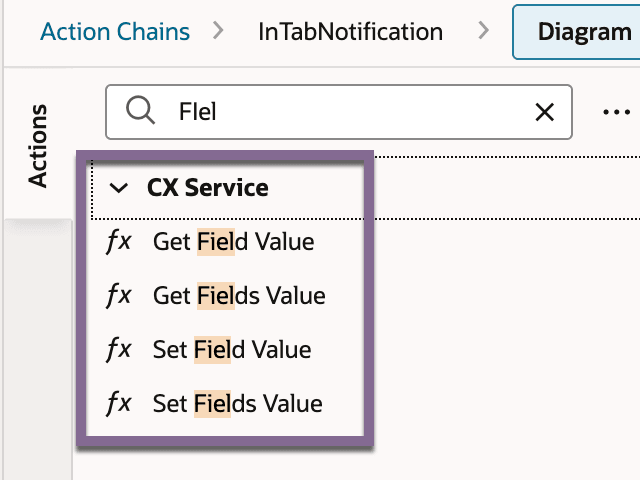
Remember, you can also use CX Service Action when setting and getting field values in an Action Chain.
Tips and considerations
-
GetComposeMessageData returns data in the same response format asGetField— reuse existing parsing logic where possible
-
Both operations require the Compose Message panel to be open and active on the SR before the action is triggered
-
Custom fields must be added to the message layout via extensibility before they can be read or written programmatically