Usage Events Reversal with Balance Management for Interfaced Bill Lines
Enable customers to correct billed usage by reversing and re-rating usage events that have already been loaded, rated, and interfaced to Fusion Accounts Receivables. Using the Usage Events Dashboard, users can process the replacement usage events even in periods already interfaced to Accounts Receivables.
The Rating ESS job will:
- Perform a Reverse/Replace: issue a Credit Memo to fully reverse the original billed amount and associated allowances.
- Create a new bill line for the same period (retaining Charge Name, Bill From/To dates, Sequence, etc.) and recompute the latest billable total.
- Use the new bill line to update and transmit the corrected amount to Fusion Accounts Receivables. If the new bill line has not yet been interfaced and further usage arrives, the same bill line is updated accordingly.
For accounting periods that are closed in Fusion Accounts Receivables, set “Accounting Date in a Closed Period” on the Transaction Source to ADJUST so the accounting date moves to the next open period while invoice/transaction dates remain unchanged. The same behavior applies to Fusion Revenue Management Cloud.
From the Usage Event Dashboard you can perform below steps for Re-rating:
- Create a Reversal Batch: Start a new batch in one click. Batch Number and Description are optional if left blank, the system auto-generates them.
- Choose the processing type: In addition to Rating, you can run Re-rating or Reverse and Replace for selected usage events.
- Filter the right events: Use optional selection criteria to find events to reverse. Note: Auto Submit is only available when selection criteria are used.
- Flexible selection objects: Filter by Subscription, Subscription Product, and/or specific Usage Events use one or combine multiple to refine your query.
- Track open work: After creation, your batch appears on the Open Batches tile for quick access.
- Add events your way: Add events via Add Events, bulk import with a CSV, or ingest through APIs.
- Clean up as needed: Delete imported or selection based events from the batch before submission.
- Review with confidence: Lock for Review to freeze the batch and automatically include all dependent events that must be reversed.
- Make changes if needed: Revert for Edit to unlock the batch and add or remove events.
- Submit the reversal: When your review is complete, use Submit to initiate the reversal process.
- Complete re-rating: After a successful reversal, run the Rate Subscription Usage Events job to finalise re-rating.
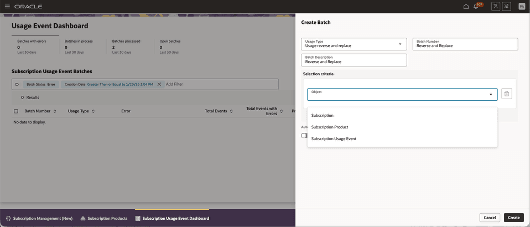
Usage Event Dashboard - Batch Creation
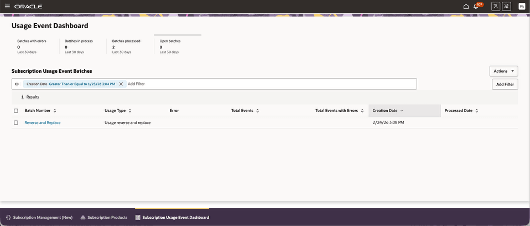
Usage Event Dashboard
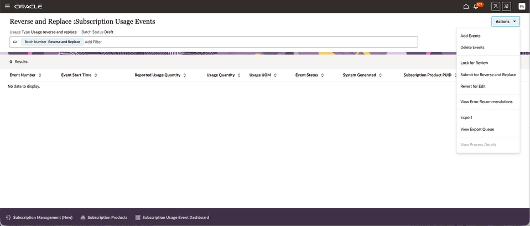
Usage Event Dashboard - Batch List Page
- Faster revenue corrections: Post-billing adjustments without manual workarounds or re-billing cycles.
- Financial integrity and auditability: Automated credit memo creation and allowance reversal maintain a clear audit trail.
- Reduced revenue leakage: Ensures late or corrected usage is accurately captured and billed.
- Operational efficiency: Streamlined re-rating from a single dashboard and reuse of the new bill line until interfaced to AR.
- Compliance with period controls: Honors closed-period rules by shifting only the accounting date to the next open period while preserving invoice and transaction dates.
- Improved customer experience: Accurate, timely adjustments minimize disputes and credit churn.
Steps to enable and configure
You don't need to do anything to enable this feature.
Tips and considerations
Advanced Rating models such as Commitments/Estimates/Volume Rating are out of scope.