Advanced Pricing Terms
Introducing Advanced Pricing Terms. This feature allows you to negotiate and capture agreed price changes over the term of the subscription before activating the subscription. The agreed price changes can be a fixed value or a value based on indices like Customer Price Index, Producer Price Index, Wholesale Price Index, Employment Cost Index, House Energy Index;etc. Though the values of these indexes are not known for the future periods, these can still be incorporated as a price change by way of specifying them as variable names or using formulas that contain these variable names.
The variables representing such indices can be factored into the adjustment value of a price adjustment. The price adjustment in created from the Advanced Pricing Term. The Advanced Pricing Terms (Price Escalation) can capture the price changes you want over the period of the subscription. These price changes can be periodic changes for a specific term in the subscription. So, you can now have more than one periodic change within the term of the subscription which is similar to having multiple pricing terms with the added flexibility of using adjustment variables to determine the actual value of the adjustment when the value of the variable becomes known.
The variables that represent these indexes are captured in a setup UI in Subscription Configuration.
Key capabilities:
- New setup navigation: a “Track Price Adjustment Variables” link from Subscription Configuration > Subscription Rules opens a Price Index tracking UI.
- Maintain indices as variables and values:
- Enter an index and its values by start and end date.
- Supports Add Row / Delete Row and QBE querying.
- Use CPI (Customer Price Index) in charge adjustments:
- A new adjustment category “Consumer Price Index (CPI) Adjustments”; selecting it exposes CPI index types from the tracking UI.
- CPI index availability is filtered by subscription/product dates (e.g., indices ending before product start aren’t shown; open-ended end dates are shown).
- If adjustment effective dates only partially overlap CPI validity, CPI is applied for the overlapping period and billing lines may be split accordingly.
- Import & REST support:
- CPI setup data can be loaded via Import Management (export/import) and REST, with the same validations enforced.
- Product-level price escalations using Price adjustment variables:
- Users can define price escalations either as fixed % per pricing term or as an expression referencing Price Index variables.
- For expression-based escalations, evaluation and application for future terms is supported via an ESS job “Generate and Apply Price Adjustments from Price Escalations”.
The UI to track the value of the price adjustment variables is accessed from Subscription Configuration.
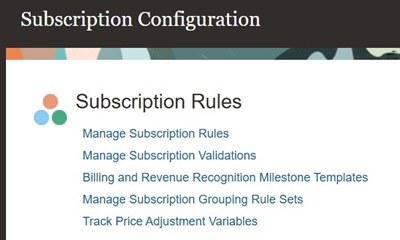
Track Price Adjustment Variables
The list page shows the variables.
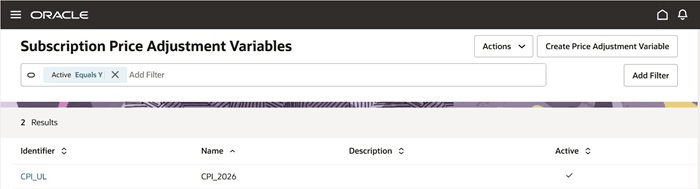
Subscription Price Adjustment Variables
You can create multiple date effective value for each variable. The Price adjustment variable once created cannot be deleted. It can be updated.
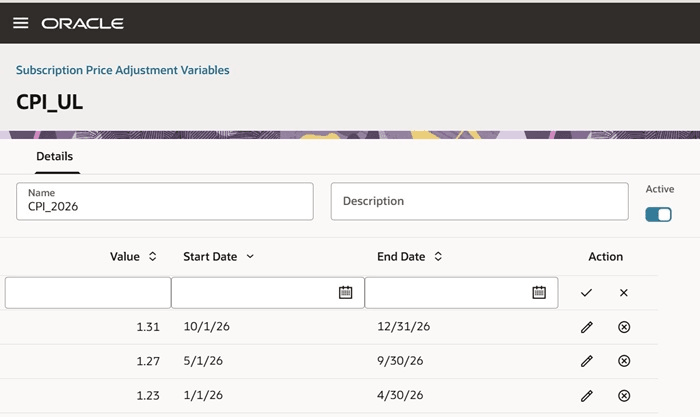
Subscription Price Adjustment Variables
The Advanced Pricing Terms/Price Escalation is enabled for recurring and usage charges. On selecting Enable Price Escalation a link View Price Escalation is displayed.

Price Escalation
On clicking the link, you can enter the price escalations or multiple pricing terms.


Advanced Pricing Terms
Explanation of Price Escalation/ Advanced Pricing Term
- When Pricing Term details are given, the price escalations shall be evaluated and applied for each pricing term.
- If Pricing Term details are not provided, then the escalation is applied once.
- The bill lines, including the price escalations are generated till the product end date when the Escalation type is Fixed.
- The bill lines, including the price escalations are evaluated and applied till current pricing term when the Escalation type is Expression.
- If an Expression value cannot be evaluated, then the price adjustment is not applied, and the ESS job shows a warning.
| of column | Meaning | Example |
|---|---|---|
| Sequence Number | The sequence number for the pricing term or price escalation record. | It can be only whole numbers. |
| Escalation Name | User given name for the escalation record. | Price adjustment negotiated for year 2027. |
| Escalation Start Date | The start date for applying the price escalation from. | Any date withing the subscription term. It should be on or earlier than the Escalation End date if it is entered. |
| Escalation Start Offset Duration |
The offset duration from the start date of the subscription product. This is mutually exclusive with Escalation Start Date and is mandatory if Escalation Start Offset Period is entered. |
Any whole number. |
| Escalation Start Offset Period |
The offset period from the start date of the subscription product. This is mutually exclusive with Escalation Start Date and is mandatory if Escalation Start Offset Duration is entered. |
A time unit of measure. |
| Escalation End Date | The end date when price escalation stops. | Any date within the term of the subscription product and after the Escalation Start Date. |
| Escalation End Offset Duration |
The offset duration from the Escalation Start Date. This is mutually exclusive with Escalation End Date and is mandatory if Escalation End Offset Period is entered. |
Any whole number. |
| Escalation End Offset Period |
The offset period from the Escalation Start Date. This is mutually exclusive with Escalation End Date and is mandatory if Escalation End Offset Duration is entered. |
A time unit of measure. |
| Escalation Type | This specifies how is the price escalation to be calculated. It can be a fixed value of an expression based on the Price Adjustment Variables used in the expression. | Fixed or Expression |
| Escalation Value | Mandatory is Fixed escalation type is used. | It is a number which indicates a percentage adjustment value. |
| Expression | Mandatory if Escalation type is Expression |
{CPI-U-101}+{CPI-S-101}-1.5 Where CPI-U-101 and CPI-S-101 are variable names in the Price Adjustment Variables setup UI. The variables should be mentioned within "{}" braces. |
| Pricing Term Duration | The duration for which the price change as per the pricing term is to be applied | Any whole number |
| Pricing Term Period | Mandatory if Pricing term Duration is entered. | A time unit of measure. |
| Pricing Term End Date | The date when pricing term evaluation and application stops. | Any date after pricing term starts and within subscription product term. |
| Pricing Term End Offset Duration |
The offset duration of pricing term applied from the Escalation Start Date. This is mutually exclusive with Pricing term End Date and is mandatory if Pricing Term End Offset Period is entered. |
A whole number. |
| Pricing Term End Offset Period |
The offset period of pricing term applied from the Escalation Start Date. This is mutually exclusive with Pricing term End Date and is mandatory if Pricing Term End Offset Duration is entered. |
A time unit of measure. |
| Charge Name | The charge name the price escalation or pricing term is applicable for. | The recurring charges and usage charges for the product. |
| Next Term Start Date | The start date for the next pricing term to be evaluated. | |
| Next Apply Date | The date when the next price change will be applied. |
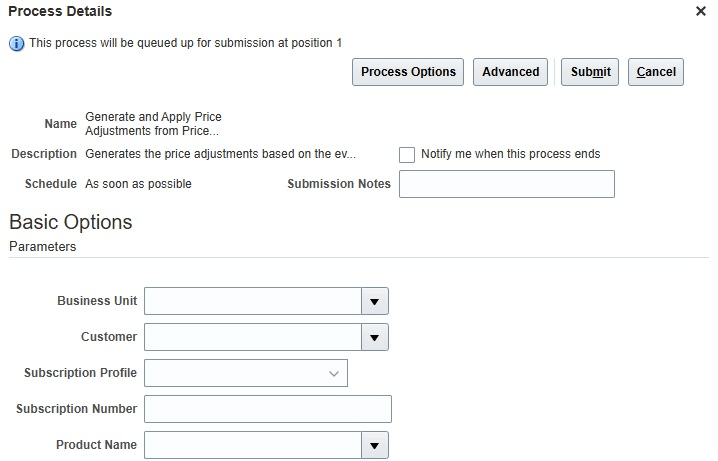
ESS Job
The ESS job generates the price adjustments when there are expressions for the Escalation type which have to be evaluated based on the Price Adjustment Variable values.
The job can be run for a specific Business Unit or Customer or a Subscription Profile or a Subscription Number or a Subscription Product or any combination thereof.
- Inflation-aligned pricing: Enables customers to peg subscription price changes to Pricing Indexes rather than using static, manually determined percentages.
- Improved renewal accuracy and consistency: Standardizes how Pricing Index-driven adjustments are calculated and applied across renewal and non-renewal scenarios.
- Operational efficiency: Central Pricing Index data maintenance plus import/REST reduces manual updates and error-prone spreadsheet processes.
- Better billing correctness: Date-effective application (including partial overlaps) supports more accurate proration and avoids over/under-charging.
- Auditability and governance: Maintains a controlled, historical record of Pricing Index values used to justify adjustments and support customer inquiries.
- Flexible escalation modeling: Supports both straightforward fixed escalations and advanced Pricing Index-based expressions for complex contracts/pricing terms.
Steps to enable and configure
You don't need to do anything to enable this feature.
Tips and considerations
- When renewal is performed, the price escalation is copied but it may not be applied if renewal price adjustment is Reprice as the adjustments may not be eligible to be applied on the new charges.
- If Advanced Pricing Term is enabled in the product then Bill TCV cannot be entered.
- If Advanced Pricing Term is enabled then Bill Immediately cannot be selected.
- If Advanced Pricing Term is enabled then Early Termination fee is not applicable.
- Both Pricing Term (Basic) and Advanced Pricing term (Price Escalation) cannot be enabled for a product.
- The Advanced Pricing Terms/ Price Escalation can be entered only in Draft status. However, they are applied even when the subscription is Active based on evaluation of the Expression.
- Advanced Pricing Term is available only in the Redwood UI.
- These price escalations are translated into date effective charge adjustments at the time of bill generation.
- This is similar to the Basic pricing terms but with the ability to specify different price escalation values for each pricing term.