Easily Sync Data for Inbound Lead Flow Using LinkedIn LeadGen Forms
Integrate LinkedIn Lead Gen forms with Fusion Marketing to bring submitted lead data into Fusion Unity Data Platform. Configure a listener for selected forms to receive near-real-time submissions and generate a Submit LinkedIn Lead Gen form behavior for use in Fusion Marketing Orchestration.
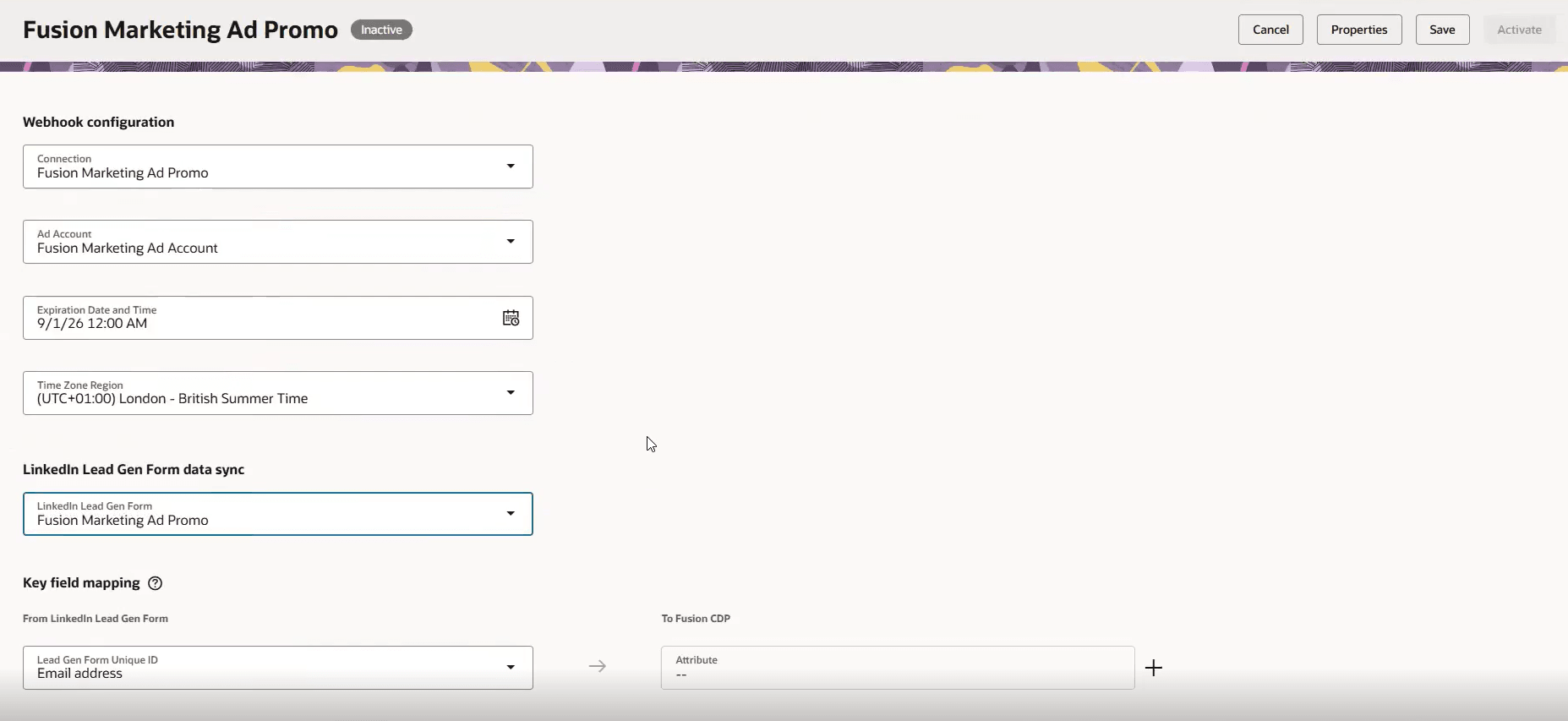
Configure Inbound Lead Flow
Business Benefits
- Enrich existing Fusion Unity records and create new contacts from LinkedIn lead data.
- Use submitted lead data for segmentation, retargeting, and nurturing.
- Automate ingestion of LinkedIn Lead Gen form submissions into Fusion Unity.
- Combine with LinkedIn Matched Audience capabilities to understand which matched-audience contacts submitted a Lead Gen form.
Steps to enable and configure
- To start go to Fusion Marketing > CDP > Integrations.
- Create a LinkedIn Connection to authenticate with your LinkedIn account.
- Create the Webhook of type 'LinkedIn Lead Gen form' to set up your webhook.
- Select your LinkedIn connection and choose the form that you wish to listen to for submissions.
- Map your form fields into your CDP contacts as appropriate.
- After activation, Lead Gen form submissions are ingested into Fusion Unity. Fusion Marketing creates a Submit LinkedIn Lead Gen form behavior for contacts with submissions. Use this behavior in Marketing Orchestration to build retargeting or follow-up campaigns.
Tips and considerations
Try it out
- After activation of the webhook (see Steps to Enable), LinkedIn Lead Gen form submissions are ingested into Fusion Unity.
- Fusion Marketing creates a Submit LinkedIn Lead Gen form behavior for contacts with submissions. Use this behavior in Marketing Orchestration to build retargeting or follow-up campaigns.
Tips and Considerations
- The selected LinkedIn connection must have access to the pages hosting the Lead Gen forms.
- The form must include at least one supported key field: EMAIL, WORK EMAIL, PHONE, or BUSINESS PHONE.
- Set the listener expiry date to align with the advertising campaign; an inactive webhook does not receive LinkedIn submission data.
- Use field mapping to send form data to the appropriate Fusion Unity destinations.
- When using a form submission to trigger immediate messaging for a new contact, allow time for the submitted data to populate before relying on personalization fields
Access requirements
• Ensure users have appropriate roles:
- Marketing Manager (ORA_FMK_MARKETING_MANAGER)
- Marketing Specialist (ORA_FMK_MARKETING_SPECIALIST)
- Customer Data Platform Manager (ORA_FMK_CUSTOMER_DATA_PLATFORM_MANAGER)
Note: A LinkedIn Campaign Manager (Ads) account is required and is separate from the Oracle subscription. Additionally, this feature requires the Fusion Marketing Orchestration Add-on for Fusion Unity Data Platform. Please contact your Oracle account manager for more information.