Management of Archived Programs
Helping keep the Programs workspace focused on active and relevant work, marketers can archive and unarchive programs in Fusion Marketing. From the Program List page or from within an individual program, users can archive programs that are no longer actively being managed. Users can also access an Archived programs view to find archived programs and restore them when needed.
Business Benefits
- Helps marketers keep the Programs workspace focused on active and relevant work.
- Preserves historical program context without requiring users to delete programs.
- Gives marketers a dedicated view for finding and managing archived programs.
- Reduces clutter while maintaining access to completed or inactive program records.
Steps to enable and configure
You don't need to do anything to enable this feature.
Tips and considerations
Try it out
- From the Program List page, users can select the archive icon to archive a program.
- From within a program, users can open the actions menu and select Archive.
- To view archived programs, users can open the Archived view from Programs. From the Archived programs page, users can search for archived programs and use the available action to unarchive a program.
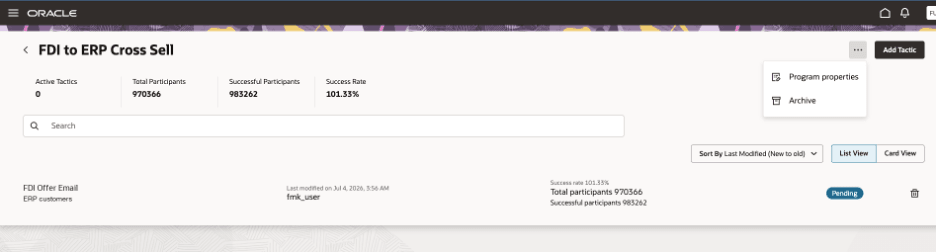
Program actions menu with Archive option
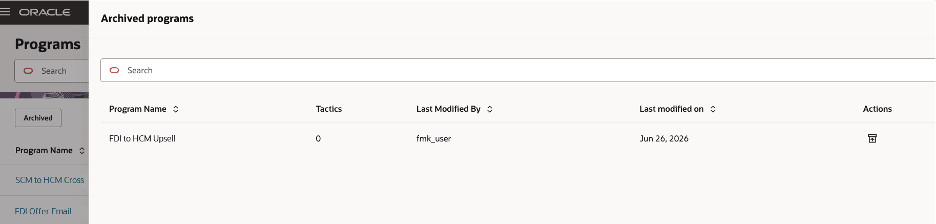
Archived programs view with unarchive action
Tips and Considerations
- Programs with active tactics cannot be archived.
- Use archiving for programs that should no longer appear in the active Programs workspace but still need to be retained.
Access requirements
- Ensure users have appropriate roles:
- Marketing Administrator
- Marketing Manager
- Marketing Specialist
Note: Requires Fusion Marketing Orchestration Add-on for Fusion Unity Data Platform. Please contact your account manager for more information.