Personalization Attribute Default Values and Skip Options in Message and Template Designers
In Fusion Marketing Orchestration, message and template designers can now configure default values and skip behavior when adding personalization attributes to emails and landing pages. When a personalization attribute is added, the default value drawer opens automatically so designers can set a fallback value for that specific instance or apply a default across all uses of the attribute in the message.
For email messages, designers can also enable skip behavior when required personalization data is unavailable. Designers can review and manage personalization settings from the Manage Personalization Attributes option in the toolbar.
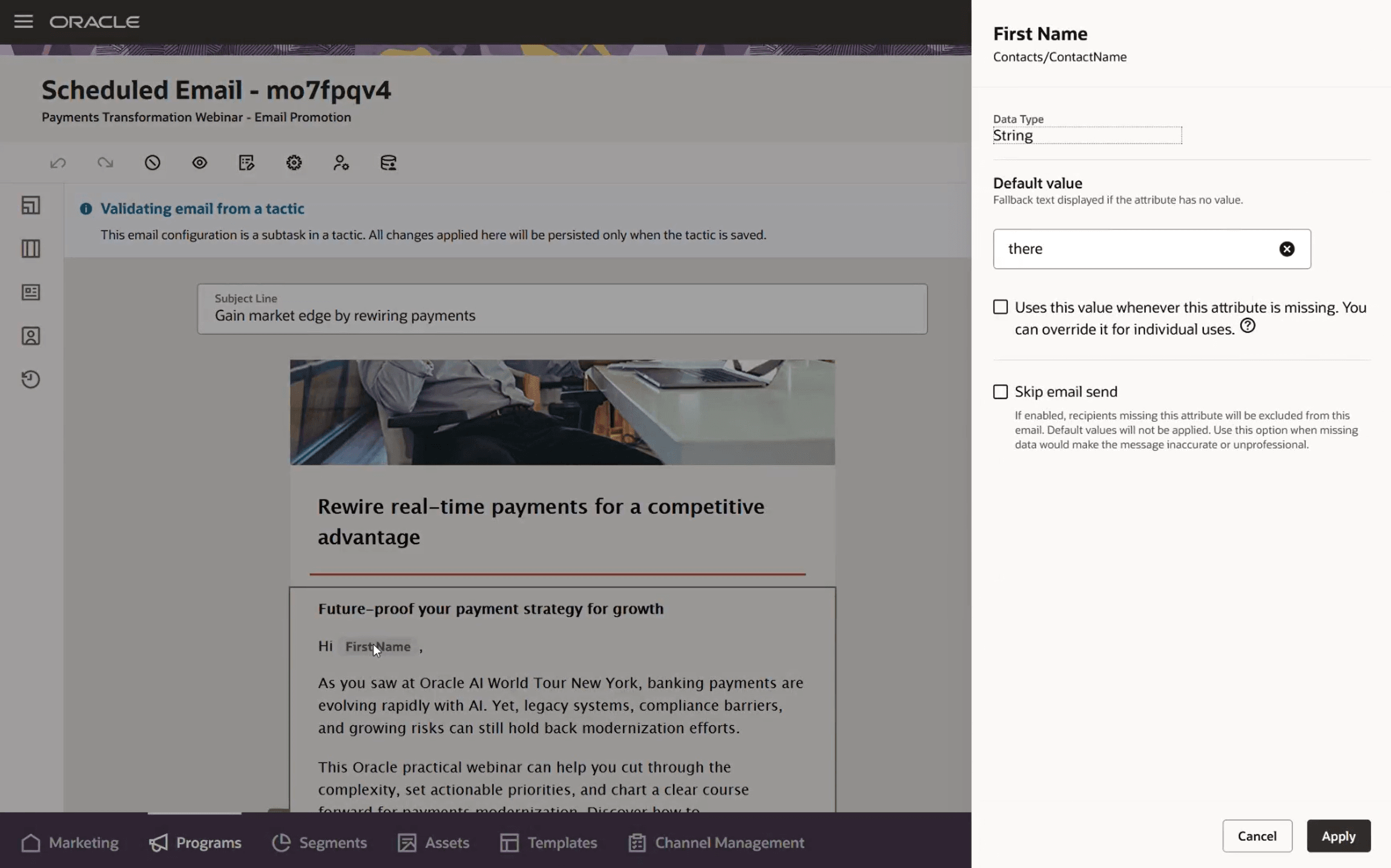
Personalization Attribute Configuration
Business Benefits
- Helps designers prevent blank or incomplete personalized content when recipient data is missing.
- Reduces manual effort by allowing default values to be configured when personalization attributes are added.
- Supports more consistent personalization by applying defaults at the instance level or across all uses in a message.
- Gives email designers more control over whether messages should be sent when required personalization data is unavailable.
- Improves message quality and reliability before launch.
Steps to enable and configure
You don't need to do anything to enable this feature.
Tips and considerations
Try it out
- Open the message designer for an email or landing page, or open the template designer.
- Drag a personalization attribute into the message or template.
- In the default value drawer, configure a default value for the attribute instance or apply the default across all uses of the attribute in the message.
- For email messages, configure skip options when the message should not be sent if required personalization data is unavailable.
- Use Manage Personalization Attributes in the toolbar to review or update personalization configurations.
- Preview and test the message with populated and missing personalization data before sending or publishing.
Tips and Considerations
- Use instance-level default values when a fallback should apply only to one use of an attribute.
- Use message-level default values when the same fallback should apply consistently wherever the attribute appears.
- Skip options are available for email messages and should be used when missing personalization data would make the email inaccurate, incomplete, or inappropriate to send.
- When skip behavior is enabled for an attribute, default values are not applied for that attribute.
- Preview messages and templates with both populated and missing personalization data to confirm the intended behavior.
Access requirements
- Ensure users have appropriate roles:
- Marketing Specialist
Note: Requires Fusion Marketing Orchestration Add-on for Fusion Unity Data Platform. Please contact your account manager for more information.