Introduction of Data Orchestration
In 26A, integration capabilities have been enhanced when exporting data to Fusion Sales allowing for mapping a Fusion Sales parent and child object in a single configuration. Data Orchestration provides the ability to design and visualize an integration workflow to any Fusion Sales parent or child object.
The enhanced automation capabilities help to streamline critical use cases such as hand-off of qualified opportunities from marketing to sales or creating qualified sales leads.
With Data Orchestration, organizations can implement rule-driven, automated workflows in which data meeting defined criteria is automatically enriched (for example, with key insights from marketing engagement) and routed to the appropriate application. This reduces latency, increases alignment, and minimizes human error, making the marketing-to-sales hand-off seamless, timely, and measurable.
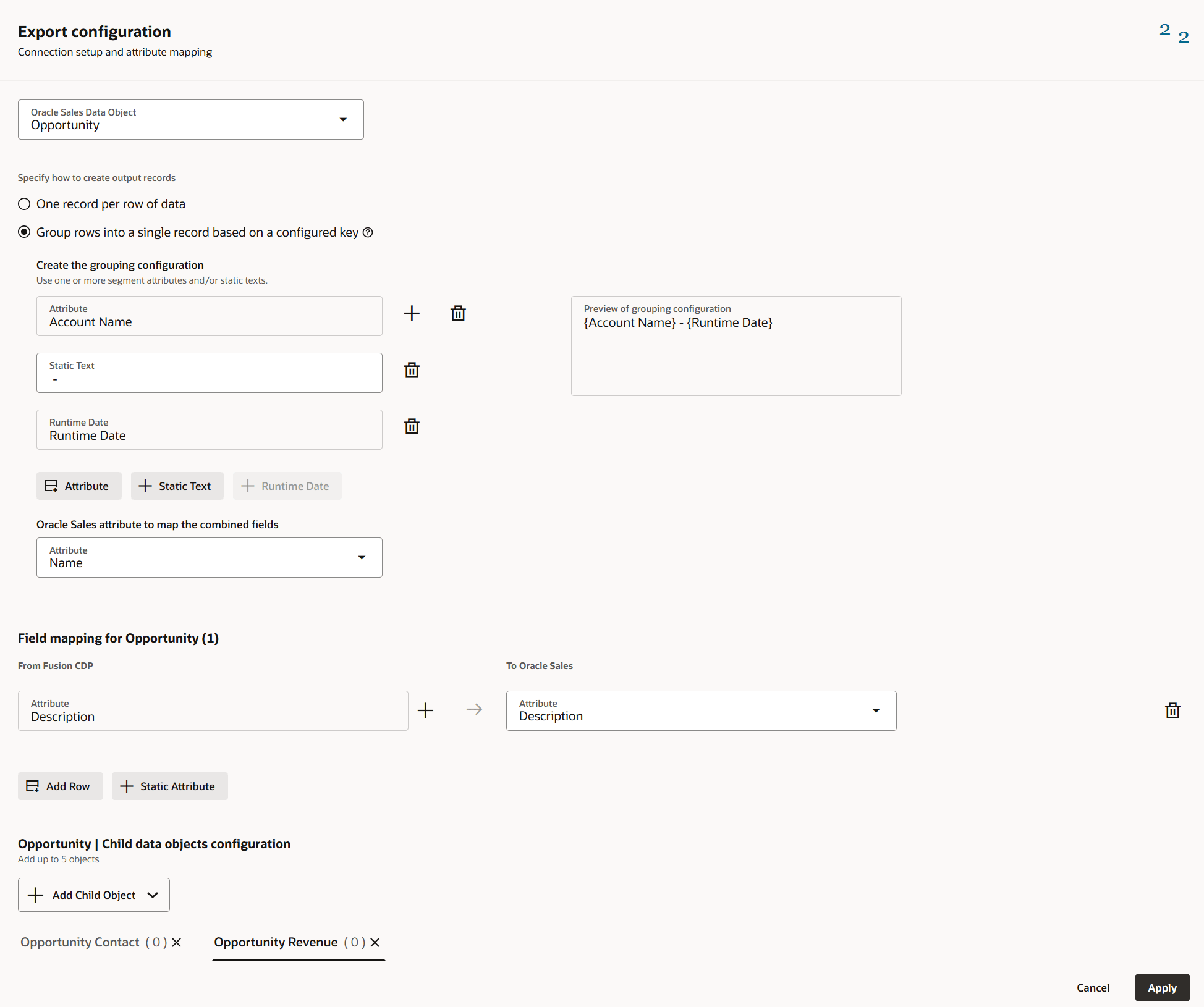
Configuration Screen
Business Benefit:
- Improved collaboration and alignment: Unified configuration ensures sales and marketing work with consistent, comprehensive data.
Steps to enable and configure
You don't need to do anything to enable this feature.
Tips and considerations
How to leverage start sending opportunities to Fusion Sales using Data Orchestration:
-
Access Data Orchestration Settings:
- Navigate to the Data Orchestration or Automation module within the Oracle platform.
- Ensure you have the necessary administrative rights to configure workflows.
-
Define Qualification Criteria:
- Collaborate with sales leadership to determine exactly when an opportunity is considered “sales-ready” (e.g., score threshold reached, specific behaviors observed, demographic fit, campaign engagement).
- Use the intuitive workflow builder to define these rules—select triggers, filters, and conditions that will prompt the orchestration (e.g., “If Opportunity Score > 80 AND Engagement Last 7 Days > 3”).
-
Configure Routing and Enrichment Steps:
- Map out which sales system, team, or user should receive each qualified opportunity based on defined logic (using territory, vertical, or account owner as parameters).
- Add enrichment tasks such as tagging, appending source campaign data, or filling in missing information based on available marketing data.
-
Establish Data Transfer Settings:
- Choose the sales systems (e.g., Fusion Sales, Siebel, Salesforce) that will receive the opportunities.
- Configure secure data transfer: set up API credentials, endpoints, or required connectors as needed.
-
Set Up Monitoring and Alerts:
- Activate notifications for process failures, exceptions, or bottlenecks.
- Enable audit logs for every automated hand-off to maintain compliance and support troubleshooting.
-
Test the Workflow:
- Use sample or test data to simulate real-world scenarios.
- Validate that only properly qualified opportunities are transferred, all fields are mapped correctly, and no records are dropped.
-
Activate the Automation:
- Once validated, turn on the orchestration workflow. The system will now manage hand-offs automatically, in real time or at scheduled intervals as configured.
-
Review and Refine:
- Monitor hand-off performance using built-in dashboards and audit logs.
- Regularly review qualification rules, enrichment logic, and routing settings to adapt to changing business needs or sales feedback.
Access requirements
Note: Requires Fusion Sales to leverage this enhancement fully. Please contact your account manager if you require more information.