Nexus Determination Lookup Logic in SuiteTax
For each sale or purchase transaction, NetSuite determines which nexus to use, and triggers the appropriate tax engine to calculate the tax amounts.
A nexus that is marked as tax-exempt does not have an assigned tax engine. Tax calculation won't be triggered.
The following diagrams describe the nexus determination lookup logic for sales and purchase transactions.
For information about setting up subsidiary tax registrations, see Assigning Tax Registrations to a Subsidiary in SuiteTax.
For information about Ship FROM and Ship TO addresses determination logic in NetSuite, see:
-
Ship FROM and Ship TO Addresses Determination on Sales Transactions
-
Ship FROM and Ship TO Addresses Determination for Purchase Transactions
When matching an address to a nexus during nexus determination for sales and purchase transactions, the value in the State/Province/County field of the address is checked to determine the correct nexus. If you enable the Allow Free-Form States in Addresses preference, you must enter the two-letter abbreviation for the state or province for the system to properly determine the transaction nexus. If you use the full name of the state or province, the system might not be able to determine the correct transaction nexus. For more information about this preference, see Setting General Account Preferences.
Nexus Determination on Sales Transactions
The following diagram provides an overview of the nexus determination lookup logic on sales transactions.
All countries except for the U.S. and Canada are considered to be Ship FROM countries. For the full list of the Ship FROM countries, see List of Countries Based on Ship FROM Address.
If you enable the Multiple Shipping Routes feature, and the Enable Item Line Shipping box is checked on your transaction, the line level shipping address is used in the nexus determination on sales transactions. For more information about Multiple Shipping Routes, see Multiple Shipping Routes.
You are tax registered if your tax registration number is filled on the respective transaction. It isn't sufficient to have this data on your customer record only.
If you enable the location at the line level on the sales transaction form, NetSuite uses it in its nexus determination.
Ship FROM and Ship TO Addresses Determination on Sales Transactions
Learn how SuiteTax determines the Ship FROM country and Ship TO address for sales transactions. When multiple address sources are available, SuiteTax evaluates them in a specific order of precedence. Understanding this order can help you identify which addresses are used on a transaction and troubleshoot unexpected shipping address results.
The Ship FROM country is determined by one of these, in the following order:
-
The line-level location, if available.
-
The header-level location if the line-level location isn't available.
-
The subsidiary shipping address if the header-level location isn't available.
-
The subsidiary main address if the subsidiary shipping address isn't available.
The Sales Ship TO address is determined by one of these, in the following order:
-
The line-level Ship TO address (if the Multiple Shipping Routes (MSR) feature is enabled).
-
The transaction shipping address (if the MSR feature isn't enabled.)
-
The transaction billing address, if available.
-
The customer default billing address if the transaction billing address isn't available.
-
The subsidiary main address if the customer default billing address isn't available.
To learn more about the MSR feature, see Multiple Shipping Routes.
Nexus Determination on Purchase Transactions
The following diagram provides an overview of the nexus determination lookup logic on purchase transactions.
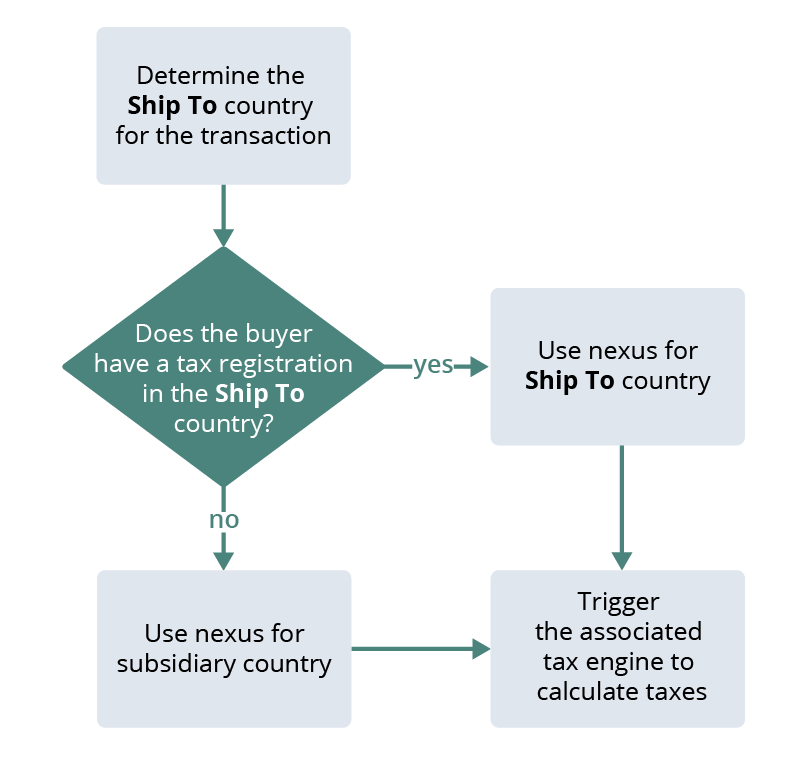
If you enable the location at the line level on the purchase transaction form, NetSuite uses it in its nexus determination.
Ship FROM and Ship TO Addresses Determination for Purchase Transactions
Learn how SuiteTax determines the Ship FROM country and Ship TO address for purchase transactions. When multiple address sources are available, SuiteTax evaluates them in a specific order of precedence. Understanding this order can help you identify which addresses are used on a transaction and troubleshoot unexpected shipping address results.
The Ship TO country is determined by one of these, in the following order:
-
The transaction shipping address (available only for drop-shipping).
-
The line-level location, if available.
-
The header-level location if the line-level location isn't available.
-
The subsidiary shipping address if the header-level location isn't available.
-
The subsidiary main address if the subsidiary shipping address isn't available.
The Ship FROM address is determined by one of these, in the following order:
-
The vendor default shipping address, if available.
-
The transaction billing address if the vendor default shipping address isn't available.
-
The vendor default billing address if the transaction billing address isn't available.
-
The subsidiary main address if the vendor default billing address isn't available.