Message Routing Between Integrations
The B2B integrations and backend integrations are not hard-wired to each other. They are instead dynamically wired to follow routing rules that you add declaratively. This section describes how the routing rules work using the concept of inbound and outbound agreements.
Inbound
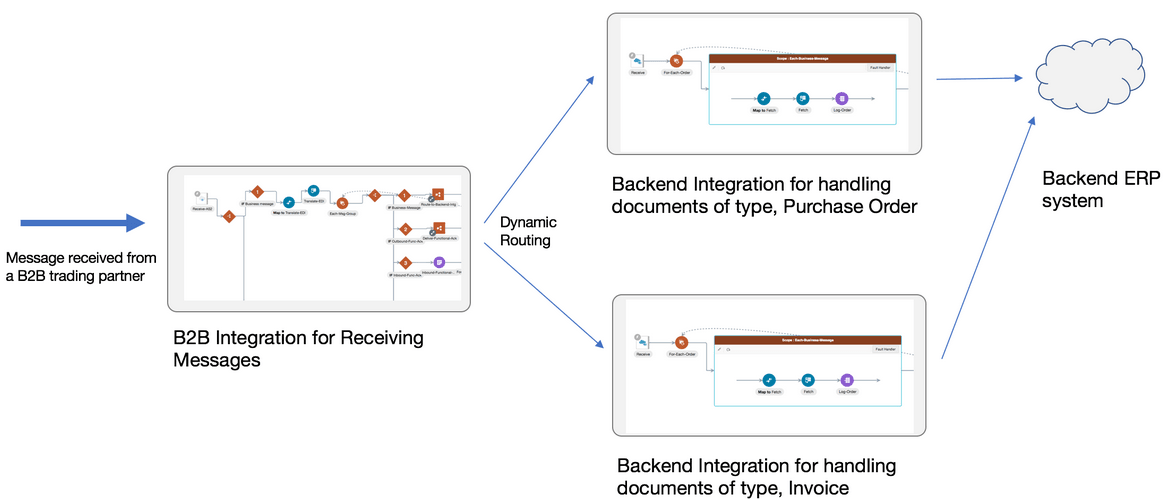
Assume one of your trading partners is sending multiple types of documents: purchase orders and invoices. For this trading partner, one B2B integration receives messages, and it receives both types of documents. You define routing rules by adding two inbound agreements to this trading partner. When you add an inbound agreement, you must select one B2B document and one backend integration.
- Inbound agreement 1 for selecting a purchase order type document and a backend integration called X.
- Inbound agreement 2 for selecting an invoice type document and a backend integration called Y.
- When a purchase order type document is received from this trading partner, it's routed to backend integration X.
- When an invoice type document is received from this trading partner, it's routed to backend integration Y.
While inbound agreements do more than routing, the routing is a primary concept. The B2B integration for receiving messages honors the routing rules at runtime and dynamically invokes backend integration X or Y, depending on the identified document type, as shown below.
Note:
You can create a single, generic backend integration that handles multiple types of documents, if you think there is enough commonality and it is easier for maintenance. In this case, select the same backend integration in the two inbound agreements.Outbound
Assume you have two trading partners and want to route a purchase order document to one of those trading partners. In this case, the backend integration must make a routing choice to select the correct B2B integration for sending messages between two integrations.
In the outbound case, inside your backend integration, you must specify
the trading partner to which you want to deliver the message. This is specified by
providing a trading partner ID or an application partner ID. See Outbound Message Processing.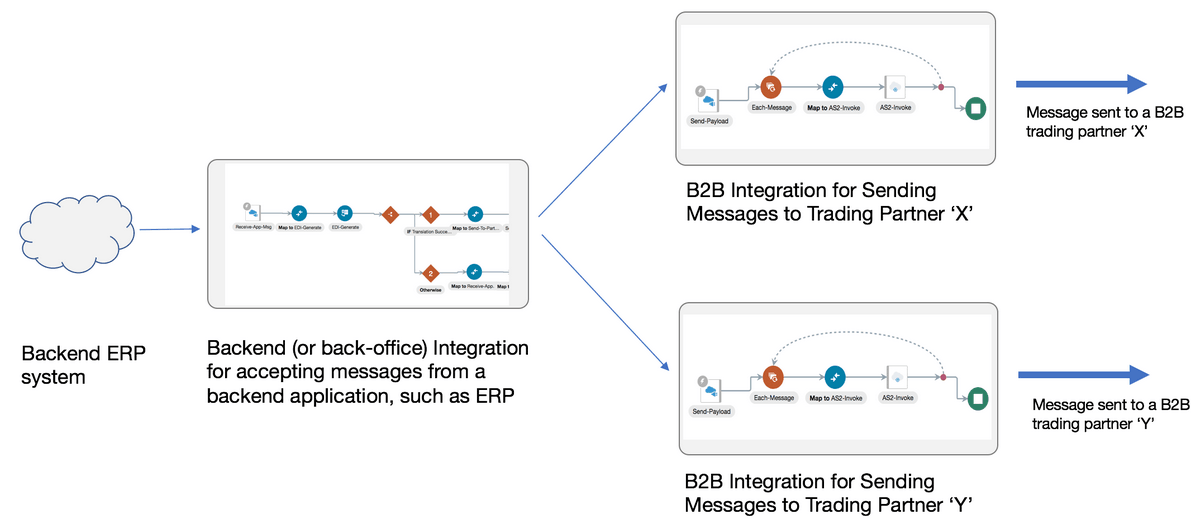
You define routing rules by adding two outbound agreements, one per trading partner. When you add an outbound agreement, you must select one B2B document and one transport. See Transports for Communication. Be aware for now that a transport maps to B2B integrations for receiving and sending messages for a given trading partner.
- Outbound agreement 1 for selecting a purchase order type document and transport X for trading partner X.
- Outbound agreement 2 for selecting a purchase order type document and transport Y for trading partner Y.
These two agreements express the intention to the system that when a purchase order type document is sent to trading partner X, route it to the B2B integration for sending messages X. When the document is sent to trading partner Y, route it to the B2B integration for sending messages Y.
Outbound agreements do more than routing, but this section only focuses on the routing aspect.
Further concepts about agreements are provided. See Agreements.
Details are provided for creating agreements. See Create Agreements.
Note:
In the outbound case also, you can create a common backend integration that handles multiple types of documents, if that is your design preference.