Integrations Used for B2B Message Processing
The actual processing of B2B messages occurs in integrations. B2B for Oracle Integration uses a two-integration design pattern for better modularity.
Inbound Message
A B2B message received from an external trading partner is called an
inbound message. The following diagram shows how an inbound message is processed
through two integrations.
- Receives the message from the trading partner and performs
various validity checks, for example:
- Is the message received from a known (that is, registered) trading partner? Verify this based on the authentication credentials, SSL certificates, HTTP headers, and so on.
- Is the message signed or encrypted? If so, verify the signature and decrypt the message. This step is called unpackaging, which is similar to removing an object from its packaging.
- Sends a transport level acknowledgment back to the trading partner, if asked by the trading partner.
- Detects the type of payload. If it is a payload that requires translation (for example, an EDI message), parse and translate the message.
- Sends a translator level acknowledgment, if configured.
- The backend integration converts the message into a format that a backend application, such as ERP, can directly consume (for example, XML, JSON, CSV, and so on) and forwards the message to a backend system for further processing.
Outbound Message
A B2B message sent to an external trading partner is called as an outbound message.
The following diagram shows how an outbound message is processed through
two integrations.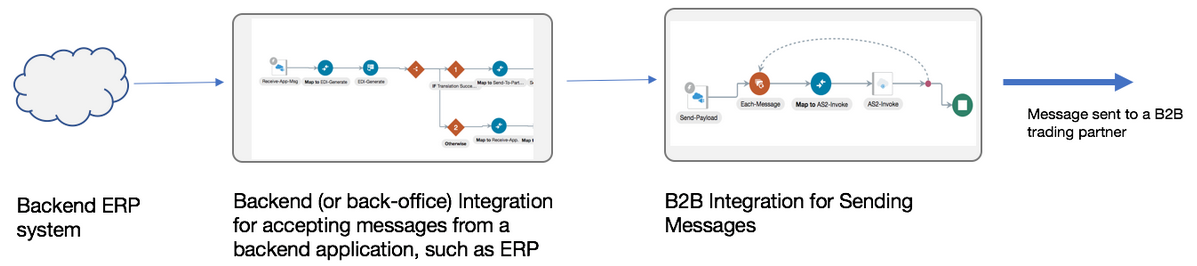
- Receives an event from a backend application such as ERP for a business document that must be sent to an external trading partner.
- Translates the message to an industry-standard B2B format (for example, Electronic Data Interchange (EDI) format).
- Adds headers, encrypts, signs, and compresses the payload, as per your required configuration. This step is called packaging, which is similar to wrapping an object into an envelope and making it ready for delivery.
- Transmits the message to the external trading partner's endpoint.
- If the trading partner responds with a transport level acknowledgment, it updates the status of the transmitted message accordingly.
The following table summarizes the two-integration pattern for B2B message processing:
| Concept | B2B Integrations for Receiving and Sending Messages | Backend Integration |
|---|---|---|
| Purpose | Handles the low-level technical interaction with an external trading partner, including B2B layer acknowledgments. This is provided by Oracle. | Handles the complete interaction with your backend
application, such as ERP, and the message transformation between B2B
canonical format and the backend application format. This is
developed by your company and is typically specific to your backend
application. There may be recipes and/or accelerators available for
specific backend applications to get you started.
See Learn About Recipes and Accelerators in Using Recipes and Accelerators in Oracle Integration 3. |
| Creation |
These integrations are automatically created for each trading partner from a template. Details about how to automatically create integrations are provided. See Create B2B Integrations for Receiving and Sending. |
You create this integration manually and use any available application adapters to interface with your backend application. Details about how to build this integration are provided. See Create Backend Integrations. |
| What does it do |
For an inbound message, the B2B integration for receiving messages also translates the message (for example, from EDI to XML). For an inbound message that contains a payload of unknown or binary (PDF, images) type, the B2B integration for receiving messages converts it to base64 encoded format. If the inbound message contains batched transactions, those are split individually before handing them to the backend integration. However, for an outbound message, the translation is not performed in the B2B integration for sending messages. (It is performed in the backend integration.) |
Handles interfacing with a backend application, such as ERP, both for the inbound and outbound sides. For an inbound message, the backend integration gets a B2B message that is already translated to a canonical format or converted to base64 encoded format. It must convert it further and forward it to your backend application. For an outbound message, the backend integration is the entry point where an event notification from a backend application triggers this integration to perform a translation to a B2B format (for example, XML to EDI) and call the B2B integration for sending messages. |
| How many integrations are needed |
A pair of integrations are required per B2B trading partner and transport. For example, if you have 10 B2B trading partners, each with one transport, then 20 integrations are needed (one each for receiving and sending messages). These integrations are automatically created for you. |
A pair of integrations are required per business document type. For example, if you have three types of business documents (purchase orders, invoices, and shipment notifications), you need six integrations (three on the inbound side and three on the outbound side), regardless of the number of trading partners. Typically, you share these integrations across many trading partners as long as they use the same document format. You may actually need fewer than six integrations if some types of business documents are only used in one direction. For example, if purchase orders are only received, but never sent, you need only one backend integration for inbound purchase orders and none for outbound purchase orders. You may also need fewer integrations if you design the integrations to handle multiple document types. This is because in the simplest case, the assumption is that one backend integration handles only one type of business document. You need to create these integrations manually. See Create Backend Integrations. |