Provide an Extended Instruction to the Anthropic Model

This use case demonstrates how to provide an array-based instruction to the Anthropic model. It also shows how to manage conversations that span multiple prompts, which enables you to break down complex tasks into smaller, more manageable subtasks.

  1. Configure a REST Adapter trigger connection.
  2. Configure an Anthropic Adapter invoke connection. See Create an Anthropic Adapter Connection.
  3. Create an application integration.
  4. Drag the REST Adapter trigger connection into the integration canvas for configuration. For this example, the REST Adapter is configured as follows:
    • A REST Service URL is defined (for this example, /invokeAnthropicLLM).
    • A Method of POST is selected.
    • A Request Media Type of JSON is selected and the following sample JSON structure is specified:
      { "model" : "claude-opus-4-20250514", "max_tokens" : 1024, "system" :
            "claude-opus-4-20250514", "metadata" : { "user_id" : "claude-opus-4-20250514" },
            "service_tier" : "auto", "temperature" : 1024, "tool_choice" : { "name" :
            "toolname", "type" : "type", "disable_parallel_tool_use" : true }, "tools" :
            "tools", "messages" : [ { "role" : "user", "content" : "What is the weather like
            right now in New York? Also what time is it there?" }, { "role" : "assistant",
            "content" : [ { "type" : "text", "text" : "I'll help you get the current weather and
            time in New York." }, { "type" : "tool_use", "id" : "toolu_01XUJFZr22Cy65yQGjC9Abc8",
            "name" : "get_weather", "input" : "stringified input" }, { "type" : "tool_use",
            "id" : "toolu_013sXxnS8VD7Db2oFo1Cxf4k", "name" : "get_time", "input" : "gfhjfgh"
            } ] }, { "role" : "user", "content" : [ { "type" : "tool_result", "tool_use_id" :
            "toolu_01XUJFZr22Cy65yQGjC9Abc8", "content" : "15 degree celsius" }, { "type" :
            "tool_result", "tool_use_id" : "toolu_013sXxnS8VD7Db2oFo1Cxf4k", "content" : "10 AM"
            } ] } ] }
    • A Response Media Type of JSON is selected and the following sample JSON structure is specified:
      { "id" : "msg_01QYBJH7FVfL9kGt9a8Adgyj", "type" : "message", "role" :
            "assistant", "model" : "claude-opus-4-20250514", "content" : [ { "type" : "text",
            "text" : "I'll help you get the current weather and time in New York." }, { "type" :
            "tool_use", "id" : "toolu_01XUJFZr22Cy65yQGjC9Abc8", "name" : "get_weather",
            "input" : "input value" }, { "type" : "tool_use", "id" :
            "toolu_013sXxnS8VD7Db2oFo1Cxf4k", "name" : "get_time", "input" : "arguments" } ],
            "stop_reason" : "tool_use", "stop_sequence" : "stop", "usage" : { "input_tokens" :
            532, "cache_creation_input_tokens" : 0, "cache_read_input_tokens" : 0, "output_tokens" :
            111, "service_tier" : "standard" } }
  5. Drag the Anthropic Adapter invoke connection into the integration canvas and configure it as follows.
    1. From the Anthropic LLM Models list, select the model to use (for this example, Claude Opus 4 is selected).
    2. From the Request Type list, select Extended Prompt.
  6. Open the request mapper automatically created when the Anthropic Adapter invoke connection was added to the integration. The mapper that was automatically created with the REST Adapter trigger connection is not edited and remains empty in this use case.
  7. In the request mapper, map the source Request Wrapper elements to the target Request Wrapper elements.
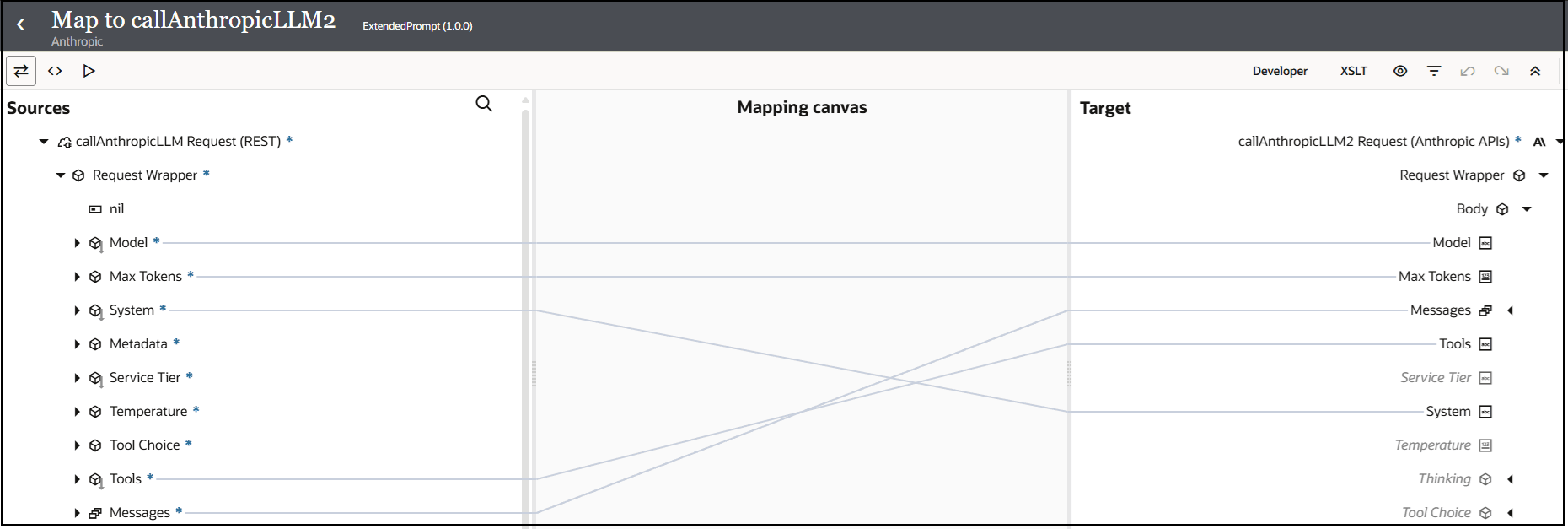
    The Sources, Mapping canvas, and Target sections are shown. The source Model is mapped to the target Model. The source Max Tokens is mapped to the target Max Tokens. The source System is mapped to the target System. The source Tools is mapped to the target Tools. The source Messages is mapped to the target Messages.

  8. Expand the target Messages, and then Content, to view the contents of the message.
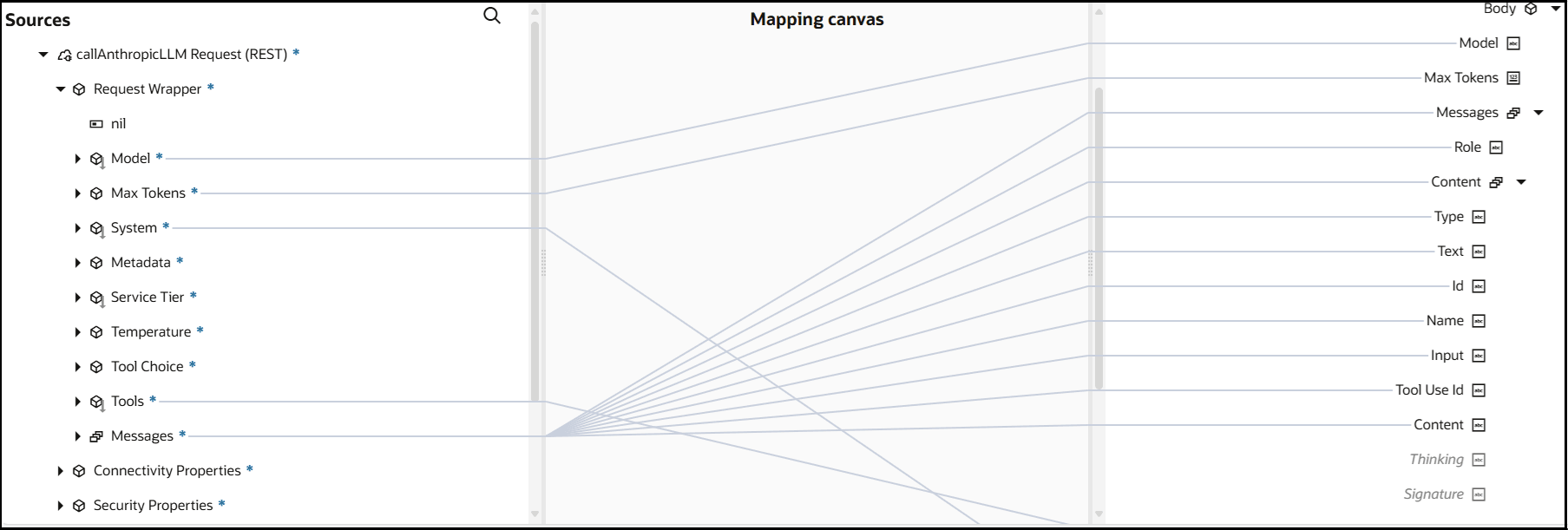
    The Sources, Mapping canvas, and Target sections are shown. The source Model is mapped to the target Model. The source Max Tokens is mapped to the target Max Tokens. The source System is mapped to the target System. The source Tools is mapped to the target Tools. The source Messages is mapped to the subelements of the expanded target Messages.

    The Content elements within Messages specify the actual textual input or output for the conversation with the Claude model.

    • Type: The substance of the content being provided. For example, text content": [{"type": "text", "text": "I'll help you get the current weather and time in New York."}]. When defining or invoking tools, this parameter can specify the substance of the tool or the tool interaction. In tool definitions, for instance, type may be defined as function to indicate a function call. In tool call responses, type may be defined as tool_use or tool_result.
    • Text: The actual content to specify. If the type value is set to text, then actual content is specified.
    • id: The ID for the tool to invoke.
    • Name: Each tool has a name parameter for identification. This name enables the Anthropic model to call the correct function.
    • Input: The text or data you provide to the model to use to process and generate a response. This input serves as the prompt or context for the Anthropic model task. The most common form of input is a string containing the text prompt to which you want the model to respond.

    For more information about Anthropic message content, see Messages.

  9. Add a response mapper.
  10. In the response mapper, map the source Response Wrapper elements to the target Response Wrapper elements.
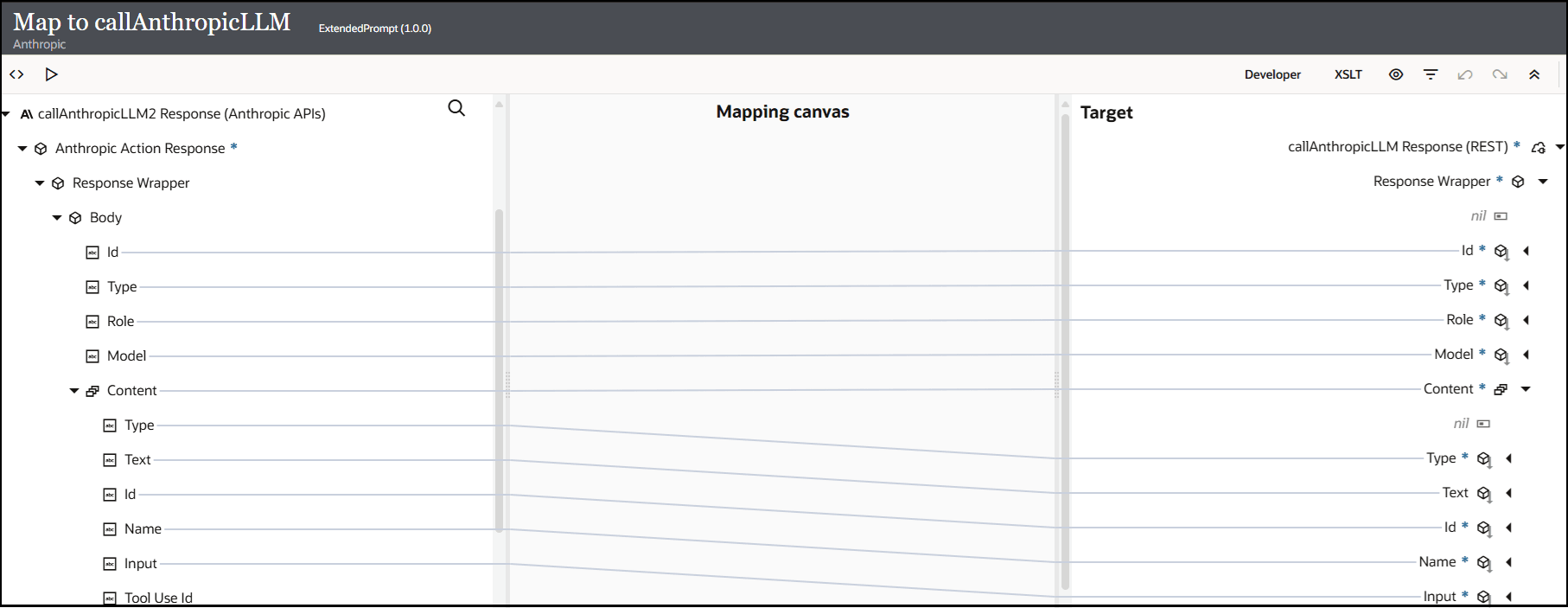
    The Sources, Mapping canvas, and Target sections are shown. The elements of the source Body are mapped to the elements of the target Response Wrapper. The source Max Tokens is mapped to the target Max Tokens. The elements of the source Content are mapped to the elements of the target Content.

    The completed integration looks as follows:


    The trigger connection, map action, map action, invoke connection, and map action are shown.

  11. Define a business identifier, then activate the integration. For this example, the Debug tracing level is selected.
  12. From the Actions Actions icon menu, select Run.
    The Configure and run page appears.
  13. In the Body field of the Request section, enter the following text, then click Run.
    {
                    "system": "Give information only about Boston",
                    "messages": [
                        {
                            "role": "user",
                            "content": [{"type": "text", "text": "What is the zipcode of Beacon Hill, Boston?"}]
                        }
                    ]
                }
    The Body field of the Response section returns the following output.
    {
      "id" : "msg_01Ps4wC6PhVpY8XYFSJv11u9",
      "type" : "message",
      "role" : "assistant",
      "model" : "claude-opus-4-20250514",
      "content" : [ {
        "type" : "text",
        "text" : "The primary zip code for Beacon Hill in Boston is 02108. 
    This historic neighborhood, known for its Federal-style rowhouses and 
    gas-lit streets, is located in downtown Boston and uses this zip code 
    for most addresses within its boundaries."
      } ]
    }
  14. Expand the activity stream to view the flow of the messages sent and received.
    • The message received by the invoke connection for delivery to the Anthropic model includes the following content:
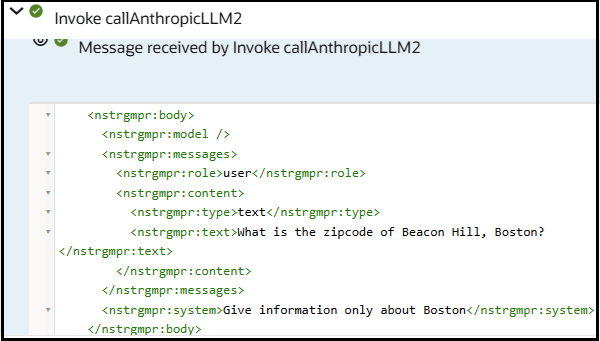

      The activity stream shows the contents of the initial prompt sent through the invoke connection to Anthropic.

    • The message reply returned by the Anthropic model includes the following content:
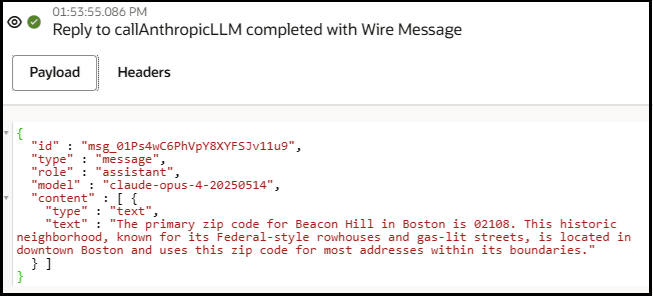

      The payload in the activity stream shows the contents of the response message returned by Anthropic.

    Let's return to the Configure and run page and enter content that uses the tools parameter to invoke functions to get the weather report and the time of day for a specific location. This example also shows how you can manage conversations that span multiple prompts. By chaining prompts together, you can break down complex tasks into smaller, more manageable subtasks.

  15. From the Actions Actions icon menu, select Run.
  16. In the Body field of the Request section, enter the following text, then click Run.
    {   "model": "claude-opus-4-20250514",   "max_tokens": 1024,   "tools": "[\n
          {\n            \"name\": \"get_weather\",\n            \"description\": \"Get the
          current weather in a given location\",\n            \"input_schema\": {\n
          \"type\": \"object\",\n                \"properties\": {\n
          \"location\": {\n                        \"type\": \"string\",\n
          \"description\": \"The city and state, e.g. San Francisco, CA\"\n                    },\n
          \"unit\": {\n                        \"type\": \"string\",\n
          \"enum\": [\n                            \"celsius\",\n
          \"fahrenheit\"\n                        ],\n                        \"description\":
          \"The unit of temperature, either 'celsius' or 'fahrenheit'\"\n                    }\n
          },\n                \"required\": [\n                    \"location\"\n                ]\n
          }\n        },\n        {\n            \"name\": \"get_time\",\n
          \"description\": \"Get the current time in a given time zone\",\n
          \"input_schema\": {\n                \"type\": \"object\",\n
          \"properties\": {\n                    \"timezone\": {\n
          \"type\": \"string\",\n                        \"description\": \"The IANA time zone
          name, e.g. America/Los_Angeles\"\n                    }\n                },\n
          \"required\": [\n                    \"timezone\"\n                ]\n            }\n
          }\n    ]",   "messages": [{     "role": "user",     "content": [       {
          "type": "text","text": "What is the weather like right now in New York? Also what time
          is it there?"       }]   }] }
    The Body field of the Response section returns the following output.
    {
      "id" : "msg_01EUmWsAGTjbfVXU2NP5euLq",
      "type" : "message",
      "role" : "assistant",
      "model" : "claude-opus-4-20250514",
      "content" : [ {
        "type" : "text",
        "text" : "I'll help you get the current weather and time in New York."
      }, {
        "type" : "tool_use",
        "text" : "",
        "id" : "toolu_01L4cWEm1yRwdmFPb892nVqY",
        "name" : "get_weather",
        "input" : "{\"location\":\"New York, NY\"}"
      }, {
        "type" : "tool_use",
        "text" : "",
        "id" : "toolu_01TZRABw9C6i6hsyng1gTSWn",
        "name" : "get_time",
        "input" : "{\"timezone\":\"America/New_York\"}"
      } ]
  17. Expand the activity stream to view the message returned by the Anthropic model.
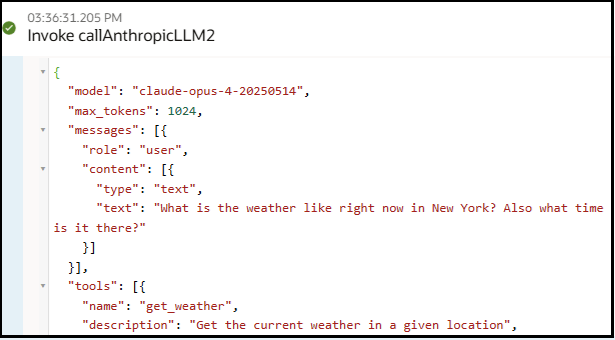

    The activity stream shows the contents of the second prompt sent through the invoke connection to Anthropic.

    Let's continue this conversation in a second prompt to get the weather and time of day in New York by replacing several variables with values returned by the first prompt. This example also shows how you can manage conversations that span multiple prompts.

  18. In the Body field of the Request section, enter the following content. Note the highlighted variables at the bottom of this content for the tool IDs and tool names.
    {
      "model": "claude-opus-4-20250514",
      "max_tokens": 1024,
      "tools": "[\n        {\n            \"name\": \"get_weather\",\n            \"description\": \"Get the current weather in a given location\",\n            \"input_schema\": {\n                \"type\": \"object\",\n                \"properties\": {\n                    \"location\": {\n                        \"type\": \"string\",\n                        \"description\": \"The city and state, e.g. San Francisco, CA\"\n                    },\n                    \"unit\": {\n                        \"type\": \"string\",\n                        \"enum\": [\n                            \"celsius\",\n                            \"fahrenheit\"\n                        ],\n                        \"description\": \"The unit of temperature, either 'celsius' or 'fahrenheit'\"\n                    }\n                },\n                \"required\": [\n                    \"location\"\n                ]\n            }\n        },\n        {\n            \"name\": \"get_time\",\n            \"description\": \"Get the current time in a given time zone\",\n            \"input_schema\": {\n                \"type\": \"object\",\n                \"properties\": {\n                    \"timezone\": {\n                        \"type\": \"string\",\n                        \"description\": \"The IANA time zone name, e.g. America/Los_Angeles\"\n                    }\n                },\n                \"required\": [\n                    \"timezone\"\n                ]\n            }\n        }\n    ]",
      "messages": [{
        "role": "user",
        "content": [
          {
            "type": "text",
            "text": "What is the weather like right now in New York? Also what time is it there?"
          }]
      },
        {
          "role" : "assistant",
          "content": [
            {
              "type": "text",
              "text": "What is the weather like right now in New York? Also what time is it there?"
            },
            {
              "type" : "tool_use",
              "id" : "%TOOL_USE_ID_1%",
              "name" : "%TOOL_USE_NAME_1%",
              "input" : "{\"location\":\"New York, NY\"}"
            },
            {
              "type" : "tool_use",
              "id" : "%TOOL_USE_ID_2%",
              "name" : "%TOOL_USE_NAME_2%",
              "input" : "{\"timezone\":\"America/New_York\"}"
            }
          ]
        },
        {
          "role": "user",
          "content": [
            {
              "type": "tool_result",
              "tool_use_id": "%TOOL_USE_NAME_1%",
              "content": "15 degree celsius"
            },
            {
              "type": "tool_result",
              "tool_use_id": "%TOOL_USE_NAME_2%",
              "content": "10:30 AM"
            }
          ]
        }
      ]
  19. Replace those variables with the following values from the output returned in the Body field of the Response section in Step 16. Based on those values, the tool called the functions for getting the weather report and the time of day for New York.
    {   "model": "claude-opus-4-20250514",   "max_tokens": 1024,   "tools": "[\n
          {\n            \"name\": \"get_weather\",\n            \"description\": \"Get the
          current weather in a given location\",\n            \"input_schema\": {\n
          \"type\": \"object\",\n                \"properties\": {\n
          \"location\": {\n                        \"type\": \"string\",\n
          \"description\": \"The city and state, e.g. San Francisco, CA\"\n                    },\n
          \"unit\": {\n                        \"type\": \"string\",\n
          \"enum\": [\n                            \"celsius\",\n
          \"fahrenheit\"\n                        ],\n                        \"description\":
          \"The unit of temperature, either 'celsius' or 'fahrenheit'\"\n                    }\n
          },\n                \"required\": [\n                    \"location\"\n                ]\n
          }\n        },\n        {\n            \"name\": \"get_time\",\n
          \"description\": \"Get the current time in a given time zone\",\n
          \"input_schema\": {\n                \"type\": \"object\",\n
          \"properties\": {\n                    \"timezone\": {\n
          \"type\": \"string\",\n                        \"description\": \"The IANA time zone
          name, e.g. America/Los_Angeles\"\n                    }\n                },\n
          \"required\": [\n                    \"timezone\"\n                ]\n            }\n
          }\n    ]",   "messages": [{     "role": "user",     "content": [       {
          "type": "text",         "text": "What is the weather like right now in New York? Also
          what time is it there?"       }]   },     {       "role" : "assistant",
          "content": [         {           "type": "text",           "text": "What is the
          weather like right now in New York? Also what time is it there?"         },         {
          "type" : "tool_use",           "id" : "toolu_01L4cWEm1yRwdmFPb892nVqY",
          "name" : "get_weather",           "input" : "{\"location\":\"New York, NY\"}"
          },         {           "type" : "tool_use",           "id" :
          "toolu_01TZRABw9C6i6hsyng1gTSWn",           "name" : "get_time",           "input" :
          "{\"timezone\":\"America/New_York\"}"         }       ]     },     {       "role":
          "user",       "content": [         {           "type": "tool_result",
          "tool_use_id": "toolu_01L4cWEm1yRwdmFPb892nVqY",           "content": "15 degree
          celsius"         },         {           "type": "tool_result",           "tool_use_id":
          "toolu_01TZRABw9C6i6hsyng1gTSWn",           "content": "10:30 AM"         }       ]
          }   ] }
  20. Click Run.
    The Body field of the Response section returns the current weather and time of day in New York.
    {
      "id" : "msg_012gjUFZB54iWPxYEYYk3JRw",
      "type" : "message",
      "role" : "assistant",
      "model" : "claude-opus-4-20250514",
      "content" : [ {
        "type" : "text",
        "text" : "Based on the results:\n\nThe current weather in New York is 15 degrees Celsius 
    (which is about 59 degrees Fahrenheit if you're more familiar with that scale). It's a fairly 
    mild temperature.\n\nThe time there is currently 10:30 AM.\n\nIs there anything else you'd 
    like to know about New York's weather or time?"
      } ]