1 Feature Summary
This chapter describes the feature enhancements in this release.
Noteworthy Enhancements
This guide outlines the information you need to know about new or improved functionality in the Oracle CrowdTwist Loyalty and Engagement update and describes any tasks you might need to perform for the update. Each section includes a brief description of the feature, the steps you need to take to enable or begin using the feature, tips or considerations that you should keep in mind, and the resources available to help you.
Column Definitions
-
Feature: Provides a description of the feature being delivered.
-
Module Impacted: Identifies the module associated with the feature, if any.
-
Scale: Identifies the size of the feature. Options are:
-
Small: These UI or process-based features are typically comprised of minor field, validation, or program changes. Therefore, the potential impact to users is minimal.
-
Large: These UI or process-based features have more complex designs. Therefore, the potential impact to users is higher.
-
-
Delivered: Is the new feature available for use immediately after upgrade or must the feature be enabled or configured? If no, the feature is non-disruptive to end users and action is required (detailed steps below) to make the feature ready to use.
- Customer Action Required: You must take action before these features can be used. These features are delivered disabled and you choose if and when to enable them.
Table 1-1 Table 1-1 Noteworthy Enhancements
| Feature | Scale | Delivered | Customer Action Required? |
|---|---|---|---|
| APIs | Small | Enabled | No |
| Integrations | Small | Enabled | No |
| Control Center Settings | Small | Enabled | No |
| User Roles and User Management | Small | Enabled | No |
| Badges | Small | Enabled | No |
APIs
User Profile V3
Oracle CrowdTwist has introduced the User Profile v3 API, a faster and more efficient way to retrieve member data from your Oracle CrowdTwist environment.
This new version lets you to specify optional include parameters, so the API
returns only the data your application needs. By limiting the response payload, integrations can
improve performance and reduce unnecessary data transfer.
Available include options include:
| Include Parameter | Returns |
|---|---|
profile |
Core member profile |
profile_extended |
Extended profile information |
social |
Social and referral data |
tier |
Member tier information |
segments |
Linked segment records |
custom_data |
Client-configurable properties |
household |
Household data |
Note:
There is no impact to existing client integrations. This is a new integration that can be adopted at your discretion.Integrated systems with valid API Keys can use this endpoint.
For implementation details along with request and payload examples, see the User Profile v3 API documentation.
Integrations
Olo Ordering Platform Integration
Oracle CrowdTwist now integrates with the Olo Ordering Platform. Using Olo’s Order Closed event, qualifying orders are converted into CrowdTwist Purchase transactions in real time. The integration also supports Olo’s Test event to assist with setup and validation.
- Automatically processes qualifying Olo purchases in CrowdTwist.
- Enables members to earn rewards when order information matches an existing loyalty profile.
- Supports real-time transaction processing.
- Simplifies integration testing and verification.
- The client must have an active Olo instance.
- Order information must match an existing CrowdTwist member profile for rewards to be applied.
Deliverect Ordering Platform Integration
Oracle CrowdTwist now integrates with the Deliverect Ordering Platform. Using Deliverect’s New Order webhook, qualifying purchases are converted into CrowdTwist Purchase transactions in real time.
- Automatically processes qualifying Deliverect purchases in CrowdTwist.
- Enables members to receive loyalty benefits when customer information matches an existing member profile.
- Supports real-time transaction processing.
- The client must have an active Deliverect instance.
- Customer information must match an existing CrowdTwist member profile for loyalty benefits to be applied.
Control Center Settings
The Oracle CrowdTwist Control Center Settings experience has been updated with a modernized interface built on the latest Oracle APEX framework. This release consolidates and reorganizes administrative settings into a more intuitive experience while maintaining existing functionality. In addition to the updated user experience, several new administration capabilities have been introduced to improve configuration and user management workflows. The following updates are exclusive to New Control Center Settings pages.
Navigation and Time Zone Settings
In New Control Center, navigation is conducted through the lower right-hand corner under the Oracle logo. With this release, users with appropriate access can now see Badges and Settings modules in the product map.
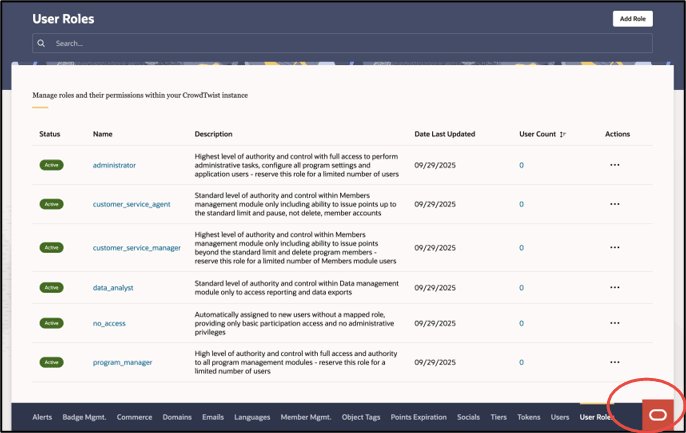
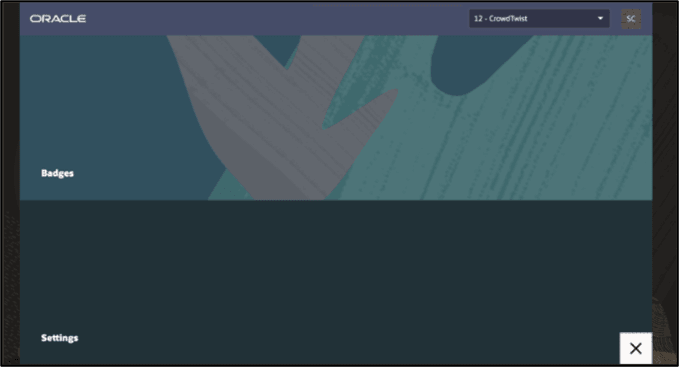
Users also unlock broader control over how date and timestamps are displayed throughout New Control Center. Under profile settings, users can configure a fixed user preference or browser location preference time zones with customizations for region and daylight savings settings.
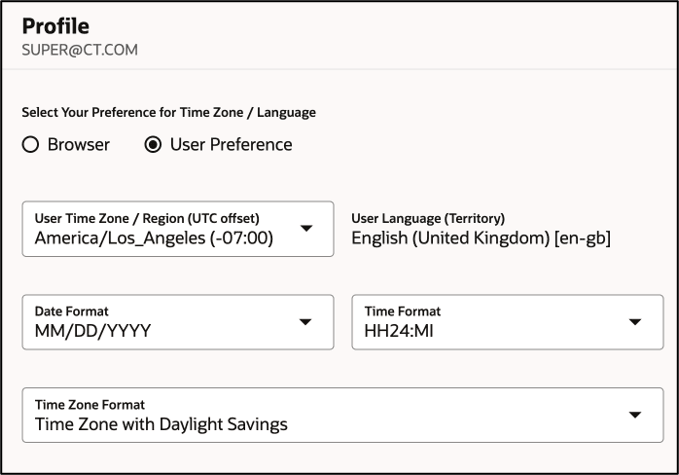
Timezone preferences are available to all users in the new Oracle Apex interface.
Badge Management
A new Badge Management page is now available within Settings, which serves as the centralized global settings management page for Badges.
This change allows access to the Badges page directly from the new Oracle Apex interface homepage.
All program administrators that create or view Badges will require a Role with appropriate read or write permissions to access the Badges feature.
The following sections contain more information on Badge Custom Attributes.
User Roles and User Management
User Management and the new User Roles feature have been enabled under Settings in the new Oracle Apex interface.
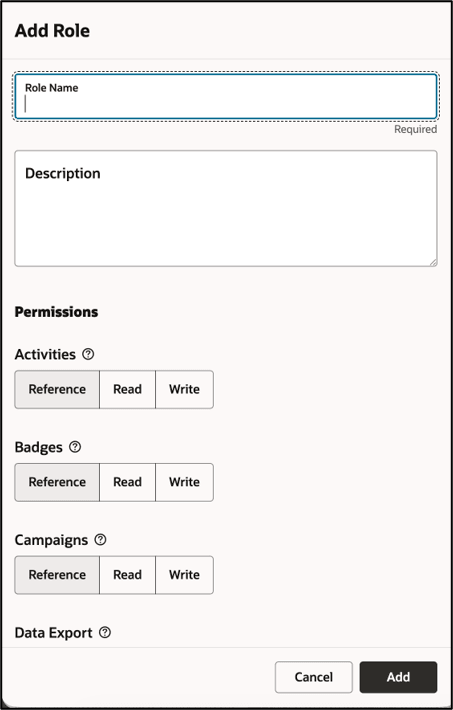
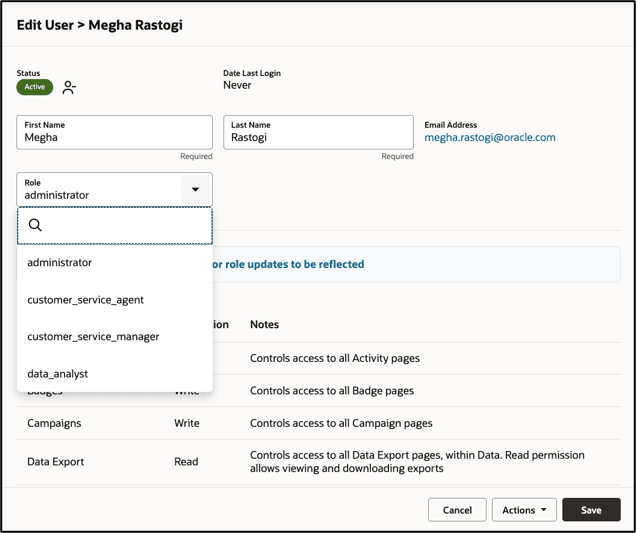
Roles allow administrators to create and manage reusable permission sets that can be assigned to Control Center users. Instead of configuring permissions individually for each user, administrators can now define permissions at the role level and assign users to the appropriate role. User Roles will enable faster user onboarding, consistent permission assignment across teams, and reduce the potential for erroneous permission assignments.
Every program will begin with six standardized roles representing common Control Center access levels: Administrator, Program Manager, Customer Service Manager, Customer Service Agent, Data Analyst, and No Access.
Existing Control Center users have been migrated to a standard role when their current permission set exactly matches one. If no standard role matches exactly, a custom role was created with the same permission set.
Client admins should review User Role assignments and manage roles going forward. Custom roles can be created, modified, or cloned as needed.
Access to User Roles requires the appropriate Settings and User Roles permissions.
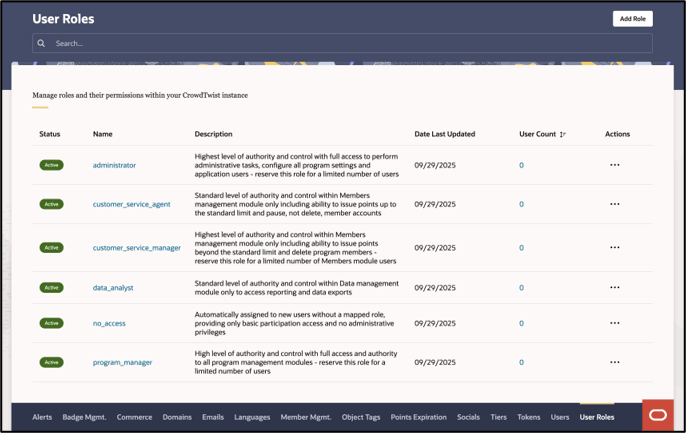
- Settings access
- Appropriate User Management access
This change aligns user administration with other platform-level configuration settings and provides a more consistent navigation experience.
User Roles for OPERA Clients
- Users and role assignments are managed through OPERA/OCIM.
- Oracle CrowdTwist roles are pre-seeded and flow into Oracle CrowdTwist from OPERA.
- Roles cannot be added, cloned, deactivated, or deleted from Oracle CrowdTwist.
- Custom role creation is not supported in Oracle CrowdTwist for OPERA clients.
- OPERA-provided roles may be configured for Oracle CrowdTwist permissions, but role lifecycle management remains outside Oracle CrowdTwist.
Badges
Custom Attributes
The introduction of Custom Badge Attributes allows tracking of badge events with custom detail across the following data types: Integer, String, Date, Boolean, Decimal.
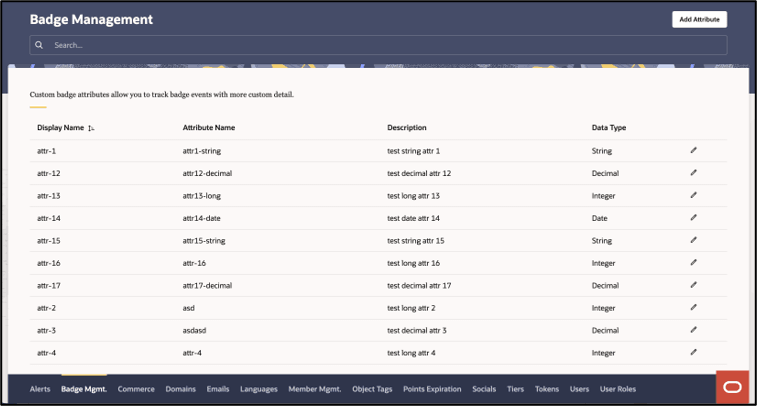
Easily filter and sort on Badges based on business specific criteria. For example, Badges from 2025 onwards and Badges with the Attribute Name "Badge_Type" and value "Streak."
All program administrators that create or view Badges will require a Role with appropriate read or write permissions to access the Badges Custom Attributes.