Update Configuration on a Single Edge Node

Use this procedure to update configuration directly on one edge node.

Before You Begin

Confirm that no other configuration update is currently in progress for the edge node.

As an alternative to navigating the edge node tabs and drawers, you can use the Configuration Editor UI to access and edit the full range of configuration values for one edge node. Use this path when you want to review or change settings across multiple configuration blocks in one place.

The single-edge configuration editor reflects the current configuration running on the selected edge node. Unlike template configuration, single-edge configuration is specific to one edge node.

From the Edge Node Details page, open the More actions menu and click Edit Configurations to open the single-edge configuration editor.
Use this path when you need to change one specific edge node instead of preparing a reusable template. If a template version is already applied to the edge node, Oracle ECP shows that association on the edge node in the left panel.
If you update an edge node directly after a template is applied, Oracle ECP warns you that the edge node will be unlinked from the applied template. After the update completes successfully, Oracle ECP removes the template association from the edge node and from the template version assignment list.

Figure 14-5 Open the Single-Edge Configuration Editor
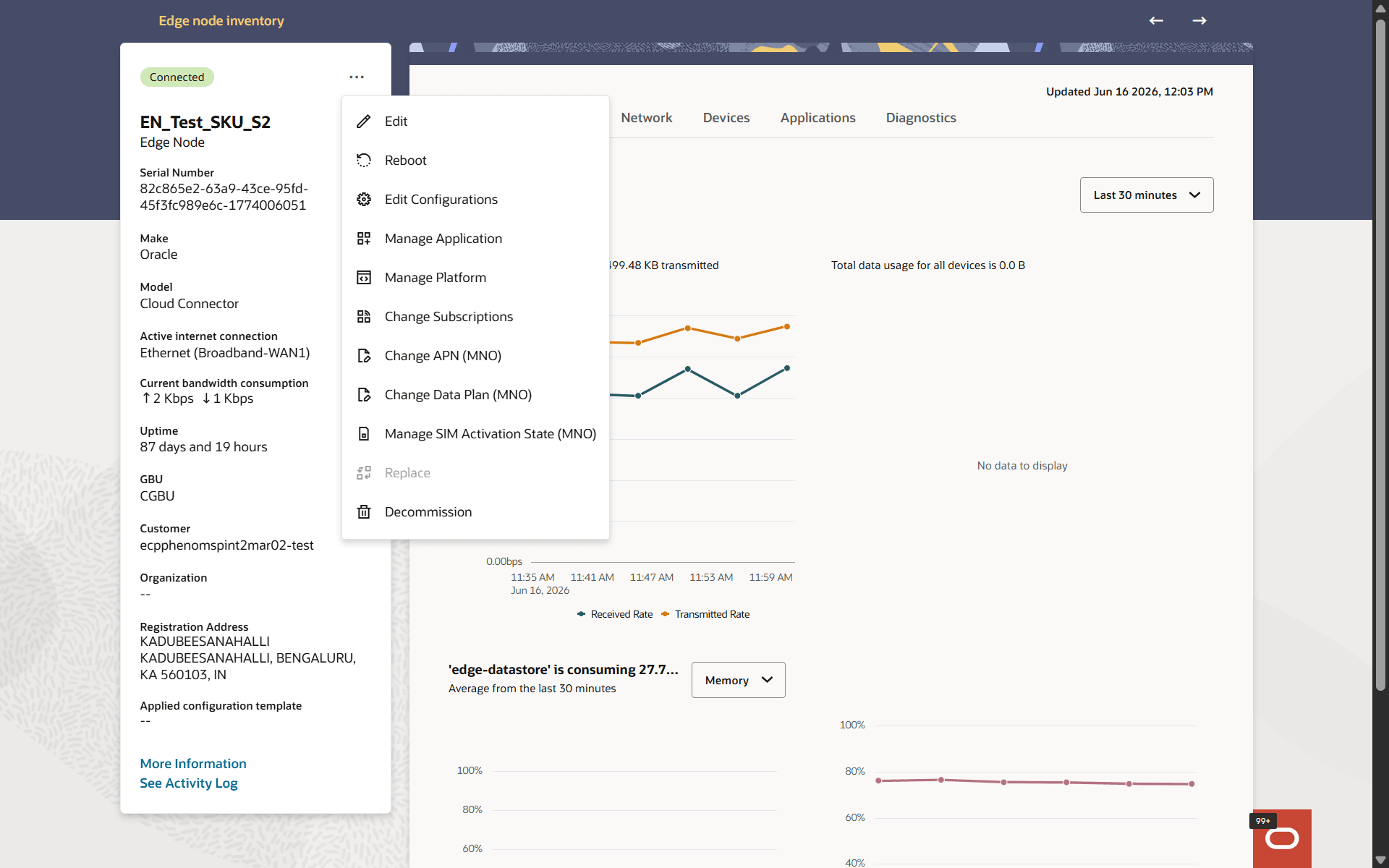

Edge Node Details page with the More actions menu open, showing the Edit Configurations action for a single edge node.

  1. In the Inventory page, select Edge Nodes in the context chooser.
  2. Click the edge node name.

    Oracle ECP opens the Edge Node Details page.

  3. Open the More actions menu.
  4. Click Edit Configurations.
  5. In the editor, select the configuration block that you want to change.
  6. Update the required settings.
  7. If Oracle ECP shows a warning that the edge node will be unlinked from the applied template, review the message and continue.
  8. Click Update.

Oracle ECP submits the change as an asynchronous configuration apply request for the selected edge node.

If the edge node was previously associated with a template version, Oracle ECP removes that association after the request completes successfully.