About Protection Policies
A protection policy is the central mechanism for controlling management of backup storage space, based on pre-defined recovery window goals. From the perspective of a DBA, the most important elements of a protection policy are the disk and tape recovery windows.
This section contains the following topics:
See Also: “Protection Policies” for an architectural overview
Purpose of Protection Policies
For every database associated with it, a protection policy specifies:
-
The recovery window for tape backups
-
Whether Recovery Appliance must replicate backups or copy them to tape before deleting them
-
Which Recovery Appliance storage location is used for backups
-
An optional backup polling policy
You can attach multiple protected databases to a single protection policy. A Recovery Appliance may have a variety of protection policies to support different data protection support levels. For example, protection policies can be generic service levels such as gold, silver, and bronze. Alternatively, policies can be specific to the requirements of protected databases and applications.
Overview of Protection Policies
A protection policy is a named, logical object recorded in the Recovery Appliance metadata database. To be added to a Recovery Appliance, a protected database must be associated with a specific protection policy. The default protection polices are Platinum, Gold, Silver, and Bronze.
Each protection policy specifies different values for the disk and tape recovery windows. These values apply to every database protected by the policy. For example, Figure 1 shows three of the default protection policies, with different protected databases assigned to each policy. In the example, databases prod3 and prod11 are in the same policy, and so both have the same disk recovery window goal of 3 days.
Figure 1: Protection Policies
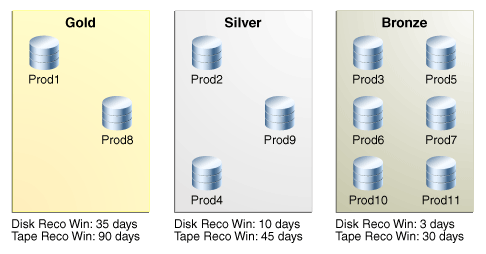
Description of the illustration amagd_vm_045.png
Guidelines for Protection Policies
Here are several considerations to create effective protection policies.
-
All databases in a protection policy must share the following:
-
Recovery Window Compliance (14 days / 30 days / etc.). This should be smaller than Recovery Window Goal. The Recovery Window Compliance may be null. If too large, this can result in the Recovery Appliance rejecting new backups, because old backups for compliance purposes have not “expired” yet and made their storage space available for re-use with incoming backups.
-
Recovery Window Goal (14 days / 30 days / etc.). This is a goal to strive for and helps determine amount of storage required. However, if the amount of free storage becomes too small, the oldest backups might have their storage space reclaimed for new backups. In such a case, the goal isn’t met but continued operation and the receiving of incoming backups is not prevented. This is the difference from the recovery window compliance.
-
Max Disk Retention (default / 21 days / 35 days / etc.)
-
Tape Retention Policy (90 Days / 365 Days / 7 years)
-
Tape Operation Schedule (Sunday Full / Daily Incremental / Daily ARCH)
-
Replication Configuration (Replicate or No-Replicate, and which Recovery Appliances to replicate to)
-
-
If a production database needs to be replicated but a development database does not, this case requires two (2) protection policies.
Similarly, if a production database needs to be replicated but another production database does not, this case also requires two (2) protection policies.
-
Geographical regions or different lines of business can mean additional protection policies. For example, the regions of North America and Europe might require two (2) protection policies.
-
Tape operations that occur on different days requires a protection policy for each day.
For example, if due to volume, certain databases perform their weekly full backup on Sunday and others on Monday, this requires two (2) protection policies. If all databases perform their weekly full backup on Sunday, then only one (1) protection policy is needed.
-
If the number of days for tape retention is different between two databases, this requires two (2) protection policies.
A protection policy is a named, logical object recorded in the Recovery Appliance metadata database. To be added to a Recovery Appliance, a protected database must be associated with a specific protection policy. The default protection polices are Platinum, Gold, Silver, and Bronze.
Each protection policy specifies different values for the disk and tape recovery windows. These values apply to every database protected by the policy. For example, Figure 1 shows three of the default protection policies, with different protected databases assigned to each policy. In the example, databases prod3 and prod11 are in the same policy, and so both have the same disk recovery window goal of 3 days.
As an example of an update to a protection policy, the customer may choose to change the LOG_COMPRESSION_ALGORITHM setting in a protection policy for generally one or both of the below reasons:
-
Reduction of CPU utilization on the appliance attributed to creation and compression of archived log backups.
-
Reduction of CPU utilization on the protected database during recovery operations, attributed to decompression of archived log backups before the logs can be applied on the restored data files.
Although Oracle cannot provide detailed CPU utilization and compression ratio differences between the different algorithms, as they are highly data type dependent, generally:
-
LOWandMEDIUMsettings utilize less CPU thanBASICandHIGHfor performing compression/decompression, with trade-off of lower compression ratio (i.e. higher space usage on appliance). -
MEDIUMoffers the optimal balance of CPU consumption and compression ratio in most cases. -
LOWoffers the least CPU consumption, at the expense of a modest reduction in compression (higher space usage on appliance) ratio compared toMEDIUMandBASIC. -
OFFdisables the compression.
If a significant increase of space is noticed then the LOG_COMPRESSION_ALGORITHM can be changed back to BASIC.
The HIGH setting is not recommended due to significant CPU consumption.
For more details on log compression usage, see “Changes in the Protection Policy Compression Algorithms” (MOSnote Doc ID KB392785).
When a protection policy has SECURE_MODE set to YES, then backups that are not encrypted are rejected before they can be uploaded to the Recovery Appliance, by design. When redo logs are being shipped directly to the Recovery Appliance, they also must be encrypted. However, the check for redo encryption happens after the redo log completes, so future attempts to open a new log on the Recovery Appliance are rejected. A few logs might get started before the archived log destination status shows redo being rejected. This condition clears when an encrypted redo log backup is sent to the Recovery Appliance. After which, future redo log switch are accepted on the Recovery Appliance.
User Interfaces for Protection Policies
This section contains the following topics:
Accessing the Create Protection Policy Page in Cloud Control
The Create Protection Policy page in Oracle Enterprise Manager Cloud Control (Cloud Control) is the recommended interface for creating protection policies.
To access the Create Protection Policy page:
-
Access the Recovery Appliance Home page, as described in “Accessing the Recovery Appliance Home Page”.
-
From the Recovery Appliance menu, select Protection Policies.
The Recovery Appliance Login page appears.
-
Enter your login credentials, and then click Login.
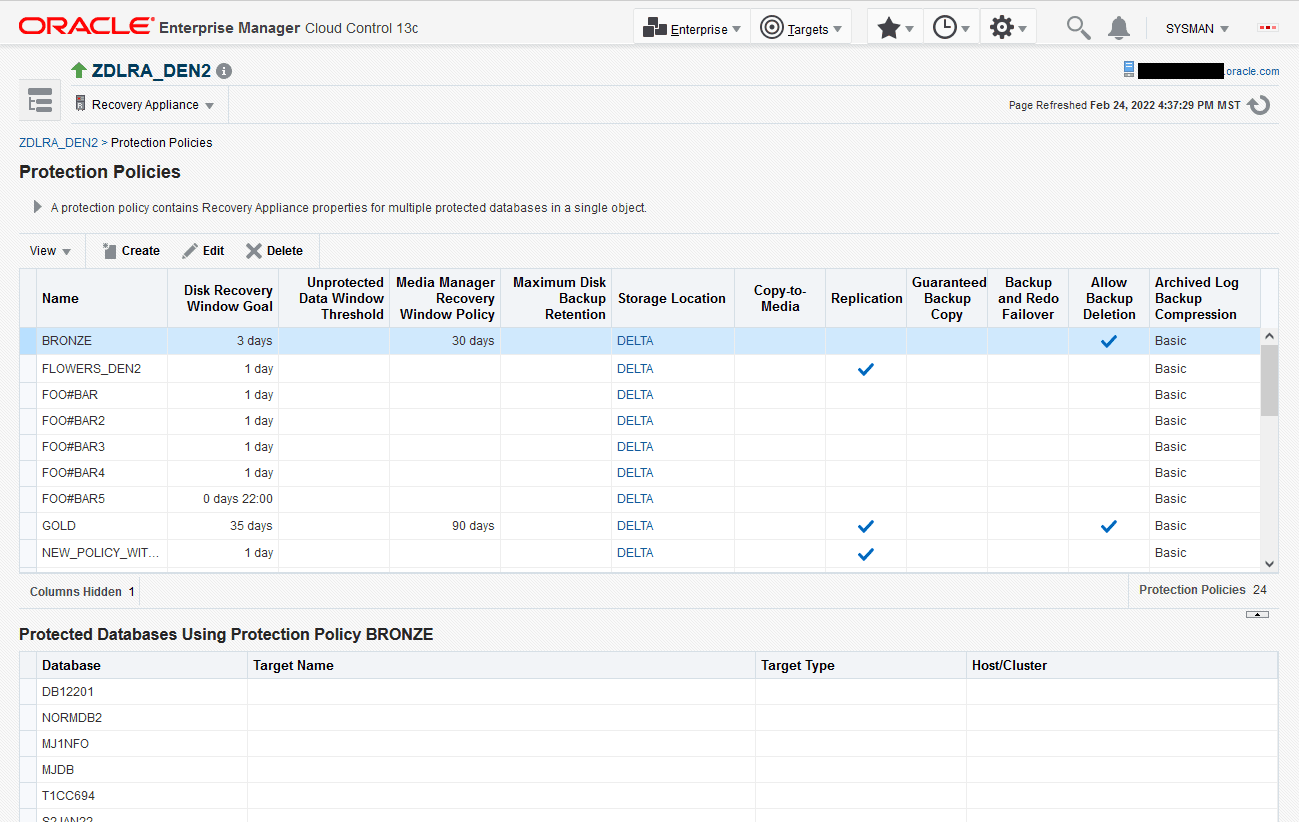
The Protection Policies page appears, as shown in the example in Figure 2.
Figure 2: Protection Policies Page
DBMS_RA Procedures Relating to Protection Policies
You can use the DBMS_RA package to create and manage protection policies. Table 1 describes the principal program units relating to protection policies.
Table 1 DBMS_RA Protection Policy Procedures
| Program Unit | Description |
|---|---|
CREATE_POLLING_POLICY |
Creates a backup polling policy. |
CREATE_PROTECTION_POLICY |
Creates a protection policy. |
DELETE_PROTECTION_POLICY |
Deletes a protection policy. |
UPDATE_PROTECTION_POLICY |
Updates a protection policy. |
See Also: DBMS_RA Package Reference
Recovery Catalog Views for Protection Policies
You can monitor protection policies using the Recovery Appliance catalog views. Table 2 summarizes the views that are most relevant for protection policies.
Table 2 Recovery Catalog Views for Protection Policies
| View | Description |
|---|---|
RA_PROTECTION_POLICY |
This view describes the defined protection policies. |
RA_POLLING_POLICY |
This view describes the defined backup polling policies. |
RA_DATABASE |
The POLICY_NAME column of this view lists the protection policy used by this protected database. |
RA_REPLICATION_CONFIG |
The PROTECTION_POLICY column of this view lists the protection policy for a particular Recovery Appliance used for replication. |
RA_REPLICATION_DATABASE |
The POLICY_NAME column of this view lists the protection policy that is associated with this replication server and database. |
RA_REPLICATION_PAIR |
This view lists replication information for replicating protection policies. |
RA_REPLICATION_POLICY |
The POLICY_NAME column of this view lists the protection policy associated with this replication server configuration. |
See Also: Recovery Appliance View Reference
Basic Tasks for Managing Protection Policies
This section explains the basic tasks involved in managing protection policies. Figure 3 shows the overall workflow described in Recovery Appliance Workflow, with the protection policy tasks highlighted.
Figure 3: Protection Policy Tasks in Recovery Appliance Workflow
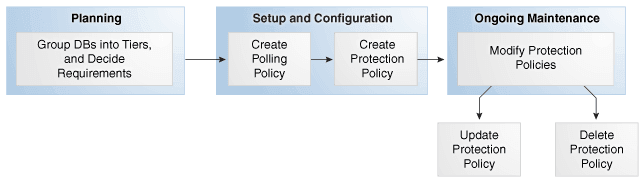
Description of the illustration amagd_vm_041.png
Typically, you perform protection policy tasks in the following sequence:
-
During the planning phase, group the databases into tiers, and decide the recovery requirements for each tier.
“Planning for Recovery Appliance” describes these tasks.
-
During the configuration phase (see “Setup and Configuration for Recovery Appliance”), create one protection policy for each database tier.
-
Optionally, if your Recovery Appliance has access to a backup polling location, and if you are performing configuration using command-line tools, then create a backup polling policy. “Creating a Backup Polling Policy (Command-Line Only)” describes this task.
Note: Cloud Control enables you to configure the polling policy and the protection policy in the same page.
-
Create a protection policy for a specific database tier.
“Creating a Protection Policy” describes this task.
-
-
During the ongoing maintenance phase (see “Maintenance Tasks for Recovery Appliance”), modify protection policies as needed. Typical modification tasks include:
-
Update the attributes of a protection policy.
“Updating a Protection Policy” describes this task.
-
Delete a protection policy.
“Deleting a Protection Policy” describes this task.
-