E Managing Oracle Key Vault Platform Certificates
This chapter describes how you can manage Oracle Key Vault platform certificates. Oracle recommends proactively monitoring and rotating platform certificates before they expire to avoid cluster downtime.
- Overview of Oracle Key Vault Platform Certificates
Oracle Key Vault platform certificates are used when adding a new node to an Oracle Key Vault multi-master cluster. In primary-standby deployments, platform certificates are used when adding systems and for communication between systems. Platform certificates are also used for redo shipping between read/write nodes in a cluster. - Monitoring Oracle Key Vault Platform Certificate Expiration
You can proactively set alerts and monitor the expiration dates of the Oracle Key Vault platform certificates and rotate them before they expire. - Rotating Platform Certificates
Learn about rotating unexpired and expired platform certificates.
E.1 Overview of Oracle Key Vault Platform Certificates
Oracle Key Vault platform certificates are used when adding a new node to an Oracle Key Vault multi-master cluster. In primary-standby deployments, platform certificates are used when adding systems and for communication between systems. Platform certificates are also used for redo shipping between read/write nodes in a cluster.
Platform certificates are different from Oracle Key Vault service certificates and have different expiration dates. They are also managed using a different process when compared with Oracle Key Vault service certificates. If you do not rotate Oracle Key Vault platform certificates before they expire, you cannot add a new node to the Oracle Key Vault multi-master cluster. The redo shipping between Oracle Key Vault read/write nodes may also be impacted, causing each node of the read/write pair to go into read-only restricted mode. You cannot upgrade an Oracle Key Vault system with expired platform certificates.
Note:
You cannot initiate a platform certificate rotation in deprecated primary-standby deployments. For more information, see Rotating Expired Platform Certificates on a Standalone Oracle Key Vault Server.Parent topic: Managing Oracle Key Vault Platform Certificates
E.2 Monitoring Oracle Key Vault Platform Certificate Expiration
You can proactively set alerts and monitor the expiration dates of the Oracle Key Vault platform certificates and rotate them before they expire.
- Finding the Expiration Date of Platform Certificates
You can find the expiration date of the platform certificates on the Oracle Key Vault management console. - Monitoring Platform Certificates Expiration Using Platform Certificate Expiration Alerts
You can set expiration alerts as reminders to rotate the platform certificates before they expire.
Parent topic: Managing Oracle Key Vault Platform Certificates
E.2.1 Finding the Expiration Date of Platform Certificates
You can find the expiration date of the platform certificates on the Oracle Key Vault management console.
E.2.2 Monitoring Platform Certificates Expiration Using Platform Certificate Expiration Alerts
You can set expiration alerts as reminders to rotate the platform certificates before they expire.
Expiration of the platform certificates could result in shipping failures between read/write nodes in a multi-master cluster or between the primary and standby node of a primary-standby deployment, resulting in the systems going into read-only restricted mode. It may also prevent the addition of a new node to the Oracle Key Vault cluster and prevent upgrade of the Oracle Key Vault system. Ensure that you rotate Oracle Key Vault platform certificates before their expiration date. To avoid expiration, Oracle recommends that you configure the Platform Certificate Expiration alert as a reminder to rotate Oracle Key Vault platform certificates before they expire. This alert is separate from those monitoring expiration of the Oracle Key Vault service certificates (CA, server/node, and endpoint certificates).
E.3 Rotating Platform Certificates
Learn about rotating unexpired and expired platform certificates.
There are two methods to rotate platform certificates. Follow the steps from Rotating Unexpired Platform Certificates if the certificates have not expired, or follow the steps from Rotating Expired Platform Certificates if the certificates have expired, or are in a deprecated primary-standby deployment.
- Rotating Unexpired Platform Certificates
Rotate platform certificates before they expire using the Oracle Key Vault management console. - Rotating Expired Platform Certificates
You must rotate expired platform certificates by logging in to the Oracle Key Vault system and running a series of commands.
Parent topic: Managing Oracle Key Vault Platform Certificates
E.3.1 Rotating Unexpired Platform Certificates
Rotate platform certificates before they expire using the Oracle Key Vault management console.
- Guidelines for Rotating Unexpired Platform Certificates
Consider these guidelines when rotating unexpired platform certificates. - Rotating Unexpired Platform Certificates
Learn how to rotate unexpired platform certificates in a multi-master cluster environment.
Parent topic: Rotating Platform Certificates
E.3.1.1 Guidelines for Rotating Unexpired Platform Certificates
Consider these guidelines when rotating unexpired platform certificates.
- To rotate unexpired platform certificates, you must be a user who has the System Administrator role.
- Platform certificate rotation can be done only when all nodes in the cluster are running Oracle Key Vault 21.10 or later.
- You cannot rotate unexpired platform certificates when the cluster is being upgraded.
- You can initiate platform certificate rotation from any cluster node. Other nodes in the cluster are notified automatically, and you do not need to start rotation on them. Oracle recommends not initiating rotation on additional nodes.
- Platform certificate rotation process is not allowed when any of the following cluster operations are in progress:
- CA certificate rotation
- Cluster services port change
- Recovery Passphrase change
- Adding a node
- Disabling a node
- Converting a server node to a cluster node
Conversely, you cannot initiate these operations when platform certificate rotation is in-progress.
- Deleting or force-deleting a node is not restricted when platform certificate rotation is in-progress.
Parent topic: Rotating Unexpired Platform Certificates
E.3.1.2 Rotating Unexpired Platform Certificates
Learn how to rotate unexpired platform certificates in a multi-master cluster environment.
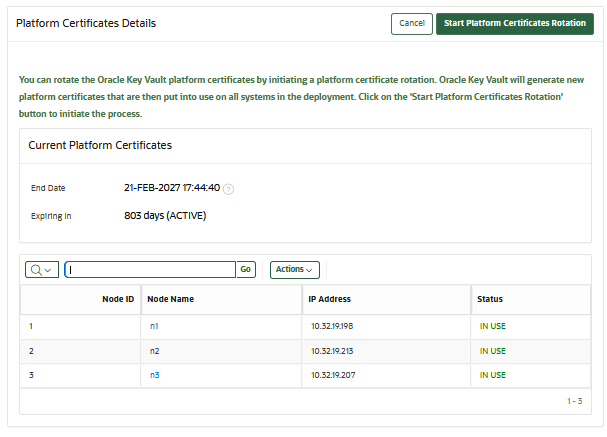
- In the Service Certificates page, select Manage Platform Certificates. The Platform Certificates Details page appears.
The Current Platform Certificates window pane displays the following:
- End Date: The platform certificate expiry date with time. The expiration date displayed is the minimum of the expiration dates of the platform certificates used for Oracle Key Vault operations.
- Expiring In: The number of days the platform certificates will be active.
- Node ID: The ID of the node.
- Node Name: The name of the node.
- IP Address: The IP address of the node.
- Status: The current status of the node.
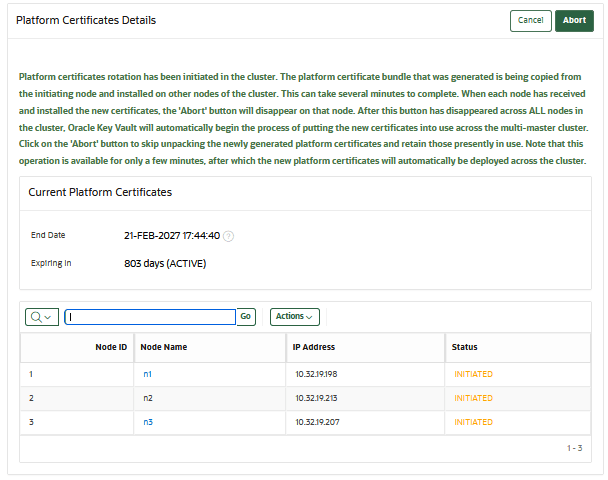
Note:
After you start the platform certificates rotation process, the status of the node changes according to the stage of the platform certificate rotation. - Select Yes. The platform certificate rotation process starts in the background. The Oracle Key Vault management console displays the notification shown in the following image:
Parent topic: Rotating Unexpired Platform Certificates
E.3.2 Rotating Expired Platform Certificates
You must rotate expired platform certificates by logging in to the Oracle Key Vault system and running a series of commands.
In a multi-master cluster, different steps may need to be run on different nodes of the cluster. In a primary-standby environment, the steps may need to be run on the primary and standby nodes.
- Rotating Expired Platform Certificates on a Standalone Oracle Key Vault Server
Rotate platform certificates on a standalone Oracle Key Vault server to replace expired certificates with new certificates. - Rotating Expired Platform Certificates in a Multi-Master Cluster Environment
Learn how to rotate platform certificates in a multi-master cluster environment.
Parent topic: Rotating Platform Certificates
E.3.2.1 Rotating Expired Platform Certificates on a Standalone Oracle Key Vault Server
Rotate platform certificates on a standalone Oracle Key Vault server to replace expired certificates with new certificates.
Parent topic: Rotating Expired Platform Certificates
E.3.2.2 Rotating Expired Platform Certificates in a Multi-Master Cluster Environment
Learn how to rotate platform certificates in a multi-master cluster environment.
- Rotating Expired Platform CA Certificate on Read/Write Multi-Master Cluster Nodes
Rotate platform certificates on read/write multi-master cluster nodes to replace expired certificates with new ones. - Rotating Expired Platform CA Certificate on Read-Only Multi-Master Cluster Nodes
Learn how to rotate platform certificates on each read-only Oracle Key Vault multi-master cluster node using the steps described in this topic. - Rotating Platform Certificates Used For Redo Shipping on a Node in a Multi-Master Cluster
In a multi-master cluster environment, if the platform certificate for redo shipping has expired, you must rotate it on one node of the cluster, and then transfer the certificate to all nodes in the cluster. - Transfer the Rotated Redo Shipping Platform Certificate to Other Multi-Master Cluster Nodes
Learn how to transfer the redo shipping platform certificate to other multi-master cluster node after rotating it on one multi-master cluster node.
Parent topic: Rotating Expired Platform Certificates
E.3.2.2.1 Rotating Expired Platform CA Certificate on Read/Write Multi-Master Cluster Nodes
Rotate platform certificates on read/write multi-master cluster nodes to replace expired certificates with new ones.
In this section, Node A and Node B refer to the two nodes of a given read/write pair. Implement these steps on each set of read/write pairs in turn.
E.3.2.2.2 Rotating Expired Platform CA Certificate on Read-Only Multi-Master Cluster Nodes
Learn how to rotate platform certificates on each read-only Oracle Key Vault multi-master cluster node using the steps described in this topic.
E.3.2.2.3 Rotating Platform Certificates Used For Redo Shipping on a Node in a Multi-Master Cluster
In a multi-master cluster environment, if the platform certificate for redo shipping has expired, you must rotate it on one node of the cluster, and then transfer the certificate to all nodes in the cluster.