Copy Service Work Orders
Users can now create new work orders by copying an existing work order from a new action in the Service Work Order Detail page. Selecting the copy work order action will open the Service Work Order Create page with the fields defaulted. The fields that are defaulted can be updated through Visual Builder Studio so both additional standard and custom fields can be included.
Customer service reps sometimes need to capture additional information on service work orders to share with the technicians performing the work and they need to create multiple service work orders due to the scope or skills required. Allowing the copying of a service work order can increase productivity since the service rep only needs to enter some of the information once.
Steps to enable and configure
There is no setup required to enable the copy work order functionality.
To configure the fields that are copied from the existing service work order, go into Visual Builder Studio and register an action chain for the vbEnter event and perform the following actions within it:
- Configure copyIncludeFieldsList to include additional fields in work order GET response.
- Configure copyExcludeFieldsList to exclude fields in work order GET response.
- If you need to add a new field, remove an existing field, or rearrange the layout positions, follow these steps:
- In the Rule Set CreateForm, duplicate the layout associated with the desired type of service work order
- Adjust the display logic using $componentContext.copyMode
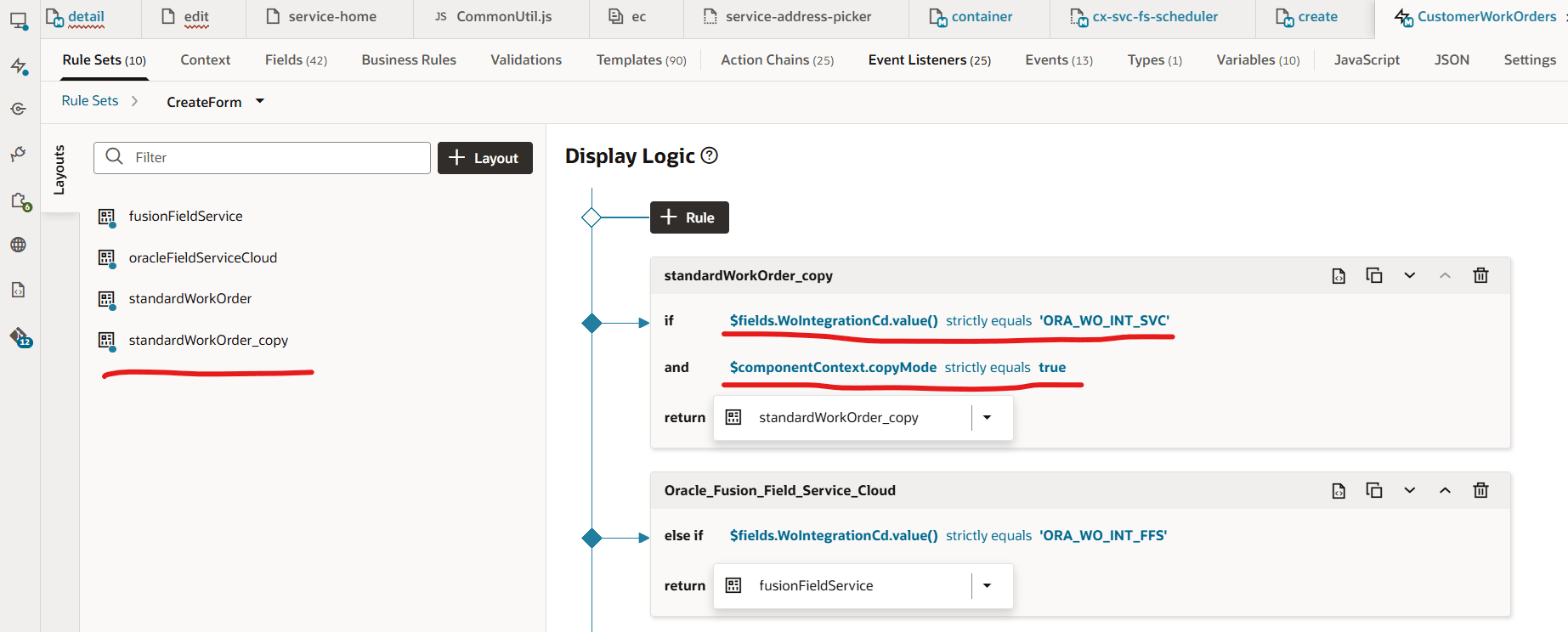
- Add a new field, remove an existing field, or rearrange the layout positions in the newly created layout.
Tips and considerations
- Service work orders can be copied in any status from the service work order detail page
- The specific fields that are copied can be updated through Visual Business Studio
Key resources
Access requirements
To copy work order from within the service work order detail page, a user needs a CRM Job Role that contains the following privileges:
- SVC_VBCS_Create_Service_Work_Order_Access
- SVC_VBCS_Edit_Service_Work_Order_Access
- SVC_VBCS_View_Service_Work_Order_Access