Support for Integration Users in Oracle CPQ Running in Fusion
Oracle CPQ 26B supports the set up of an integrated user application for inbound communication to Oracle CPQ. For example, a customer may want to send data to Oracle CPQ from their own internal company-driven application.
When CPQ is running in Fusion, to ensure secure communication, the integrated user application must be set up as a connected application using Oracle Cloud Infrastructure Identity and Access Management (IAM) as identity provider (IdP) and CPQ as a service provider. IAM was previously known as Oracle Identity Cloud Service (IDCS).
Once the secure inbound communication for the integrated user application is established via IAM, CPQ administrators can easily manage the integrated user from the new Redwood Integrated Users page. Administrators can view, create, and update the integrated user details as well as activate and inactivate the integration user.
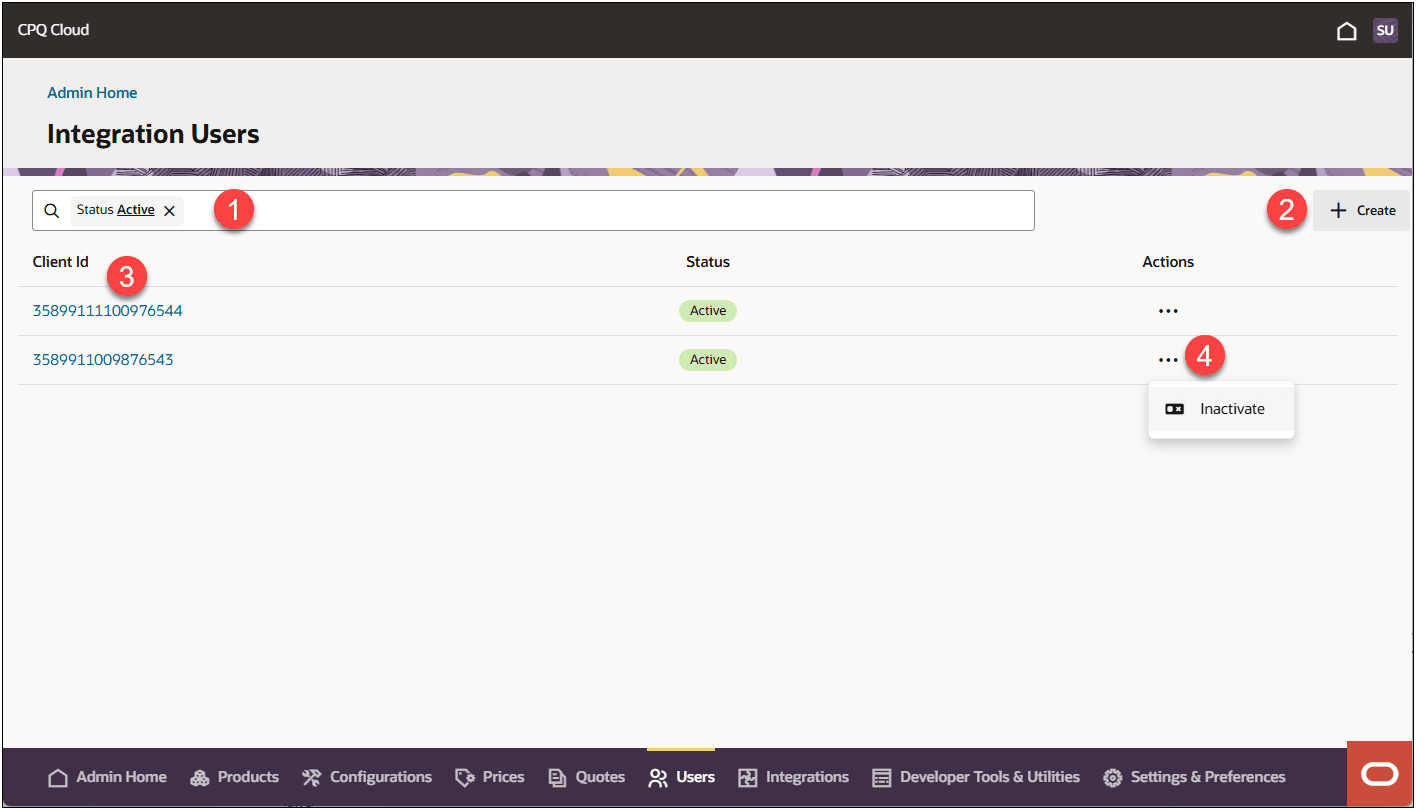
| Item | Description |
|---|---|
| 1 |
Search and Filter
|
| 2 |
Click on + Create to add a new integration user. You will need use the Client ID created in IAM/IDCS to create the integration user. |
| 3 |
Click on Client Id link to view and/or edit the integration user details. |
| 4 | Click on the integration user’s action ellipsis to Activate or Inactivate that integration user. |
Steps to enable and configure
Refer to the Oracle CPQ Administration Online Help after this feature is generally available in Oracle CPQ Update 26B.
Tips and considerations
This feature strictly is used for sending inbound communication from an integrated user client application to Oracle CPQ running on Fusion.