API Certificate Based Authentication: Support for Multiple User Certificates
API users may authenticate using one of many certificates associated with their login, a new User Authentication Management UI allows administrators to designate a "default" user certificate, and the v1.4 auth API now supports certificate-based authentication.
API users authenticating via Certificate-Based Authentication (CBA) may now authenticate against any valid user certificate associated with their login. This support exists for the v1.3 Auth API and the v1.4 Auth API, which returns a JWT token. The User Authentication Management account administration screen is also updated so Account Administrators can clearly see all user certificates associated with the given user.
Multiple User Certificates
A given API user may have more than one user certificate associated with them for certificate-based authentication (CBA), and leverage their preferred user certificate by name while calling the Auth API. While calling the Auth API, please include the identify the challenge user cerificate by name via the new "X-RSYS-CERT-NAME" header attribute.
- v1.3 Auth API: If X-RSYS-CERT-NAME is not included nor specified, the "Default" user certificate is used for authentication
- v1.4 Auth API: Authentication calls must specify the user certificate by name via X-RSYS-CERT-NAME.
Updated User Authentication Management Screen
The updated User Authentication Management screen (User identity management -> User authentication management) provides the following capabilities:
- Listing of all user certificates associated with the user
- Ability to designate one (1) user certificate as the "default" for v1.3 Auth requests.
- Note: For accounts updating from Responsys 26C, the user's existing user certificate is designated as the "default" user certificate.
- Upload a new user certificate
- Delete an existing user certificate
- View a given certificate's expiration date
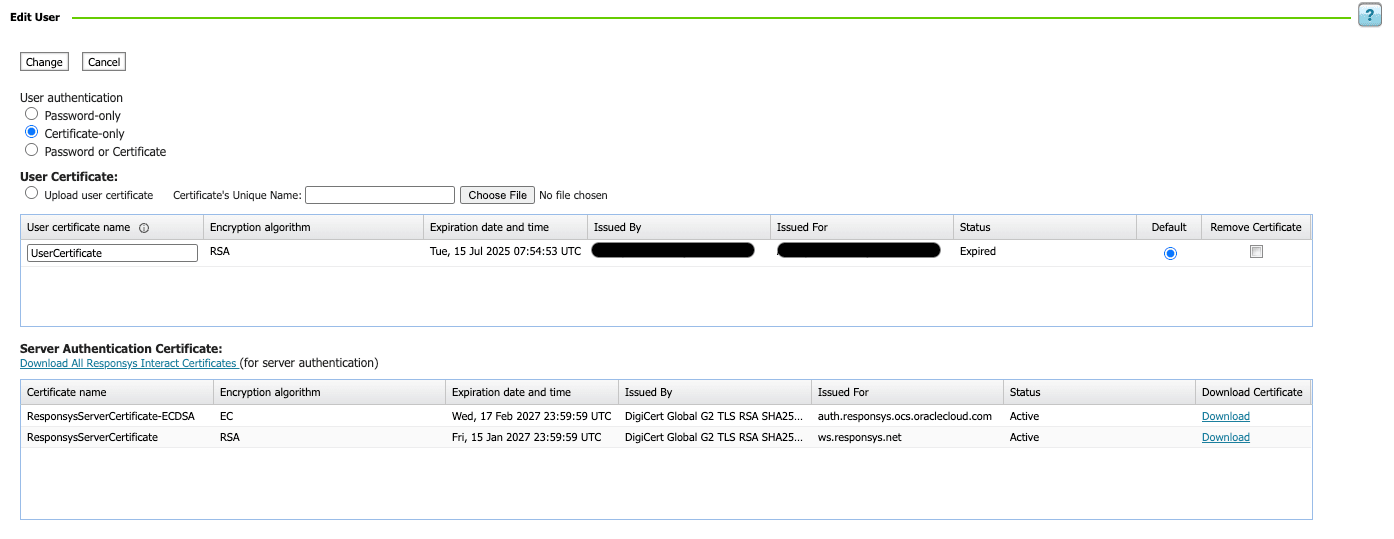
The expanded support for multiple certificates allows customers to deploy and test a new user certificate before the existing user certificate expires. A user may also have a different user certificate for each integration environment.
Steps to enable and configure
You don't need to do anything to enable this feature.
Tips and considerations
User certificate requirements:
- Algorithm: RSA or ECDSA
- Certificate Name's allowed characters: A-Z, a-z, 0-9, dot ( . ), underscore ( _ ), colon ( : ), and hyphen ( - )