Conditional Processing Steps
Form conditional processing steps let users configure multiple instances of each processing-step type and apply conditions based on data submitted through a form. When multiple conditions are met, processing follows the configured priority order.
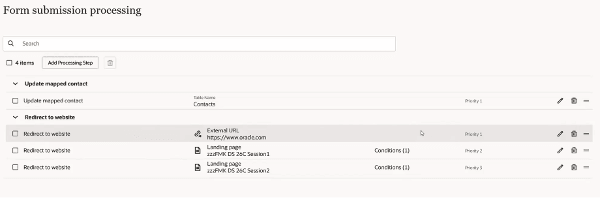
Conditional Processing Steps
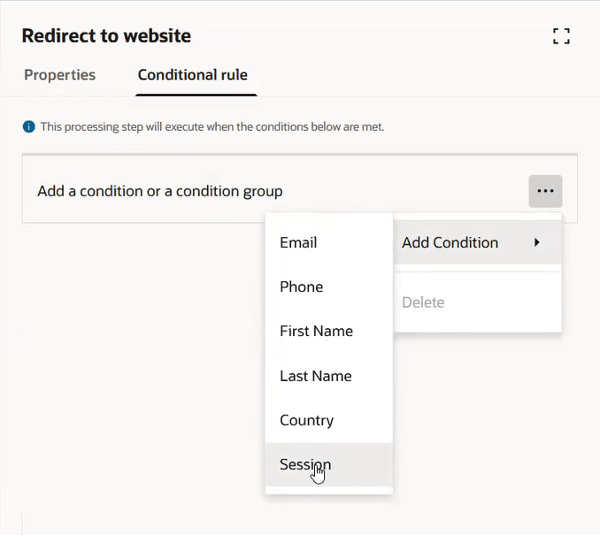
Conditional Processing Configuration
Business Benefits
- Redirect contacts to different pages based on form-field selections.
- Write selected data to a contact only when the required fields are completed.
- Apply granular conditions and priority ordering, including a default option when no other condition is met.
Steps to enable and configure
You don't need to do anything to enable this feature.
Tips and considerations
Try it out
- Configure a form with processing steps.
- Configure the required processing step.
- Open the Conditions tab and add a condition based on submitted form data.
- Set priority order for applicable processing steps.
Tips and Considerations
- Configure priorities carefully because the highest-priority step is processed when multiple conditions are met.
- Use a default option for cases where no configured condition is met.
- No hard limits were identified.
- Do not create conditions that may conflict, which may cause the step not to process.
Access requirements
- Ensure users have appropriate roles:
- Access to Forms is required.
Note: Requires Fusion Marketing Orchestration Add-on for Fusion Unity Data Platform. Please contact your account manager for more information.