Segment Usage Details
Fusion Unity users can now see what other segments are using a particular segment before they change or delete it. The segment list page now includes a column with a usage summary, and users can open a drawer to see the full list of segments that reference a selected segment. When users delete a segment that is used by other segments, Fusion Unity also shows a warning so they can understand the potential impact before they continue.
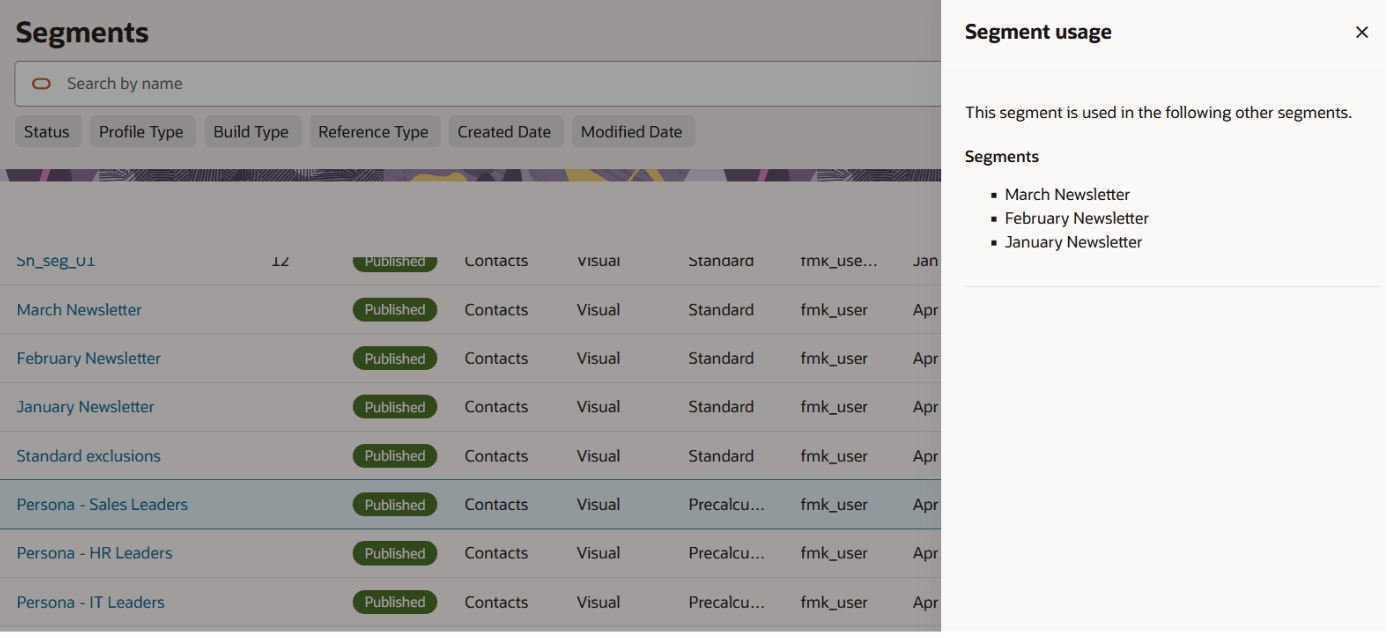
Full list of where segment is used via Action Menu
Business Benefits
- Helps marketers understand the impact of changing or deleting a segment.
- Reduces the risk of breaking segments that depend other segments.
- Gives users better visibility into segment relationships without requiring manual tracking.
Steps to enable and configure
You don't need to do anything to enable this feature.
Tips and considerations
Try it out
- Open the segment list page.
- Review the usage column to see how many other segments reference each segment.
- Select the Usage option from the action menu to view the full list of segments where it is used
- If deleting a segment, review the usage warning before proceeding. Deleting a segment that is used by other segments can break those dependent segments.
Tips & Considerations
- In this release, usage details show segments that reference other segments. Usage visibility for tactics and data orchestrations is not included in this release.
- The feature warns users about usage impact but does not block deletion.
- All segmentation users can view the segment usage details.
- Usage is only tracked when the parent segment is published. Draft usage is not tracked.
- Usage is only shown for parent segments published after the 26C release. In order to include tracking of segments added before then, you can re-publish the parent segment.