In-line Segment Creation in a Tactic
Enable marketers and program builders to create, review, and modify audience segments directly within the tactic design interface. Quickly tailor audiences based on tactic-specific criteria (such as recent activity, demographic filters, or campaign engagement) as they construct their targeted audience logic.
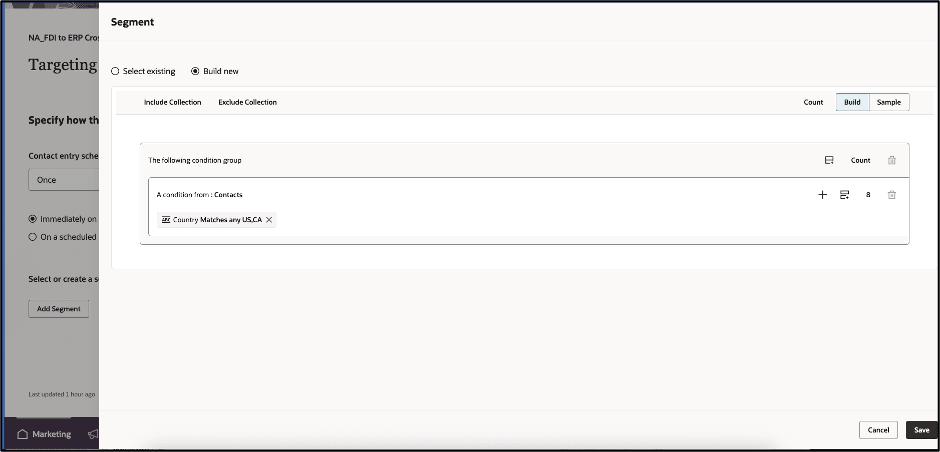
Configure Segment
Business Benefits:
- Accelerates campaign setup: Marketers save time by defining or adjusting segments in the context of their tactic workflows, reducing switching between modules or tools.
- Encourages segment standardization: By leveraging the core segmentation engine, even in-line definitions share underlying logic and infrastructure, promoting consistency in targeting approaches.
- Empowers decentralized teams: Non-technical users and distributed marketing teams can achieve sophisticated audience targeting without technical expertise.
Steps to enable and configure
You don't need to do anything to enable this feature.
Tips and considerations
To start using in-line segments in a tactic, you would:
- Open or Create a new Tactic: Navigate to an existing program and select an existing tactic to edit or “Add Tactic.”
- Navigate to the Targeting Step: Within the tactic designer, click on the “Targeting” step and click “ Add Segment”
- Create an In-line Segment: Choose to “Build new”segment directly in this context.
- Define Segment Criteria:
- Use the visual segment builder to set rules—such as demographic data, behavioral events, lead status, or custom fields relevant to your campaign.
- You can combine multiple criteria using AND/OR logic (e.g., “Account Industry = Finance” AND “Country = US, CA”).
- Preview and Validate Segment:
- Preview the resulting segment count and view a sample of included contacts to confirm criteria are working as intended.
- Save the In-line Segment:
- Once satisfied, save the segment definitions.
- The in-line segment is now scoped specifically to this tactic and does not affect or rely on global segment definitions.
Access requirements
Note: Requires Fusion Marketing Orchestration Add-on for Fusion Unity Data Platform. Please contact your account manager for more information.