 End Assignment and Terminate Work Relationship Automatically Based on Projected Dates
You can now automate employment lifecycle events by scheduling the Update Employment Data Enterprise Scheduler Service (ESS) process to end assignments or terminate work relationships based on projected dates.
Use the new scheduled process to automatically:
-
End an assignment when its projected assignment end date is reached.
-
Terminate a worker's work relationship when a projected termination date is reached.
The scheduled process uses standard Enterprise Scheduler Service (ESS) capabilities, allowing you to run it on demand or according to a recurring schedule.
Use the Update Employment Data scheduled process and select either the Update Termination Date or Update Assignment End Date process based on your requirement.
The enhanced ESS process evaluates workers whose projected assignment end date or projected termination date falls within a specified number of days and processes eligible records automatically. HR administrators can further limit processing by worker type, country, legal employer, and, by business unit for assignment processing.
You can select any of the following ESS parameters:
| Parameter | Description |
|---|---|
|
Number of days to be considered for ending an assignment or terminating a work relationship from today's date. If the number of days is 0, then all records whose projected end date or projected termination date is today will be considered. Note that records that have projected end date or projected termination date in the past won't be considered when the ESS process is run. |
|
Type of worker - employee, contingent worker, or nonwoker. |
|
Country to which the worker belongs. |
|
Legal employer of the worker. |
|
Business Unit of the worker. |
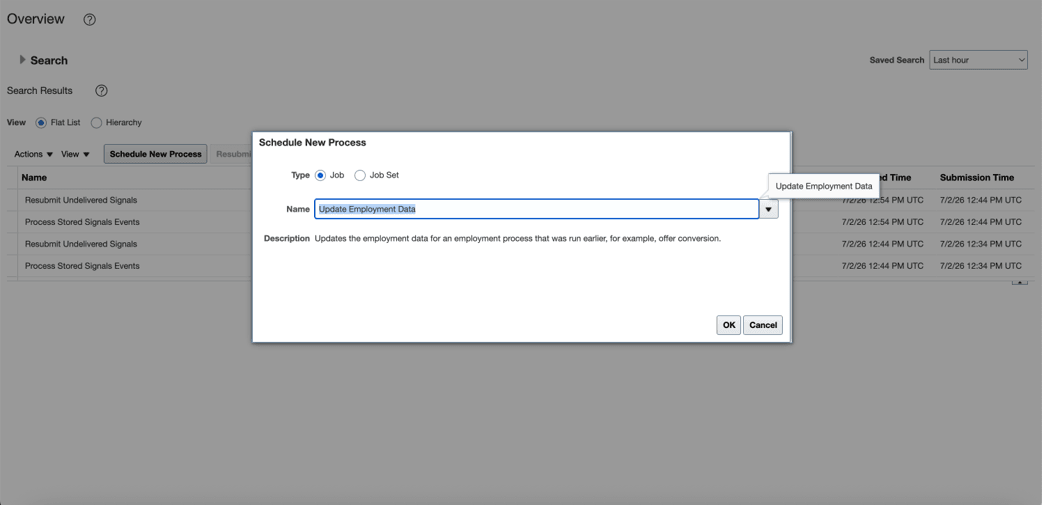
Update employment data
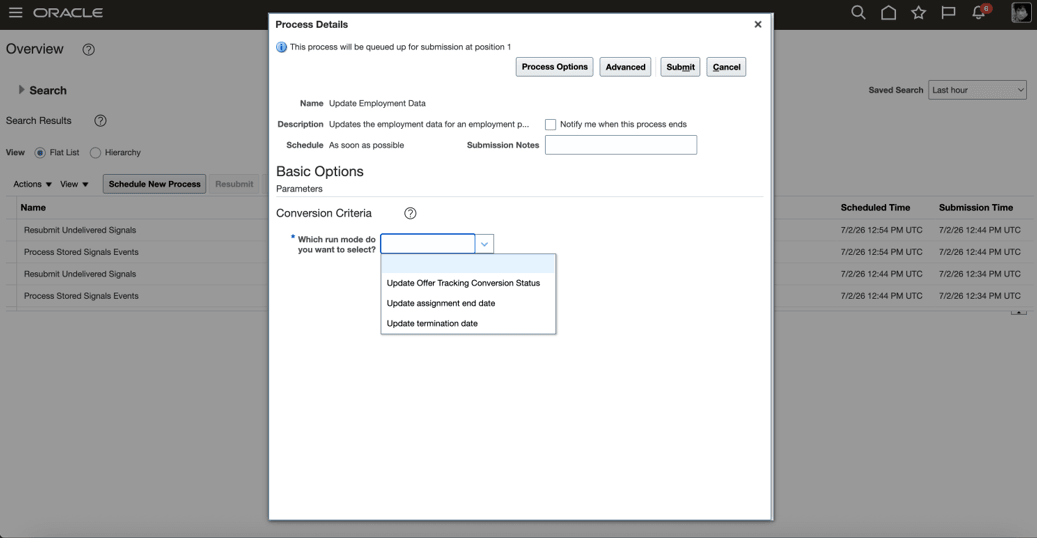
Update employment data ESS process
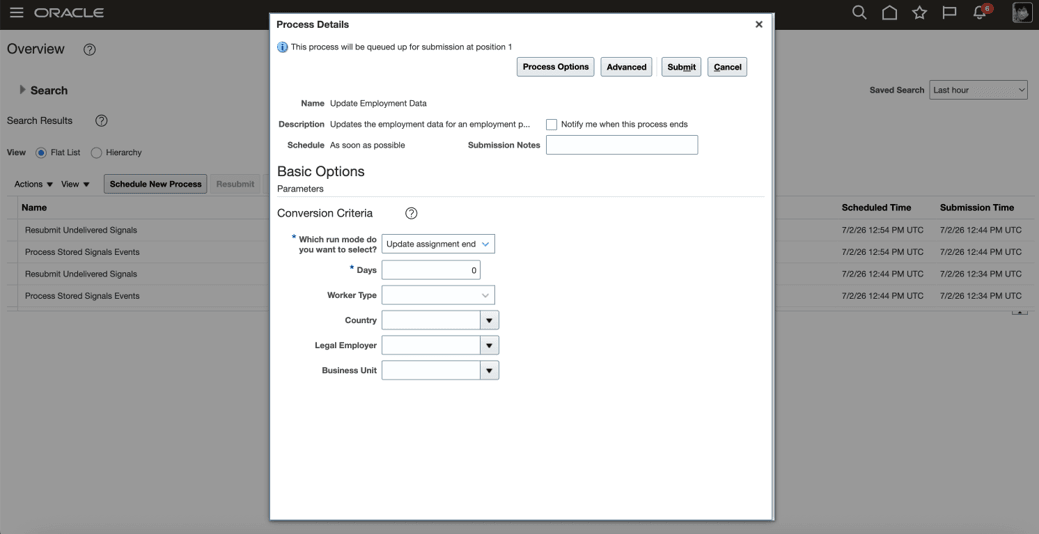
Update employment data for end assignment
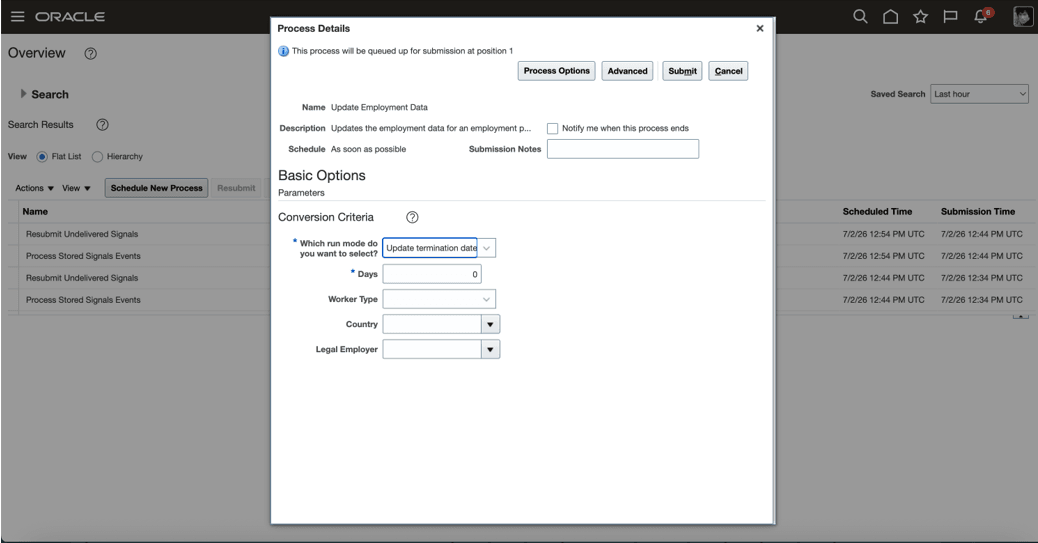
Update employment data for terminating work relationship
The ESS log provides details of successful and failed transactions, including the assignment number, business title, and any validation or processing errors.
The automated end assignment processing follows the same business validations and eligibility rules as the End Assignment and End Temporary Assignment transactions available in the user interface. This ensures consistent behavior whether the action is performed manually or through the scheduled process.
This feature offers the following business benefits
- Reduces manual administration of worker lifecycle events.
- Improves compliance with contract and retirement policies.
- Ensures assignments and work relationships are updated in a timely and consistent manner.
- Minimizes administrative errors by automating recurring HR processes.
Steps to enable and configure
You don't need to do anything to enable this feature.
Tips and considerations
- Only active records with projected dates that fall within the specified processing window are evaluated.
- Records with pending approvals, conflicting future-dated changes, or other validation failures aren't processed.
- The process follows the same validation rules as the application user interface to ensure consistent processing.
- Worker type filtering helps limit processing to the appropriate worker population.
Key resources
For more information, refer to the following resources on the Oracle Help Center.
- Enterprise Scheduler Job Definitions and Job Sets in the Using Common Features for HCM guide
For more information on using Express mode, refer to these resources.
-
Express Mode in VBS for detailed instructions on using specific Express Mode features.
-
Extending Redwood Applications for HCM and SCM Using VB Studio for details on what’s supported by HCM.
-
You can refer to the VB Studio documentation "Configure an Oracle Cloud Application" to check the steps to access VB Studio from a Redwood page.
-
Extending HCM Redwood Applications Using Visual Builder Studio
-
Refer to the Customer Connect forum Visual Builder Studio for HCM