Partial Shift Swap
The shift swap capability has been further enhanced to allow workers to swap only a portion of their shift with a coworker. A worker can offer a start-anchored segment (the beginning of their shift) or an end-anchored segment (the end of their shift) to a coworker whose full shift matches the offered segment's duration and shift type. The system automatically identifies eligible coworkers, validates compliance with scheduling rules, and processes the swap upon acceptance. After a partial swap is completed, the schedule manager is notified to review and assign breaks for the resulting shift segments.
How Workers Initiate a Partial Shift Swap
Here's how a worker with shift swap privileges can initiate a partial shift swap:
- Select the assigned shift you want to partially swap from a published schedule.
- Choose Swap and then specify the start or end time to define the segment you want to offer. The offered segment must be at least 1 hour, and the portion you retain must also be at least 1 hour.
- Optionally, adjust the date range to broaden or narrow the search for eligible coworkers.
- Review the list of eligible coworkers. The system displays coworkers who have a full shift matching your offered segment's duration and shift type. You can also view any unavailability that overlaps with the shift you would receive, as well as incentive or premium indicators on coworker shifts.
- Select up to 3 coworkers and submit the swap request.
- The request follows the configured approval workflow. Once accepted and approved, the system updates both calendars automatically.
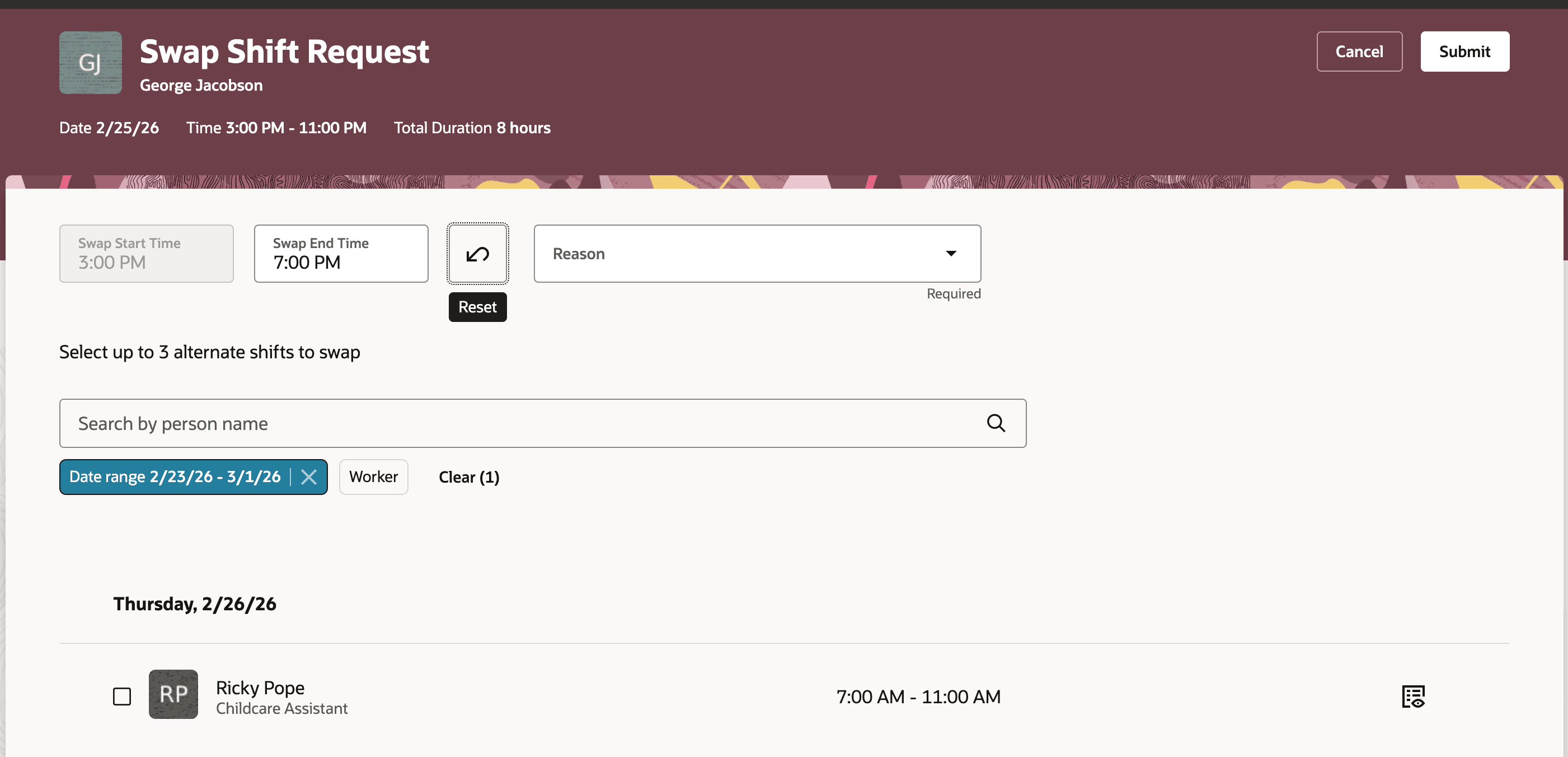
Worker Initiates a Partial Shift Swap
How Recipients Respond to a Partial Swap Request
Here's how a worker who receives a partial swap request can respond:
- Open your shift and navigate to the Requests tab to see incoming swap requests.
- Review the initiator's offered segment details, including the partial shift time, incentive and premium indicators.
- Accept or decline the request from the notification. If you accept, your full shift is exchanged for the initiator's offered segment.
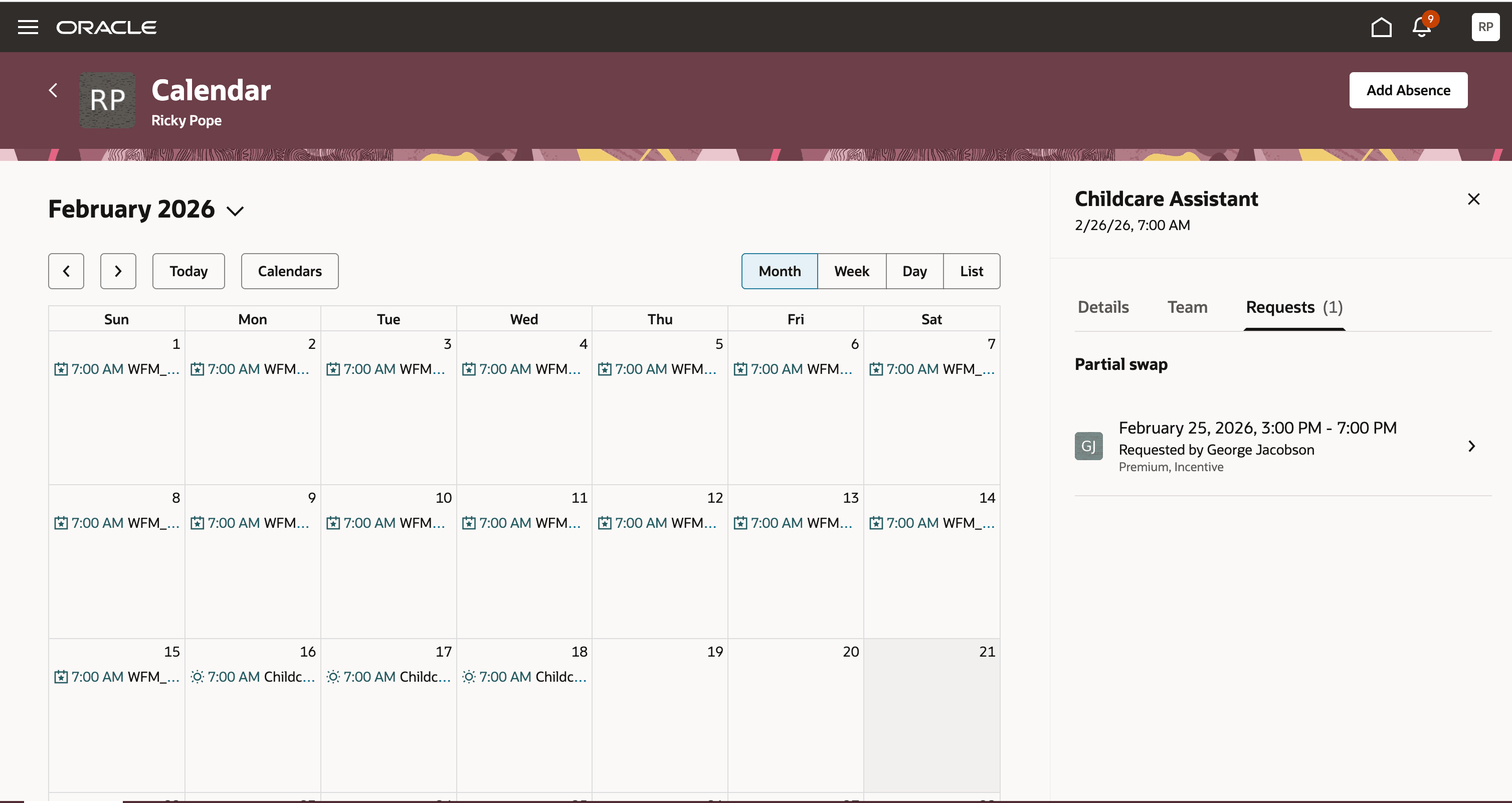
Recipient Views Partial Shift Swap Request
How Schedule Managers Oversee Partial Swaps
As a schedule manager:
- View all pending swap requests in the Schedule Requests panel of the Gantt view, with requests grouped under Full Swap and Partial Swap sections.
- Depending on the configured approval flow, approve or decline requests before they are sent to recipients, or after a recipient accepts.
- After a partial swap is completed, receive a notification to review and assign breaks for the affected shift segments.
Practical Use Case Scenarios
| Scenario | What Happens | Outcome |
|---|---|---|
| Medical appointment | A nurse working 7:00 AM–7:00 PM has an afternoon appointment. She offers the last 4 hours (3:00 PM–7:00 PM) of her shift and a coworker with a matching 4-hour shift accepts. | The nurse keeps her morning shift and the coworker takes over the evening portion. Full coverage is maintained without manager intervention. |
| Childcare pickup | A warehouse worker needs to leave early for school pickup. He offers the end segment of his shift (2:00 PM–6:00 PM) for swap. | A coworker with a 4-hour shift on a different day within the schedule period accepts the swap, allowing the worker to leave early. |
| Overnight shift adjustment | A security guard working 11:00 PM–7:00 AM needs to swap the first 4 hours. He offers the start segment (11:00 PM–3:00 AM) and the system adjusts reference dates for the overnight shift. | A coworker with a matching 4-hour shift takes the overnight start segment. The system handles the cross-day reference date logic automatically. |
| Coverage without overtime | A team lead wants to swap her morning segment but the only eligible coworker would exceed weekly hours. The shift does not allow overtime. |
The system blocks the swap because the recipient would exceed FTE limits. The team lead can search for other eligible coworkers. |
Partial Shift Swap delivers measurable improvements in workforce scheduling flexibility and operational efficiency:
- Reduced unplanned absences: Workers can accommodate partial-day personal needs—such as medical appointments, childcare, or personal errands—without calling out for an entire shift.
- Improved schedule coverage: By enabling swaps of shift segments rather than requiring full-shift exchanges, organizations maintain continuous coverage with fewer gaps.
- Lower administrative burden: The system automatically identifies eligible coworkers, validates compliance, and processes swaps, reducing the need for manual manager intervention.
- Greater employee satisfaction: Providing workers with more control over their schedules improves morale, retention, and work-life balance.
- Compliance assurance: All partial swaps are validated against scheduling rules, overtime limits, qualification requirements, and minimum rest periods, ensuring organizational policies are enforced.
Steps to enable and configure
An administrator must enable the Partial Shift Swap setting before workers can use this feature. Here's how you do it:
- Navigate to the Schedule and Shift Options page.
- On the Partial Shift Swap setting under the shift change request details section, set the value to Enabled.
- Save your changes.
Workers with existing shift swap privileges will now see the option to initiate partial shift swaps.
Existing approved or pending swap requests are not affected when this setting is changed.
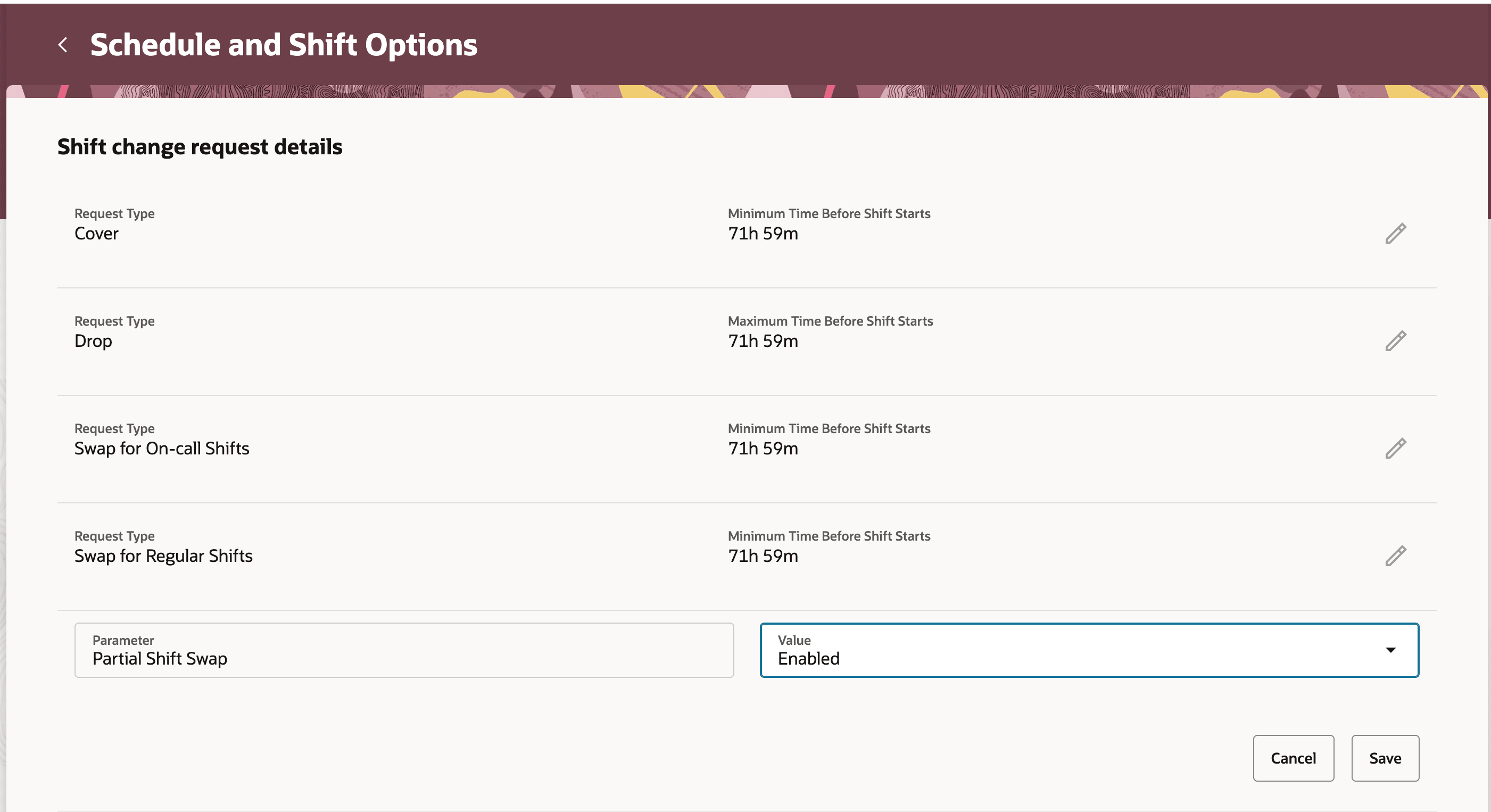
Administrator enables Partial Shift Swap
Tips and considerations
- Only the beginning or end portion of a shift can be offered for a partial swap. Middle segments are not supported.
- Both the offered segment and the retained portion must be at least 1 hour in duration.
- The recipient must swap their entire shift. Their full shift's work duration must exactly match the initiator's offered segment.
- Both shifts must share the same shift type (for example, Regular or On-Call).
- Both shifts must be within the same published scheduling period, department, and location.
- After a partial swap is completed, the schedule manager receives a notification to review and assign breaks for the affected segments. The initiator inherits the recipient's break structure for the acquired full shift, but the retained and newly acquired partial segments are delivered as continuous blocks without breaks.
- If a shift does not allow overtime and the swap would cause either worker to exceed their FTE limits, the system blocks the swap.
- Workers who report to different managers are eligible to swap shifts, provided all other eligibility rules are met.
- For overnight shifts, the system automatically adjusts the reference date based on the day-start time definition.
- Partial shift swaps across different scheduling periods or for different durations are not supported.
Key resources
For more information about Workforce Scheduling, see these resources:
- Oracle HCM Cloud Workforce Management: Scheduling documentation
- Oracle Cloud HCM What's New: https://docs.oracle.com/en/cloud/saas/readiness/hcm.html
Access requirements
| Role | Requirement |
|---|---|
| Administrators | Required to enable or disable Partial Shift Swap in Schedule and Shift Options. |
| Workers | Must have existing shift swap privileges. Permitted to initiate partial swaps once the setting is enabled. |
| Schedule Managers | Receive notifications to review and assign breaks after swaps. Involved in approval flows as configured. Require appropriate scheduling management privileges. |
The feature depends on existing swap privilege roles and configured approval flows to operate as described.