Flexfield support for Schedule Shifts
Custom data descriptive flexfields (DFFs) can be added to schedule shifts to capture shift-specific details such as assignment, team lead, location, or instructions. Administratively configured global DFF segments appear across scheduling UIs and can be attached to workload plans and shifts. When workload plans or requirements include DFF values, the scheduling engine copies them to generated shifts and to newly created shifts when workload updates occur.
When shifts are created from workload plans, corresponding DFF values are copied automatically. If identical shifts have different DFF combinations, the engine creates separate shift records and groups open shifts accordingly so users can distinguish instruction sets.
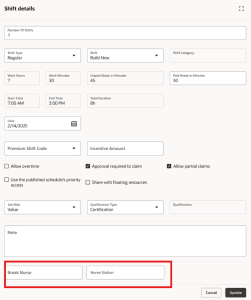
Schedule Shift DFF
This update enhances the employee calendar by introducing a new read-only Descriptive Flexfield (DFF) section in the shift detail drawer, displaying additional shift-specific instructions and business details across all calendar views. Workers can now see these details when viewing scheduled and open shifts, claiming shifts, swapping or covering shifts, and handling partial swaps, with each shift segment retaining the correct information after reassignment. Open shifts with identical attributes but different DFF values now appear as separate entries, and all related scheduling notifications include the same DFF details, ensuring workers have consistent, accurate information wherever they interact with shifts.
Descriptive flexfields let organizations embed shift-level instructions and context directly into schedules, ensuring managers and workers have the exact details needed to execute work correctly. This improves clarity, reduces manual coordination and errors, and preserves critical instructions as shifts are generated, assigned, transferred, or modified.
Steps to enable and configure
Enabled by default
- Define and enable the desired DFF (global segments) for the schedule shift object in your application configuration by finding the DFF configuration under ( 'Workload Plans and Schedule Shifts').
- Create and configure a DFF definition for schedule shifts and assign the required global segments to attributes. Register and deploy the DFF definition so it becomes available for scheduling.
- Populate workload plans by shift with DFF values where required so schedule generation can copy those details to shifts.
- You can also update DFF values when creating shifts or editing open shifts.
Tips and considerations
- Read-only behavior: DFF values are viewable but not editable on assigned shifts and during assign, transfer, swap, split, and notification workflows.
- Persistence & copying: DFF values carry forward when copying schedules, assigning, transferring, swapping, or unassigning shifts; only values present at creation are copied.
- Split & cover nuances: Split shifts retain DFF on the assigned portion (new open shifts may require re-entry), and cover shifts show DFF only after acceptance.
- Configuration required: DFF segments must be configured and mapped before use; they don’t retroactively populate existing shifts and only configured segments appear.
- Visibility limits: DFF details are not shown in self-scheduling or team schedule views and are read-only in worker-facing panels.
- Grouping & counts: Open shifts with different DFF combinations appear as separate entries and are counted/grouped independently.
- Data & setup considerations: Text fields are limited to 150 characters, values entered apply to all shifts created in the same action, and mappings should be tested to ensure correct data flow.
Access requirements
Required Privileges
| Privilege Name | Privilege Code | Description |
|---|---|---|
| Manage Workforce Schedule | ORA_HTS_MANAGE_WORKFORCE_SCHEDULE | Allows users to manage workforce schedules for which they are responsible. |