Descriptive Flexfield support for Workload Plans
Shift-level DFF attributes on Workload Plans
Workload Plans defined by shift can include up to 15 custom attributes (text, date, number) that capture additional shift-specific information. When schedules are generated, those attribute values are copied to the scheduled shifts so that managers, schedulers, and employees can view and edit them at the shift level.
- Adds configurable attributes to the Workload Plan record via a registered DFF association.
- DFF is defined under 'Workload Plans and Schedule Shift' Descriptive Flexfield
- Supports five text attributes (ATTRIBUTE1–ATTRIBUTE5), each with a 150-character default length.
- Supports five date attributes (ATTRIBUTE_DATE1–ATTRIBUTE_DATE5) and five numeric attributes (ATTRIBUTE_NUMBER1–ATTRIBUTE_NUMBER5).
- Once deployed, schedule administrators and managers can create DFF definitions, associate values to workload plans, and use those fields when managing plans.
- DFF values entered on a workload plan are copied into the schedule engine during schedule generation so each created shift exposes its associated DFF values.
- Distinct shifts with identical time ranges but different DFF values are treated as unique so instructions remain specific to each requirement.
- Edits to DFF values on a workload plan do not change DFF values on shifts already created for overlapping generated schedules; those shifts must be updated directly.
- DFF attributes are not available for Workload Plans defined by time and will not affect consolidation by time or time-based workload UI.
Configuration and display
Administrators define the attribute segments (names and value sets) that appear on workload plans; the attributes are then visible in the Workload Plan details and can be set at creation or edit for shift-based plans.
- Administrators create the global segments (attribute names and value lists) that users select on workload plans.
- Configured DFF attributes are shown in an Additional information section on the Workload Plan details panel when creating or editing a shift-based plan.
- Workload Plan creation and DFF association can be done at any time except when both the plan start and end dates are in the past.
DFF attribute section on Workload Plan details (by shift)
When a workload plan requirement is created or managed by shift, an Additional information section displays the configured DFF attribute values. Users can create, view, modify, or remove these attribute values on the workload plan record. The DFF values persist with the workload requirement and are copied to scheduled shifts when the schedule engine creates shifts as described in the rules below.
- Applies only to workload plan requirements defined by shift; workload plans defined by time do not show or accept DFF attribute values.
- Users can add, edit, or delete DFF attribute values on a by-shift workload plan up until schedule generation for that scheduling period.
- When the schedule engine initially generates shifts from a workload-by-shift requirement, the current DFF values on the workload plan are copied into each created scheduled shift.
- If an existing workload-by-shift record is edited and the quantity is increased after a schedule has been generated, newly created shifts from that update will receive the DFF values from the updated workload record.
- Updates to DFF values or other workload plan changes do not retroactively change DFF values on already-created scheduled shifts except for newly created shifts as described above
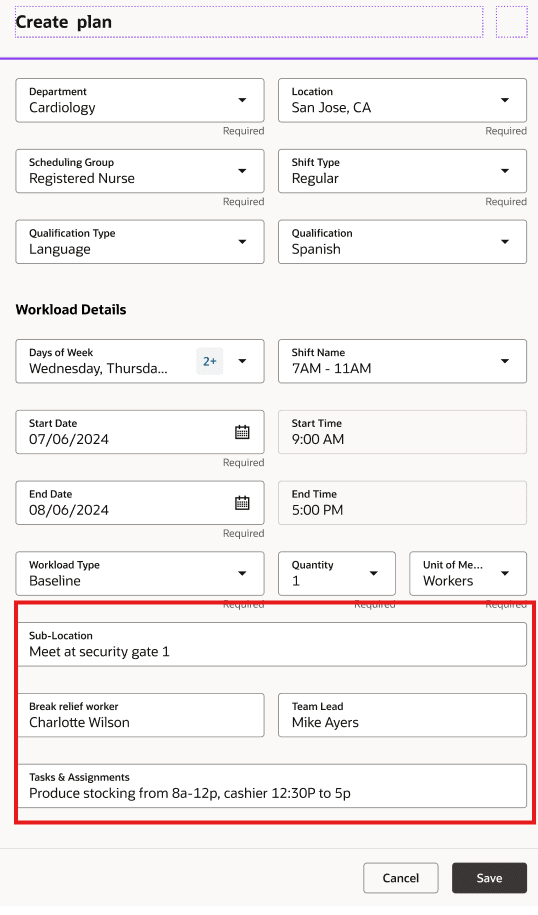
Workload Plan Dff
Add and update DFF attributes on Workload Plan via HDL
The HCM Data Loader (HDL) now accepts a set of new DFF attributes on the Workload Plan business object so that customers can create and update workload requirement records that include these additional attribute fields. This applies to HDL create and update actions for workload plans.
- You can create Workload Plan records with the new DFF attribute values supplied in the HDL file.
- You can update existing Workload Plan records to change DFF attribute values via HDL, subject to schedule-generation rules.
- When a workload period overlaps an active schedule period, only workload quantity updates are allowed; DFF updates are blocked if schedule generation has run for overlapping dates.
- Past dates cannot be updated via HDL for workload plans.
- Deletes are not allowed for any date within an active schedule period.
DFF attribute support on workloadPlans REST API
The workloadPlans REST API (representational state transfer API) resource now includes a set of DFF attributes in its request and response payloads. This enables customers to provide, view, and modify the specified DFF fields when creating, retrieving, or updating workload plan records.
- GET responses for workload plan records include the new DFF attributes and any values present.
- POST requests can include values for the DFF attributes when creating a workload plan record.
- PATCH requests can update DFF attribute values for an existing workload plan record (subject to scheduling rules).
- Supported DFF attributes: ATTRIBUTE_CATEGORY, ATTRIBUTE1–ATTRIBUTE5, ATTRIBUTE_NUMBER1–ATTRIBUTE_NUMBER5, ATTRIBUTE_DATE1–ATTRIBUTE_DATE5.
- DFF values are editable up until the schedule for the dates in the workload plan is generated; after schedule generation, DFF values can no longer be changed.
- Applies to the workloadPlans REST endpoint used by schedule administrators and schedule managers.
- Access more information at .../hcmRestApi/resources/11.13.18.05/workloadPlans/{id}/child/WorkloadPlansRestDFFVL/describe
Copy Workload Plan DFF attributes to scheduled shifts
When the Schedule Engine creates shifts from Workload Plan by Shift requirements, any custom attribute DFF values on those workload records are copied to the scheduled shifts. This applies during initial schedule generation and when workload quantities are increased after generation so new shifts inherit the workload DFF values.
- During schedule generation, DFF attribute values on each Workload Plan by Shift requirement are copied to every scheduled shift created for that requirement.
- If multiple workload requirements share the same shift name but have different DFF values, each requirement is treated as distinct and produces separate scheduled shifts carrying its own DFF values.
- When a workload requirement’s quantity is increased after schedule generation, newly created shifts receive the DFF values from that updated requirement.
- Decreasing a workload quantity (removing requirements) doesn't retroactively change or delete existing scheduled shifts that were previously created.
- If shifts created from an earlier generation are manually edited, those shifts keep their original DFF values even after a later regeneration that uses different workload DFF values.
- New Attributes on the Workload Plan object can include each of your defined DFF attributes: (from the image above)
- FLEX:HTS_WORKLOAD_PLANS_DFF
- Sub-Location (HTS_WORKLOAD_PLANS_DFF=Global Data Elements)
- Break relief worker (HTS_WORKLOAD_PLANS_DFF=Global Data Elements)
- Team Lead (HTS_WORKLOAD_PLANS_DFF=Global Data Elements)
- Tasks and Assignments (HTS_WORKLOAD_PLANS_DFF=Global Data Elements)
Workload Plan requirements can now include shift-specific instructions, ensuring scheduling managers and assigned workers have the information they need for each shift.
Steps to enable and configure
The DFF feature is enabled by default, with access to the Workload Plan feature.
Tips and considerations
- DFF attributes apply only to Workload Plans defined by shift; Workload Plan by time does not accept or propagate DFF values.
- Once a schedule has been generated for dates that overlap a workload plan, updating DFF values on the workload plan will not change DFF values on shifts already created for that generated schedule.
- If workload changes increase the number of shifts, new open shifts will be created carrying the current workload plan DFF values.
- You can create workload plans and set DFF attributes at any time, except when both the plan start and end dates are in the past.
- The DFF provides up to five text fields (150-character default), five date fields, and five number fields; plan accordingly for data capture needs.
- Until the DFF is registered and deployed, the new attributes will not be available on workload plan records.
- Edits to DFF attributes are permitted only until the schedule is generated for the workload plan dates. Once the schedule is generated, attempts to change DFF values will be rejected.
- Ensure any integrations or clients that create or update workload plans include the new DFF fields if they need to store those values.
- Date and number DFF fields should follow the same value formats expected by the REST API payloads for other date and number fields.
Access requirements
Privilege Access Requirement
| Privilege Name | Privilege Code | Description |
|---|---|---|
| Manage Workload Plans | ORA_HTS_MANAGE_WORKLOAD_PLANS | Allows users to manage the workload plans for which they are a manager. |