 Configurable Countries and Phone Countries LOVs in Redwood Pages
We have enhanced Redwood person pages so that the Country attribute reflects the central configuration for the Countries and Phone Countries LOVs. Previously, the fields for the Countries LOV were fixed on Redwood pages as Flag, Code, and Country. And the fields for the Phone Countries LOV were fixed on Redwood pages as Flag, Phone Country Code, Code, and Country. Now you can configure these LOVs.
Here's an example from the Personal Details page. The Country attribute, which uses the Countries LOV, has been configured to display the two fields Code and Country. The Flag field was removed.
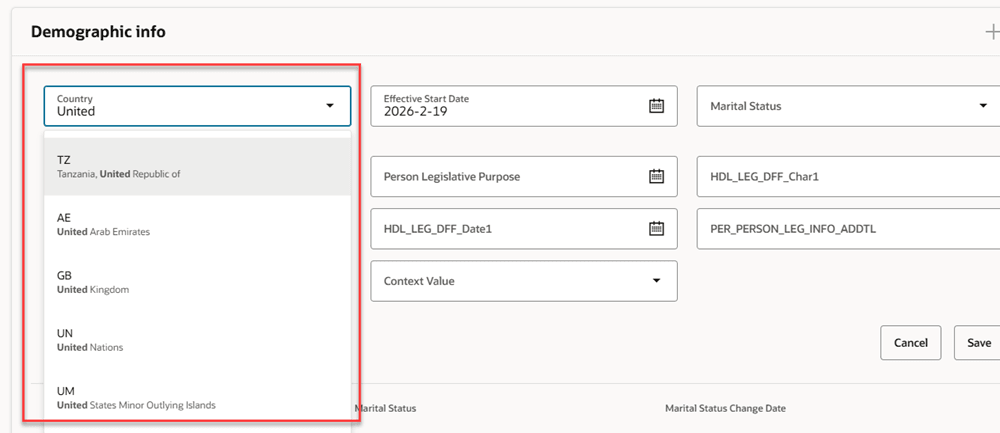
Countries LOV displaying code and country fields in Demographic info region of the Personal Details page
This image shows the corresponding sample configuration for the Countries LOV with only the Code and Country fields. The Flag field has been removed from the list.
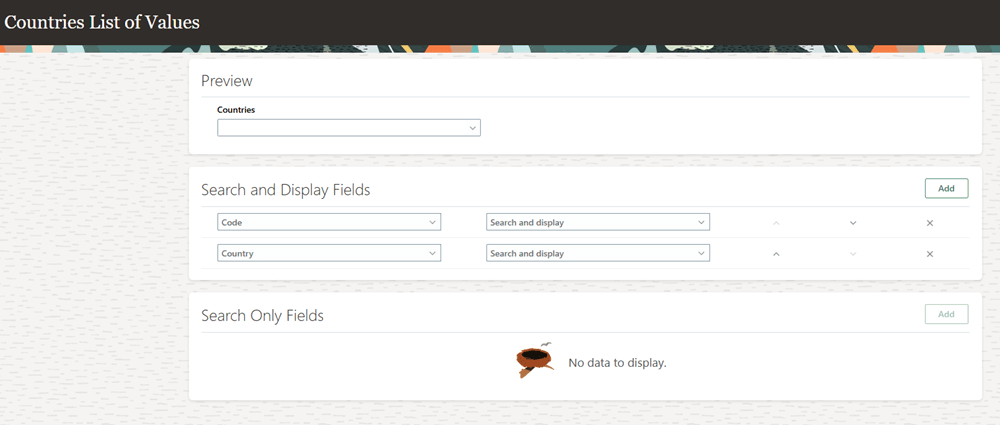
Countries LOV Configuration in HCM Experience Design Studio
This feature gives you the flexibility to select the columns you want to display in the Countries and Phone Countries LOVs based on your requirement.
Steps to enable and configure
You can add or modify your configuration for the Countries and Phone Countries LOVs on Redwood pages from the Search Configuration page in HCM Experience Design Studio.
For more information about how to configure the LOVs, see How do I configure a list of values?.
Tips and considerations
- If your configuration changes don't display immediately in the LOV, try clearing your browser cache.
Key resources
For more information, refer to these resources on the Oracle Help Center: