Redwood: Business Title List of Values Configuration
You can now see and search by the attributes that your administrators have configured for the Business Title list of values on the Redwood Goal Management pages.
Note: You can see the Business Title list of values only when a person has more than 1 assignment.
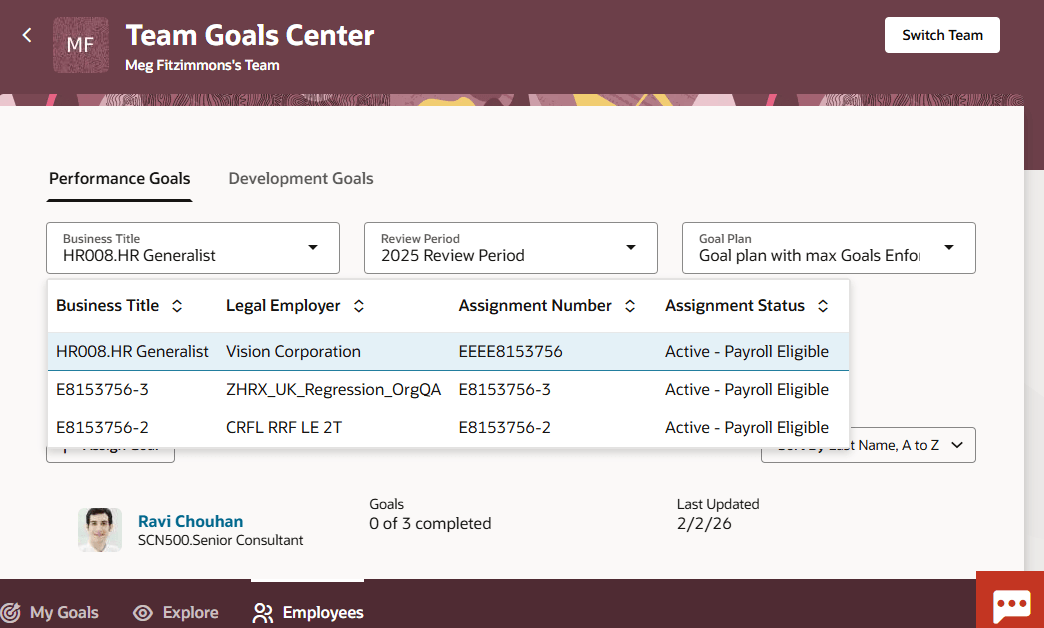
Business Title List of Values
Business Benefit
Enable users to easily locate the business title of a person for which they need to manage goals and ensure that they manage goals with ease.
Steps to enable and configure
To enable Redwood Goals Center, you need to enable the profile options indicated in the table.
|
Profile Option Code |
Profile Option Display Name |
Value |
|---|---|---|
|
ORA_HCM_VBCS_PWA_ENABLED |
Enable VBCS Progressive Web Application User Interface |
Y |
|
ORA_HRA_PERFORMANCE_DOCUMENTS_AND_GOALS_REDWOOD_ENABLED |
Enable Redwood Performance Documents and Goals Center |
Yes |
NOTE: The Performance Document, Check-in, and Goals Center features are closely connected. So, the Redwood version of these pages can all be enabled or disabled only using the common ORA_HRA_PERFORMANCE_DOCUMENTS_AND_GOALS_REDWOOD_ENABLED profile option. These features can't be enabled individually.
To use the business title list of values, you need to enable this profile option.
|
Profile Option Code |
Profile Option Display Name |
Value |
|---|---|---|
| ORA_PER_EMPL_ENABLE_WRK_ASG_REST_LOV | Enable Worker Assignment REST LOV |
Y |
For more information, see How do I enable a profile option?.
To configure the Business Title list of values:
- Go to Home > Configuration > Sandboxes.
- Create and enter a sandbox that has HCM Experience Design Studio enabled.
- Go to Tools > HCM Experience Design Studio.
- Select the Search Configuration tab.
- Select the Worker Assignment list of values.
- Select the attributes that you want to search and display and the attributes that you only want to display in the list of values.
- Save your changes.
Access requirements
A user must have a role with the Access HCM Page Configurator (HRC_ACCESS_HCM_TRANSACTION_CONFIGURATOR_PRIV) privilege granted to access the lists of values configuration UI.