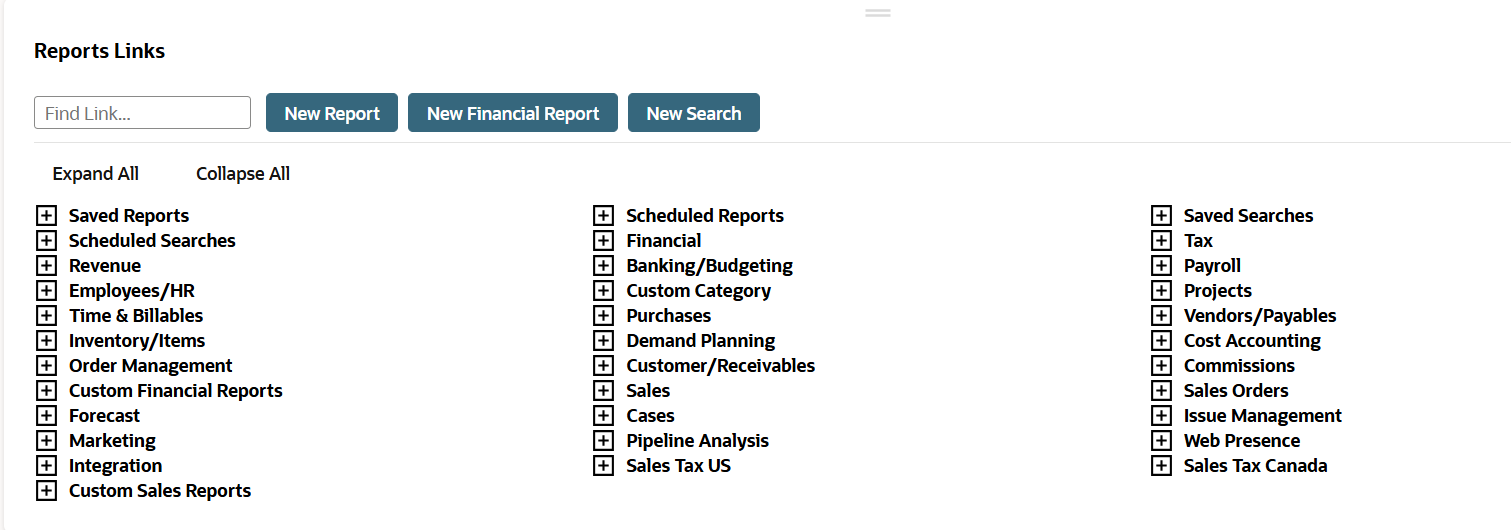
The Reports Page
You can access all available reports and reporting-related functions from the Reports page.
Accessing and Using the Reports Page
To display the Reports page, click the Reports tab or its Reports Overview menu link.
The reports available to you are determined by the role you use to log in to NetSuite and the features enabled in your account. Reports are listed under collapsible categories. Available categories available differ according to the center to which you log in.
You can locate a standard report in one of the following ways :
-
In the Find Link field, enter a keyword that appears in the title of the report you want to view. For example, if you want to view a sales report, enter sales in the Find Link field. The categories expand to reveal reports with sales in the title. The word sales is highlighted.
-
Click the [+] symbol to expand the category where the report resides.
-
Click Expand All at the top of the page to expand and browse all reports categories.
Summary and detail versions are available for many reports:
-
Reports listed at the first level under a category are summary versions. Click a report name to display it.
-
Each report that has a detail version displays clickable Detail immediately below the report name.
-
Click Customize for a summary or detail report to display it in the Report Builder, where you can modify its formatting and included data. For information, see Report Customization. Note that financial statements are customized in the Financial Report Builder. For information, see Financial Report Builder.
-
Navigation links within reports let you shift back and forth between summary and detail versions with one click. In a summary report, click View Detail. In a detail report, click View Summary.
From the reports page, you also can:
-
Click New Report to run an ad-hoc report. See Ad Hoc Reports.
-
Click New Financial Report to create a custom financial statement. See New Financial Report - Select Financial Statement Page.
-
Click New Search to run a search. See Search Overview.
-
Expand Saved Reports and click All Saved Reports to view a list of all custom reports available to you, or click an individual report link to run that custom report.
See Exporting a Saved Report as an Excel Web Query and Viewing or Editing a Saved Custom Report.
-
Expand Scheduled Reports and click a link to see a list of all scheduled reports or to display a page with links to results for completed long-running reports.
See Report Schedules Page and Report Results Page.
-
Expand Saved Searches and click All Saved Searches to view a list of all saved searches available to you. See Saved Searches.
-
Click a link in the Recent Reports portlet to rerun a report you've run before.
-
View the results of a long-running report from the Report Results portlet. See Report Results Page.
Screenshot of Reports Links Portlet on the Reports Page
The report categories available to you depend on your assigned permissions and on your account's enabled features.