Creating Center Tabs
Administrators and users with the Custom Center Tabs permission can create center tabs.
Add custom tabs to roles using center tabs. Center tabs can include categories of links to NetSuite pages, custom records, Suitelets, or external web pages. You can also designate which portlets you want to appear on the dashboard when users click the tab. You need to enable Custom Records to customize center tabs.
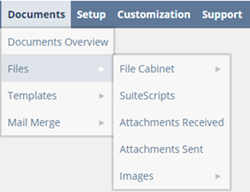
Center Tabs in NetSuite
In the following screenshot, the tabs are Documents, Setup, Customization, Commerce, Connector, and SuiteApps. Off the Documents tab, the categories are Files, Templates, and Mail Merge. Off the Files category, the links to the File Cabinet are SuiteScripts, Attachments Received, Attachments sent, Images, and so on.
If you want to create a tab that displays internal information in your account, you should create your own custom intranet tab. For more information, see Publishing Information to an Internal Site.
For details about how to create a center tab, see Creating a Center Tab.
For information about changing the order of tabs, see Changing the Order of Tabs in a Custom Center.
If you return to the tab and don't see the changes you've made, clear your browser cache.
You can use SuiteCloud Development Framework (SDF) to manage center tabs as part of file-based customization projects. For information about SDF, see SuiteCloud Development Framework. You can use the Copy to Account feature to copy an individual center tab to another of your accounts. Each center tab page has a clickable Copy to Account option in the upper right corner. For information about Copy to Account, see Copy to Account.
You can also use the Dashboard Tiles SuiteApp to create a dashboard with tiles that display your business critical KPIs in a bold visual layout with images and blinking alerts. For more information about the Dashboard Tiles SuiteApp, see Dashboard Tiles.