SuiteCloud Agent Skills with Cline and SuiteCloud Developer Assistant
SuiteCloud Agent Skills and SuiteCloud Developer Assistant (SDA) work together to support AI-assisted SuiteCloud development, but they cover different aspects. SuiteCloud Agent Skills are reusable packages that provide instructions for specific workflows. SuiteCloud Developer Assistant is the coding assistant used to access and apply those skills. Use this page to understand the difference between the two and when to use them.
When to use SuiteCloud Developer Assistant
SDA is an AI-powered coding assistant designed for SuiteCloud developers. Integrated with Visual Studio Code (VS Code) through the Cline extension, it uses advanced language models specialized for SuiteCloud and SuiteScript to support NetSuite customization tasks.
Use SDA when you want to work in a supported assistant environment and apply one of the available SuiteCloud Agent Skills.
When to use SuiteCloud Agent Skills
SuiteCloud Agent Skills are task-specific instruction sets that help AI assistants complete NetSuite development work consistently. Each skill is designed for a focused use case, such as:
-
Supporting SuiteCloud development workflows
-
Reviewing SDF roles and permissions
-
Looking up UIF SPA APIs and component options
-
Applying NetSuite AI Connector instructions
Skill definitions may vary, but they typically describe what the skill does, when to use it, and its expected inputs and outputs.
Use a SuiteCloud Agent Skill when you need help with a specific task and want the assistant to follow a defined workflow. For example:
-
You need a repeatable workflow for a development or configuration task.
-
You need to validate permission IDs and access levels.
-
You need UIF SPA reference information.
-
You need structured guidance for a NetSuite AI-to-NetSuite session.
Using SuiteCloud Agent Skills with Cline and SuiteCloud Developer Assistant
Combining SDA with SuiteCloud Agent Skills helps developers get more consistent, NetSuite-specific guidance directly in VS Code, from writing SuiteScript to following SDF/UIF patterns and security best practices. SDA provides the AI coding experience, with the skills adding reusable, structured 'know-how' to improve accuracy, standardize workflows, and speed up common customization and deployment tasks.
To use SuiteCloud Agent Skills with Cline and SDA:
-
Install SuiteCloud Agent Skills for Cline (locally in a project or globally):
npx skills add oracle/netsuite-suitecloud-sdk -a clinenpx skills add oracle/netsuite-suitecloud-sdk -a cline -gNote:To check for and install available updates, run:
npx skills checknpx skills updateFor more information, see Skills Installation.
-
Set up SDA using Cline in SuiteCloud Extension for VS Code. For more information, see Setting Up SuiteCloud Developer Assistant Using Cline in SuiteCloud Extension for VS Code.
-
Open your project and invoke your skills normally.
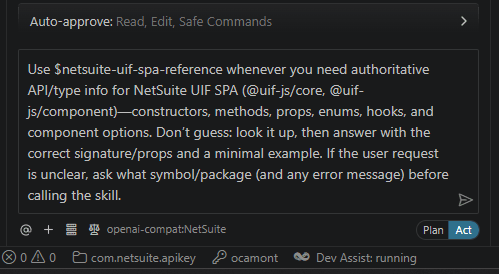 Tip:
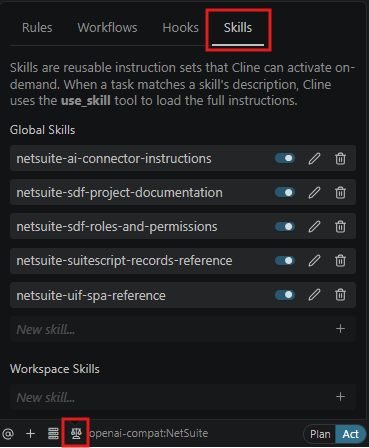
Tip:To see available skills in Cline, in VS Code go to the Cline Extension > Manage Cline Rules and Workflows > Skills.
For more information, see SuiteCloud Developer Assistant.