Service Connections: Static Versus Dynamic
Service connections in VB Studio are defined by the service’s OpenAPI metadata, which describes the available endpoints and details required to connect to the service. How you want your connection to retrieve this service metadata—either statically or dynamically—is entirely up to you. Both options have their advantages and disadvantages.
Let’s say a service’s OpenAPI definition is located at https://service.com/openapidef. You can set up your service connection to retrieve this definition in one of two ways:
- Copy the service definition from
https://service.com/openapidefat the time of development and save it to the extension’s sources. That is, statically retrieve the service metadata saved to the application when the service connection was first created—a static service connection. - Always get the service definition from
https://service.com/openapidef. That is, dynamically retrieve the service metadata from the source URL each time you open the application—a dynamic service connection. The service definition in this case is only a “reference”, a pointer to the OpenAPI document located outside VB Studio.
In the service connection wizard, you can use the Metadata Retrieval Option to specify how you want to retrieve service metadata:
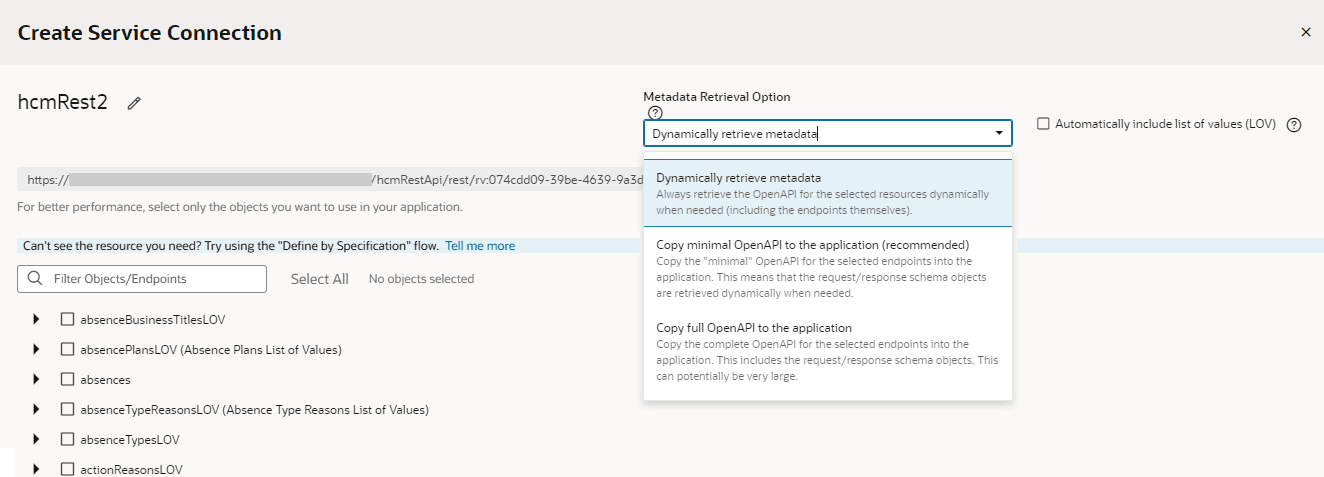
Description of the illustration static-dynamic-serviceconnections-appui.png
Here’s what each option provides:
-
Choose Dynamically retrieve metadata if your service definition changes frequently and you want to include these updates, especially during development, when things are rapidly evolving. In other words, by creating a dynamic service connection, you guarantee that a new field added to the service definition will be available to your App UI, because the service metadata is fetched every time the App UI is opened. This picks up all changes made to endpoints, including the new field. The metadata will always be up to date.
Note: You can dynamically retrieve metadata only for service connections that provide a service specification or those derived from a catalog, specifically the Oracle Cloud Applications backend.
- For better runtime performance, consider the Copy full OpenAPI to your application to your application option. Dynamic service connections pull entire resources, not just individual endpoints, which can make the
openapi3.jsonmetadata file unwieldy. If you check the Automatically include list of values (LOV) checkbox as well, the size of the file increases even more. Coupled with factors such as complexity of the schema and network latency, dynamically retrieving metadata may take a while to retrieve and process. Using the Copy full OpenAPI option and selecting just the endpoints you need for your application can improve performance, as your endpoint definitions are stored locally in the application for faster retrieval. - While you might consider creating a dynamic service connection for development, then converting the connection to a static one when your application is ready for production, there’s a better option: Copy minimal OpenAPI to the application. This option provides the best of both worlds when you create a service connection that points to an ADF Describe.
The Copy minimal OpenAPI to the application option is available only for services that are based on ADF Describe (like Oracle Cloud Applications’ ADF BC-based REST APIs) and have a minimal describe endpoint to get limited metadata. This option stores service metadata for the endpoints you select in your extension’s sources, much like a static service connection, but it only copies the minimal describe for those endpoints. It also dynamically retrieves the parameter or request/response schema similar to a dynamic service connection. But it does this only when required (say, when a user tries to bind a table with an endpoint’s response), not every time the extension is opened. Because only the minimal OpenAPI is copied to your application only for the endpoints you select, the size of the metadata file is reduced. And because the schema object is still referenced, the latest service definition is dynamically retrieved whenever required. For optimal performance, this is the recommended option for ADF Describe-based services.
Here’s a quick breakdown of the advantages and disadvantages of each metadata retrieval option:
| Service Connection Option | Advantage | Disadvantage |
|---|---|---|
| Copy full OpenAPI to your application (Static) | Better performance as service metadata is retrieved locally from the application’s sources | Application is out of sync from the latest service definition and might not have recent customizations. Also, because full service metadata (including child objects) is saved to the application’s sources, runtime performance may be impacted if this metadata is very large. |
| Dynamically retrieve metadata (Dynamic) | Provides the most up-to-date service definition for your application | Performance may be impacted, though not always |
| Copy minimal OpenAPI to the application (recommended) (Static + Dynamic) Available only for ADF Describe-based services like Oracle Cloud Applications |
Optimal performance as minimal service metadata is stored and can be retrieved faster from the application’s sources; granular endpoint selection is also possible. Dynamically referenced schema objects provide the ability to retrieve the most up-to-date request/responses schema. | Performance may be impacted when schema objects are retrieved |
No matter which option you choose to create your service connection, you can switch it up any time you want, as described in Convert a Service Connection (Static to Dynamic or Dynamic to Static). You can also change things when you edit a service connection to add endpoints, as described in Manage Service Endpoints.