Edit a Backend
To edit a backend:
- Open the Backends tab from the Services tab in the Navigator.
- Select the backend you want to modify, then click the Settings tab.
- Change the description, if desired, or change the transform attached to the backend (see Add Transforms for more information.)
- On the Headers tab, use + Header to add static headers that are passed from the browser to the service.
-
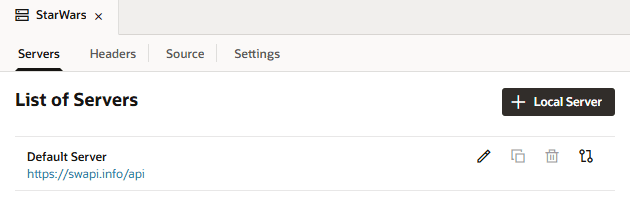
On the Servers tab, select an in-source or local server to modify. Note that local servers are flagged with an extra “Local server definition” tag.
-
Click the Edit icon
 to display the Edit Server dialog: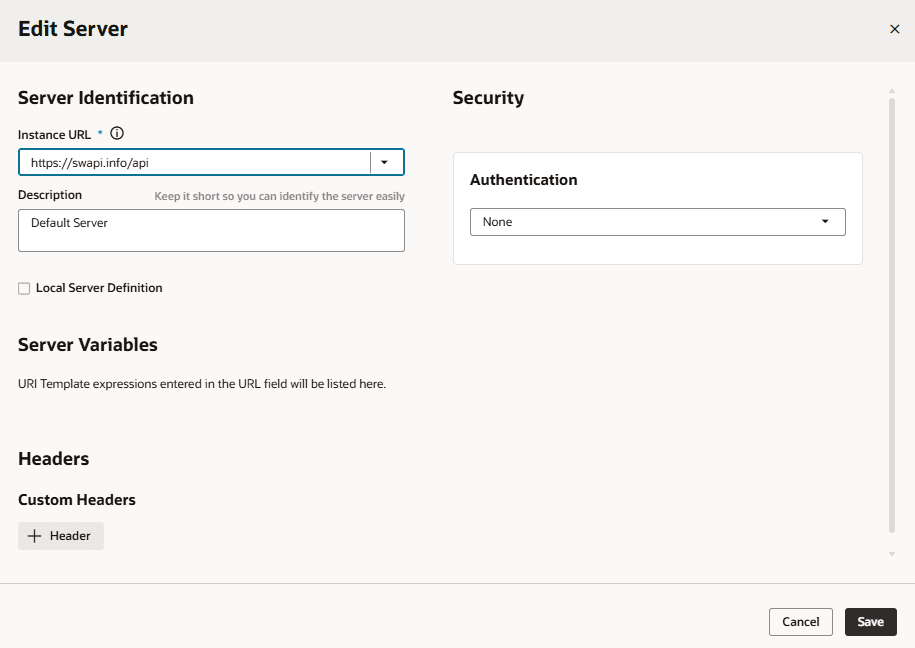
Modify the backend server details. These options are the same as those you configure when you define a backend. Depending on whether it’s a local or in-source server, you’ll see slightly different fields:
- In Server Identification, under Instance URL, change the modifiable portion (the part that isn’t grayed out) of the instance URL or the description. If this is an in-source server, you can also change the server variables (described in Add Server Variables for Backends).
- In Headers, under Custom Headers, use + Header to add static headers that are passed from the browser to the service (although it’s preferable to use the backend’s headers rather than those on this tab—see step 4 in this procedure).
- In Security, you can change the authentication type used to connect to the backend. If this is a local server, you can also change the connection type (see Set the Backend’s Authentication Method and Connection Type).
- Click Save when you’re done making changes.
-
Click the Source tab to view the contents of the
services/self/catalog.jsonat the extension level. Edit the file if needed.You can also access this file under
servicesin the Navigator’s Source View tab.
Remember, any changes you make here for a local server will not be reflected in the server’s source code.