Use External Table Cache to Improve Performance for External Tables
External Table Cache in Oracle Autonomous AI Database enables you to cache frequently accessed data from external tables in your database.
Note:
External Table Cache is only supported for Oracle AI Database 26ai.- About External Table Cache in Autonomous AI Database
An external table cache is a storage area in your Autonomous AI Database that stores the data from an external table. - Quick Start with External Table Caches
Provides examples to help you get started with creating and populating external table caches. - Choose Your Caching Preference
Describes how to choose the appropriate caching preference, including cache behavior and size allocation for external tables. - Prerequisites to Create External Table Cache
Lists the prerequisites to create the external table cache. - Use Policy-Based Caching for External Tables
Describes how to use policy-based caching for external tables in Autonomous AI Database. - Use Automatic Caching for External Table
Describes how to use automatic caching for external tables in Autonomous AI Database. - Monitor and Diagnose External Table Cache Performance
Autonomous AI Database provides views that allow you to monitor the external table cache. - Use Cases for External Table Caching
Describes common scenarios where external table caching is beneficial.
Parent topic: Features
About External Table Cache in Autonomous AI Database
An external table cache is a storage area in your Autonomous AI Database that stores the data from an external table.
External data is not managed by the database; however, you can use the external tables to query data outside of the database. Queries on external tables will not be as fast as queries on database tables because each time you access the data it needs to be fetched from the external files stored on Object Store.
The external table cache lets you store frequently accessed external data locally. When you use the cache, queries on external tables can retrieve data directly from within the Autonomous AI Database, making them significantly faster. You don't need to change existing SQL statements or workflows to benefit from faster access, as this caching mechanism is fully transparent to applications. You can create external table cache for partitioned and non-partitioned external tables created on Parquet, ORC, AVRO, CSV and Iceberg Tables.
-
Improved Performance for analytics: Queries are several times faster for your frequently accessed external data - ideal for dashboards, reports, and analytical tools that access the same data regularly.
-
100% Transparent: The caching mechanism is entirely transparent; applications can benefit from improved speed without requiring any changes to their queries, dashboards, or applications.
-
Lower Cloud Costs: In a multi-cloud application, caching reduces the need for repeated external data retrievals from remote storage, thereby reducing data egress fees associated with accessing data across regions or clouds.
-
Fine-grained, flexible caching control: You can cache all files, a percentage of files, or only the most recently updated data. You can control the cached data, cache size, and storage limits for external table caches.
External table caches in your database can be managed automatically or through policy-based settings. With policy-based cache management, you can define simple policies to populate, refresh, and retire files from the cache, giving you precise control over cache contents and maintenance.
See Query External Data for more information.
Quick Start with External Table Caches
Provides examples to help you get started with creating and populating external table caches.
Create a policy-based external table cache for the SALES schema.
When you create a cache, it is initially empty and enabled for population. The cache size increases each time a file is added, depending on the defined space quota limits for the schema, until it reaches the assigned limits.
DBMS_EXT_TABLE_CACHE.CREATE_CACHE to create external table cache for your schema. For example:BEGIN
DBMS_EXT_TABLE_CACHE.CREATE_CACHE (
owner => 'SALES',
table_name => 'STORE_SALES',
partition_type => 'PATH');
END;
/
This creates a cache for the STORE_SALES table in the SALES schema. The STORE_SALES is an external table pointing to data stored on Object Store.
The owner parameter specifies the schema name. This example creates an external table cache for the SALES user.
partition_type controls how the cache is split. With 'PATH', the cache is partitioned by the folder path of each source file. FILE$PATH is a hidden column that stores that folder path (everything before the file name).
…/n/<ns>/b/<bucket>/o/sales/2024/09/data1.parquet then FILE$PATH = 'sales/2024/09/' (the folder).
USER_EXTERNAL_TAB_CACHES view to verify the cache creation. For example:SELECT external_table_name, cached, disabled
FROM user_external_tab_caches;DBMS_EXT_TABLE_CACHE.VALIDATE procedure to validate an external table cache. An error is reported if the referenced external table is not found in the database. For example:BEGIN
DBMS_EXT_TABLE_CACHE.VALIDATE (
owner => 'SALES',
table_name => 'STORE_SALES',
raise_errors => TRUE);
END;
/Run DBMS_EXT_TABLE_CACHE.ADD_TABLE to populate an entire table into the cache. For example:
BEGIN
  DBMS_EXT_TABLE_CACHE.ADD_TABLE (
    owner         => 'SALES',
    table_name    => 'STORE_SALES');
END;
/
This example attempts to populate the STORE_SALES table into the cache.
Create automatically-managed external table caches
By default, automatic caching is disabled, AUTO caches are automatically created when you enable automatic caching.
DBMS_CACHE.SET_USER_PROPERTY to enable automatic caching of external table for the HR schema. For example: BEGIN
DBMS_CACHE.SET_USER_PROPERTY (
property_name => 'max_cache_size',
property_value_num => 10737418240);
END;
/This example enables automatic caching for the HR schema and sets the MAX_CACHE_SIZE parameter to 10737418240 bytes, specifying a maximum cache allocation of 10 GB for external tables in the HR schema. It also creates the required caches for external tables and populates them.
BEGIN
 DBMS_CACHE.SET_GLOBAL_PROPERTY (
 property_name       => 'max_cache_percent',
 property_value_num  => 20);
END;
/
Use the MAX_CACHE_PERCENT global property to set the default cache limit for all users. When you set MAX_CACHE_PERCENT to 20, automatic external table caching can use up to 20% of each user’s assigned tablespace quota (for example, a user with 100 GB quota can cache up to 20 GB, a user with 10 GB quota up to 2 GB). This global setting applies only to automatic caching and is per user, not a total limit across all users. You can override this default for individual users by running the DBMS_CACHE.SET_USER_PROPERTY procedure.
SELECT external_table_name, cached, auto
FROM all_external_tab_caches;DBMS_CACHE.REFRESH procedure to perform an on-demand refresh for all caches of a specified user. For example:BEGIN
DBMS_CACHE.REFRESH (
owner => 'HR',
refresh_type => 'ALL');
END;
/This example updates existing caches and creates new external table caches for the HR schema, as needed. The refresh_type property specifies the scope at which the refresh is performed.
Choose Your Caching Preference
The external table cache is created as a schema object in your database, which is allocated physical space similar to how tables and indexes are stored in data files. When you create an external table cache, a new table is created in your schema, and any space quota limits that are set for your schema also apply to the external table cache.
-
Policy-based cache management
-
You explicitly define how caches are created, populated, refreshed, and retired.
-
Provides fine-grained control over cache contents and lifecycle.
-
Suitable when predictable or customized caching behavior is required.
-
-
Automatic cache management
-
The database automatically creates, populates, refreshes, and drops caches.
-
Actions are driven by external table query patterns and workload usage.
-
Ideal for environments where caching behavior should adapt dynamically without manual intervention.
-
Prerequisites to Create External Table Cache
Lists the prerequisites to create the external table cache.
-
You can only create an external table cache in your own schema and for the external tables that you own.
-
You must have an appropriate space quota allocated for your schema to ensure there is sufficient storage capacity for the cache data.
-
You must have credentials to access external table files stored on Object Store. You don't need to create credentials if you enable resource principal credentials for accessing Oracle Cloud Infrastructure Object Store.
Use Policy-Based Caching for External Tables
Describes how to use policy-based caching for external tables in Autonomous AI Database.
Policy-based caching provides you with explicit control over how external data is cached, refreshed, and managed within the database. In this approach, you define caching policies and manage the entire cache lifecycle using PL/SQL procedures available in the DBMS_EXT_TABLE_CACHE package. These procedures allow you to explicitly perform various cache lifecycle operations, such as creating and populating caches, dropping files from the cache, and enabling or disabling the caches.
This approach gives you fine-grained control over cache behavior. You can specify which external table files or what percentage of external table’s data should be cached, thereby ensuring optimal use of cache space based on workload requirements. Procedures such as ADD_BY_LIKE and ADD_LATEST_FILES let you filter and populate files into the cache based on several parameters, such as file name patterns, modification times, or data freshness criteria. Similarly, you can use procedures such as CLEAR, RETIRE_FILES, or DROP_BY_LIKE to remove files from the cache.
Since policy-based caches are not managed by an automatic eviction algorithm, the database does not automatically drop them under space pressure. If cache space becomes unavailable, new files may fail to populate until additional space is freed. This approach provides greater flexibility, and is ideal for workloads where you need more control over cache contents.
See DBMS_EXT_TABLE_CACHE Package for more information.
The following flowchart outlines the steps for managing policy-based caches using the DBMS_EXT_TABLE_CACHE package. It includes key steps such as cache creation, population, and drop.
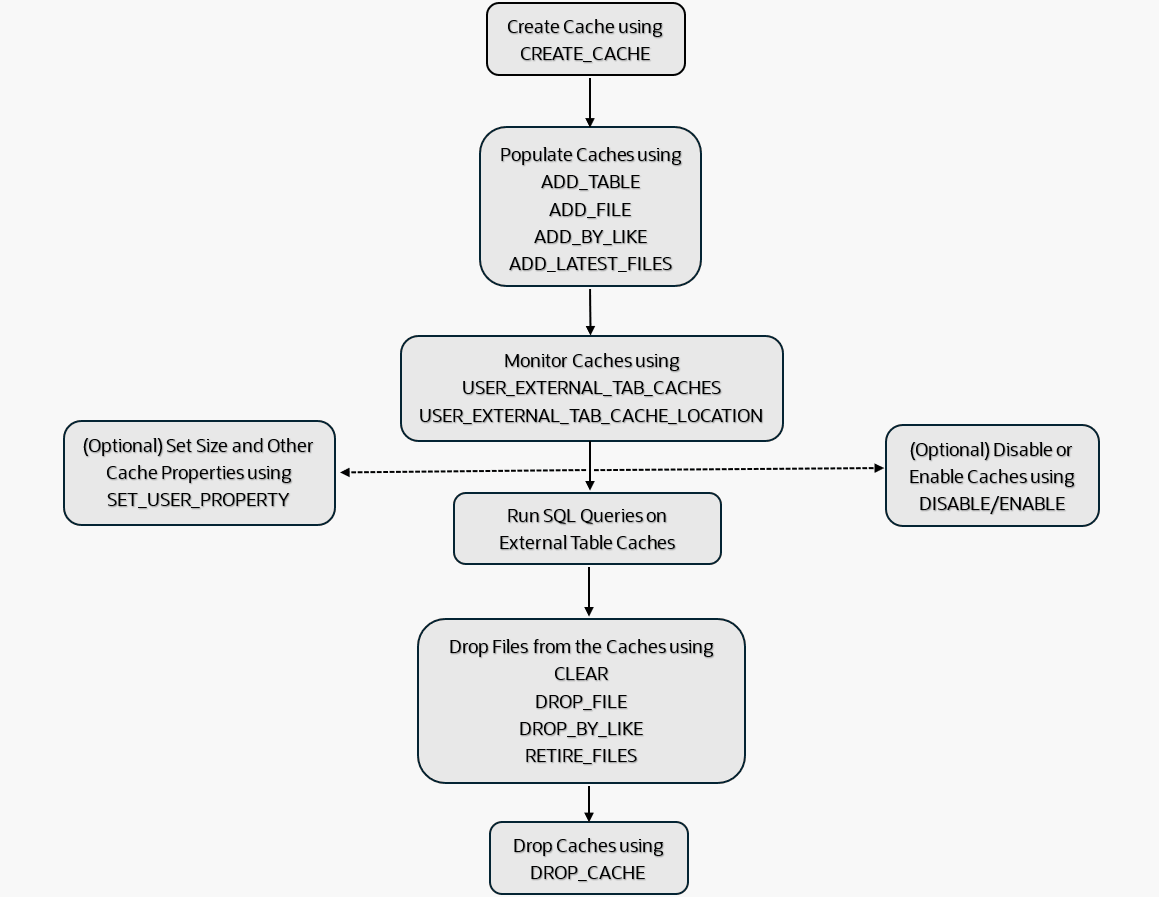
Description of the illustration adb_external_table_cache.png
Topics
- Populate Files into External Table Cache
Describes how to populate the previously created policy-based cache. - Drop Files from External Table Cache
Shows examples to drop files from external table cache. - Disable and Enable External Table Cache
Shows examples to disable and enable the external table cache. - Drop External Table Cache
Shows an example to drop the external table cache. - Set Optional Sizing Preferences for Policy-Based Caches
Describes how to set sizing preferences for policy-based external table caches in Autonomous AI Database.
Populate Files into External Table Cache
Describes how to populate the previously created policy-based cache.
After you create a cache, you can populate files into the cache. Populating files loads the contents of the specified external table files into the cache. You can choose to populate all files from a table, a specific percentage of the table, or specify a filter condition to limit the files you want to populate. For example, you can filter the files based on their names or a date range.
Note:
-
Depending on the space quota allocated for the schema, Oracle attempts to populate files into the cache. If the assigned quota limit is reached, Oracle stops populating files unless the required space is allocated.
-
The external table cache does not refresh automatically. To update the cache when a file on the Object Store is modified, you must repopulate the file.
-
When a file is deleted from the Object Store, the corresponding cached data immediately becomes invalid and cannot be retrieved.
Add Table to External Table Cache
Use DBMS_EXT_TABLE_CACHE.ADD_TABLE to populate an entire table or a certain percentage of the external table into the cache.
Examples
BEGIN
  DBMS_EXT_TABLE_CACHE.ADD_TABLE (
    owner         => 'SALES',
    table_name    => 'STORE_SALES');
END;
/
This example attempts to populate the STORE_SALES table into the cache, skipping any existing files that have already been populated.
BEGIN
  DBMS_EXT_TABLE_CACHE.ADD_TABLE (
    owner         => 'SALES',
    table_name    => 'STORE_SALES',
    percent_files => 80);
END;
/
This example attempts to populate 80% of the STORE_SALES table into the cache, skipping any existing files that have already been populated.
The percent_files parameter is optional; if you do not specify this parameter, the entire table is populated into the cache.
See ADD_TABLE Procedure for more information.
Add Files to External Table Cache
-
ADD_FILE: to add a single file into the cache. -
ADD_BY_LIKE: to add one or more specified files based on the specified path filters. -
ADD_LATEST_FILES: to add one or more files based on the specified time interval.
Examples
DBMS_EXT_TABLE_CACHE.ADD_FILE procedure to populate a single file into the external table cache. For example:BEGIN
DBMS_EXT_TABLE_CACHE.ADD_FILE (
owner => 'SALES',
table_name => 'STORE_SALES',
file_url => 'https://swiftobjectstorage.us-ashburn-1.oraclecloud.com/v1/your_namespace/your_bucket/salesdata.parquet'
);
END;
/This example populates data from the salesdata.parquet file into the cache.
This example skips populating the file into the cache if the specified file exists in the cache and has not been modified since the file was last cached.
See ADD_FILE Procedure for more information.
DBMS_EXT_TABLE_CACHE.ADD_BY_LIKE procedure to populate one or more files into the external table cache. For example:BEGIN
DBMS_EXT_TABLE_CACHE.ADD_BY_LIKE (
owner => 'SALES',
table_name => 'STORE_SALES',
path_filters => '["https://swiftobjectstorage.us-ashburn-1.oraclecloud.com/v1/your_namespace/your_bucket/sales%.parquet",
"https://swiftobjectstorage.us-ashburn-1.oraclecloud.com/v1/your_namespace/your_bucket/customer%.parquet"]'
);
END;
/This example populates all files with names beginning with sales or customer, while excluding files that have already been populated.
BEGIN
  DBMS_EXT_TABLE_CACHE.ADD_BY_LIKE (
    owner        => 'SALES',
    table_name   => 'STORE_SALES',
    path_filters => '["https://swiftobjectstorage.us-ashburn-1.oraclecloud.com/v1/your_namespace/your_bucket/sales#_data1.parquet",
                      "https://swiftobjectstorage.us-ashburn-1.oraclecloud.com/v1/your_namespace/your_bucket/sales#_data2.parquet"]',
    esc_char     => '#',
    force        => TRUE);
END;
/
This example populates the sales_data1.parquet and sales_data2.parquet files into the cache.
In this example, '#' character is defined as the escape character. The '_' character following '#' is treated as a literal underscore, not as a wildcard matching any single character.
See ADD_BY_LIKE Procedure for more information.
DBMS_EXT_TABLE_CACHE.ADD_LATEST_FILES procedure to populate one or more files based on the last modified date into the external table cache. For example:BEGIN
DBMS_EXT_TABLE_CACHE.ADD_LATEST_FILES (
owner => 'SALES',
table_name => 'STORE_SALES',
since => INTERVAL '7' DAY,
max_files => 5,
force => TRUE);
END;
/The since parameter specifies the time interval; only files modified within the last seven (7) days are eligible to be populated into the cache.
The max_files parameter limits the number of files that can be populated into the cache. This example populates only five (5) files.
The force parameter forces the specified files to be overwritten in the cache even if the files were not modified.
See ADD_LATEST_FILES Procedure for more information.
Parent topic: Use Policy-Based Caching for External Tables
Drop Files from External Table Cache
Shows examples to drop files from external table cache.
Clear External Table Cache
Use DBMS_EXT_TABLE_CACHE.CLEAR to drop all files from the external table cache. For example:
BEGIN
  DBMS_EXT_TABLE_CACHE.CLEAR (
    owner         => 'SALES',
    table_name    => 'STORE_SALES');
END;
/
This example drops all files from the STORE_SALES cache and deallocates all space used by the removed files.
See CLEAR Procedure for more information.
Drop Files from External Table Cache
-
DROP_FILE: to drop a single file from the cache. -
DROP_BY_LIKE: to drop one or more files from the cache based on the specified path filters. -
RETIRE_FILES: to drop one or more files from the cache based on the specified interval.
Examples
Use DBMS_EXT_TABLE_CACHE.DROP_FILE to drop a file from the external table cache. For example:
BEGIN
  DBMS_EXT_TABLE_CACHE.DROP_FILE (
    owner        => 'SALES',
    table_name   => 'STORE_SALES',
    file_url     => 'https://swiftobjectstorage.us-ashburn-1.oraclecloud.com/v1/your_namespace/your_bucket/salesdata.parquet'
);
END;
/
This example drops the salesdata.parquet file from the cache and deallocates all space used by the removed file.
See DROP_FILE Procedure for more information.
Use DBMS_EXT_TABLE_CACHE.DROP_BY_LIKE to drop one or more files based on the path_filters parameter. For example:
BEGIN
  DBMS_EXT_TABLE_CACHE.DROP_BY_LIKE (
    owner        => 'SALES',
    table_name   => 'STORE_SALES',
    path_filters => '["https://swiftobjectstorage.us-ashburn-1.oraclecloud.com/v1/your_namespace/your_bucket/salesdata.parquet",
                      "https://swiftobjectstorage.us-ashburn-1.oraclecloud.com/v1/your_namespace/your_bucket/salesdata1.parquet"]'
);
END;
/
This example drops the salesdata.parquet and salesdata1.parquet files from the cache and deallocates all space used by the removed files.
BEGIN
  DBMS_EXT_TABLE_CACHE.DROP_BY_LIKE (
    owner        => 'SALES',
    table_name   => 'STORE_SALES',
    path_filters => '["https://swiftobjectstorage.us-ashburn-1.oraclecloud.com/v1/your_namespace/your_bucket/sales#_data1.parquet",
                      "https://swiftobjectstorage.us-ashburn-1.oraclecloud.com/v1/your_namespace/your_bucket/sales#_data2.parquet"]'
);
END;
/
This example drops the sales#_data1 and sales#_data2 files from the cache and deallocates all space used by the removed files.
In this example, the '#' character is defined as the escape character. The '_' character following '#' is treated as a literal underscore, not as a wildcard matching any single character.
See DROP_BY_LIKE Procedure for more information.
Use DBMS_EXT_TABLE_CACHE.RETIRE_FILES to drop one or more files based on the specified interval. For example:
BEGIN
 DBMS_EXT_TABLE_CACHE.RETIRE_FILES (
    owner        => 'SALES',
    table_name   => 'STORE_SALES',
    before       => INTERVAL '30' DAY);
END;
/
This example drops files that are older than thirty (30) days from the cache and deallocates all space used by the removed files.
See RETIRE_FILES Procedure for more information.
The above examples remove one or more files from the cache while retaining the cache. You can load files again into the cache when necessary. See Populate Files into External Table Cache for more information.
Parent topic: Use Policy-Based Caching for External Tables
Disable and Enable External Table Cache
Shows examples to disable and enable the external table cache.
Run DBMS_EXT_TABLE_CACHE.DISABLE to disable external table cache from the database. Disabling a cache does not delete data from the cache; instead, the cache is flagged as DISABLED, and the optimizer cannot use the cache for query rewrites.
Example
BEGIN
    DBMS_EXT_TABLE_CACHE.DISABLE (
      owner          => 'SALES',
      table_name     => 'STORE_SALES');
END;
/
This example disables the STORE_SALES cache.
See DISABLE Procedure for more information.
After you disable an external table cache, use DBMS_EXT_TABLE_CACHE.ENABLE to enable the cache.
BEGIN
  DBMS_EXT_TABLE_CACHE.ENABLE (
    owner        => 'SALES',
    table_name   => 'STORE_SALES'
 );
END;
/
This example enables the STORE_SALES cache.
See ENABLE Procedure for more information.
Parent topic: Use Policy-Based Caching for External Tables
Drop External Table Cache
Shows an example to drop the external table cache.
Run DBMS_EXT_TABLE_CACHE.DROP_CACHE to drop an external table cache. The DBMS_EXT_TABLE_CACHE.DROP_CACHE procedure removes the specified external table cache from the database and releases the storage space associated with the cache.
Example:
BEGIN
    DBMS_EXT_TABLE_CACHE.DROP_CACHE (
      owner          => 'SALES',
      table_name     => 'STORE_SALES');
END;
/
This example drops the STORE_SALES cache from the SALES schema.
Dropping a cache removes its metadata from the data dictionary and deletes all its cached data.
See DROP_CACHE Procedure for more information.
USER_EXTERNAL_TAB_CACHES view to verify that the cache has been dropped. For example:SELECT external_table_name, cached
FROM user_external_tab_caches;See DBA_EXTERNAL_TAB_CACHES and USER_EXTERNAL_TAB_CACHES Views for more information.
Parent topic: Use Policy-Based Caching for External Tables
Set Optional Sizing Preferences for Policy-Based Caches
Describes how to set sizing preferences for policy-based external table caches in Autonomous AI Database.
By default, the external table cache is disabled for a user. To enable and create the external table cache use the DBMS_EXT_TABLE_CACHE.CREATE_CACHE procedure. The cache is created in your default schema and inherits any space quota limits defined for your schema. However, you can also use the DBMS_EXT_TABLE_CACHE.SET_USER_PROPERTY procedure to define space quotas for external table cache. You use the PROPERTY_NAME and PROPERTY_VALUE parameters of the DBMS_EXT_TABLE_CACHE.SET_USER_PROPERTY procedure to set the space quota limits.
The PROPERTY_NAME parameter accepts MAX_CACHE_SIZE and MAX_CACHE_PERCENT values. The MAX_CACHE_SIZE property specifies the total external cache size in bytes. The MAX_CACHE_PERCENT property specifies the total external cache size as a percentage of the specified user's quota.
Examples
BEGIN
    DBMS_EXT_TABLE_CACHE.SET_USER_PROPERTY (
    property_name  => 'MAX_CACHE_PERCENT',
    property_value => 50,
    owner          => 'SALES');
END;
/
This example sets the caching preference to MAX_CACHE_PERCENT for the SALES schema.
The property_value is 50%, which specifies that the cache space quota for the SALES schema is a maximum of 50% of the total space quota defined for SALES.
BEGIN
    DBMS_EXT_TABLE_CACHE.SET_USER_PROPERTY (
    owner          => 'SALES',
    property_name  => 'MAX_CACHE_SIZE',
    property_value => 5368709120);
END;
/
This example sets the caching preference to MAX_CACHE_SIZE for the SALES schema.
The property_value is 5368709120, which specifies that the maximum cache size for the SALES schema is up to 5GB.
See SET_USER_PROPERTY Procedure and CREATE_CACHE Procedure for more information.
Use DBMS_EXT_TABLE_CACHE.GET_USER_PROPERTY to retrieve the cache size properties.
Example:
SET SERVEROUTPUT ON
    DECLARE
    max_cache_sz NUMBER,
    BEGIN
    max_cache_sz := DBMS_EXT_TABLE_CACHE.GET_USER_PROPERTY (
        property_name       => 'MAX_CACHE_SIZE',
        owner               => 'SALES');
END;
/
See GET_USER_PROPERTY Function for more information.
Note the following precedence order for setting the cache size properties:
-
When
MAX_CACHE_SIZE,MAX_CACHE_PERCENT, and the space quota are defined,MAX_CACHE_PERCENTtakes precedence overMAX_CACHE_SIZE. -
When only
MAX_CACHE_SIZEis defined, andMAX_CACHE_PERCENTor space quota is not defined,MAX_CACHE_SIZEtakes precedence. -
When only the space quota is defined and
MAX_CACHE_SIZEandMAX_CACHE_PERCENTare not defined, the cache size quota defaults to 10% of the total schema quota. -
When
MAX_CACHE_SIZE,MAX_CACHE_PERCENT, or the space quota is not defined, the cache space quota defaults toUNLIMITED.
Note:
To monitor cache space usage, query theCACHE_CUR_SIZE column in the ALL_EXTERNAL_TAB_CACHES views. See DBA_EXTERNAL_TAB_CACHES and USER_EXTERNAL_TAB_CACHES Views for more information.
Parent topic: Use Policy-Based Caching for External Tables
Use Automatic Caching for External Table
Describes how to use automatic caching for external tables in Autonomous AI Database.
When you enable automatic caching for your database, the database automatically manages the entire cache lifecycle, including creation, population, refresh, and drop, without requiring your intervention. Oracle uses internal mechanisms to determine which external tables can benefit from caching, when to refresh the caches, and when to drop them based on usage patterns and available storage space. This approach reduces your overhead for cache management, as cache usage is continuously monitored, ensuring that frequently accessed external table data remains available in the cache to improve query response times.
By default, automatic caching is not enabled in your database. To enable it, you must set the cache size to a non-zero value using procedures such as DBMS_CACHE.SET_USER_PROPERTY provided in the DBMS_CACHE package. You can configure automatic caching either for a specific user or as the default setting for all database users, depending on your requirements.
When automatic caching of external tables is enabled, Oracle creates external table caches that are marked AUTO, and populates all corresponding data from a external table into its cache if quota permits. The AUTO caches are refreshed automatically on a regular schedule. However, you can also use DBMS_CACHE.REFRESH or DBMS_CACHE.CLEAR procedures to refresh or drop your caches, respectively.
Oracle manages the AUTO caches using an eviction algorithm similar to Least Recently Used (LRU). When under space pressure, caches that have been accessed least recently are automatically dropped during the refresh cycle to release the storage space.
Topics
- Enable Automatic Caching for External Tables
Describes how to configure automatic caching properties. - Refreshing External Table Caches
Shows an example to refresh AUTO caches for the specified schema. - Drop External Table Caches
Shows an example to drop AUTO caches for the specified schema.
Enable Automatic Caching for External Tables
Describes how to configure automatic caching properties.
By default, automatic caching is disabled, you can enable automatic caching for your external tables either globally for all database users or for a specific user. After automatic caching is enabled, the database automatically creates external table caches. All newly created caches are marked as AUTO. Existing caches continue to follow the policy-based cache management settings.
You use DBMS_CACHE.SET_GLOBAL_PROPERTY or DBMS_CACHE.SET_USER_PROPERTY to set AUTO caching properties, including properties to enable automatic caching globally or for a specified user, respectively. User-level caching preferences take precedence over global caching preferences. Use the PROPERTY_NAME and PROPERTY_VALUE parameters of these procedures to set space quota limits for external table caches.
Depending on the specified space quota, Oracle creates the caches and attempts to populate the entire external table data into the cache. The population process fails if the cache size is not sufficient to accommodate the entire data of the external table.
Note:
To monitor cache space usage, query theCACHE_CUR_SIZE column in the ALL_EXTERNAL_TAB_CACHES views. See DBA_EXTERNAL_TAB_CACHES and USER_EXTERNAL_TAB_CACHES Views for more information.
Parent topic: Use Automatic Caching for External Table
Refreshing External Table Caches
Shows an example to refresh AUTO caches for the specified schema.
-
Add new caches.
-
Drop any invalid caches (the caches that becomes inaccessible are marked as invalid and are dropped in the subsequent refresh cycle.)
-
Update or repopulate existing caches.
-
Drop the least recently accessed caches when under space pressure.
Alternatively, you can also use the DBMS_CACHE.REFRESH procedure to perform an on-demand refresh for all caches of the HR user.
Parent topic: Use Automatic Caching for External Table
Drop External Table Caches
Shows an example to drop AUTO caches for the specified schema.
During each refresh cycle, invalid caches and the least recently accessed caches are dropped from the database. Alternatively, you can use the DBMS_CACHE.CLEAR procedure to drop all caches for a specified user.
Parent topic: Use Automatic Caching for External Table
Monitor and Diagnose External Table Cache Performance
Autonomous AI Database provides views that allow you to monitor the external table cache.
| View | Description |
|---|---|
|
Provides information either about all external table caches in the database or about a user's external table caches. |
|
|
Provides information about the files in Cloud Storage that are accessible to the current user and belong to cached external tables. |
|
|
Provides information about the files in cloud storage that are owned by the current user and belong to cached external tables. This view does not display the |
These views give detailed information about how cached data for external tables is stored, accessed, and maintained within the database. These views enable you to monitor cache performance, identify stale or outdated data, and analyze space utilization to ensure optimal query efficiency. By monitoring these views, you can detect when caches need refreshing, verify that cache sizes are within configured limits, and diagnose performance bottlenecks related to external data access.
Examples:
SELECT table_name, cached, stale, last_refreshed, last_accessed
  FROM all_external_tab_cache_locations
  ORDER BY stale DESC, usage_count DESC;
The following query provides information on cache inventory and space usage:
SELECT external_table_name, cache_cur_size, cache_max_size, disabled
FROM user_external_tab_caches;Use Cases for External Table Caching
Describes common scenarios where external table caching is beneficial.
| Use Case | What to Cache | Cost Impact | Performance Impact | Notes |
|---|---|---|---|---|
|
Interactive BI or dashboards over external tables |
Frequently queried external tables or partitions feeding dashboards |
Eliminates repeated cross cloud or regional reads |
Keeps hot data local for faster, consistent response times and avoids cold starts |
This is the most common scenario |
|
Multicloud analytics (For example, Autonomous AI Database on OCI reading S3 or GCS or Azure) |
Hot datasets accessed from non-OCI Object Stores |
Cuts cross cloud egress and reduces provider request charges |
Removes remote I/O and network latency |
Call out cost and latency together |
|
Cross region (same cloud) access |
External data in a different region |
Avoids cross-region egress on repeat scans |
Reduces latency by localizing reads |
Same rationale as multicloud. |
|
Materialized View refresh over external data |
Source external tables for Materialized Views |
Lowers repeat egress for scheduled refreshes |
Stabilizes and speeds Materialized View refresh; reduces remote scan time |
Ideal for near to real-time aggregates |
|
Latest files pipelines (landing zone) |
Last |
Latest data is always hot |
||
|
Small but frequently joined lookup or reference data |
Small external tables used in joins |
Prevents overload due to many small requests |
Keeps lookup data local for joins |
Small dictionary data is always up to date, non need to maintain complex ETL |
|
Data science and feature engineering |
Reused training or feature sets in external tables |
Fewer remote reads during iterative work |
Faster repeated scans during experimentation |
Works well with notebook-driven loops |
|
Bursty or throttled object store |
Any high traffic external table |
Fewer retries across many users |
Shields queries from store throttling and variable throughput |
Improves SLA predictability |
|
Iceberg or large partitioned lakes |
Hot partitions or snapshots read frequently |
Avoids repeated reads of the same parquet stripes |
Localizes data pages for hot partitions; steadier query times |
Cross link to Iceberg setup page |
|
Adhoc exploration at scale |
Provisional external tables that see repeat access |
Avoids repaying egress while exploring |
Makes follow up queries snappy after first pass |
Good on ramps without copying pipelines. |