Choose a Character Set for Autonomous AI Database
The Autonomous AI Database default database character set is Unicode AL32UTF8 and the default national character set is AL16UTF16. When you provision a database, depending on the workload type, you can select a database character set and a national character set.
Note: Oracle recommends using the default Unicode database character set (AL32UTF8) for its universality and compatibility with contemporary and future technologies and language requirements.
If you are using an on-premises database with a non-Unicode character set, migrating to the default Unicode character set can be a convoluted process requiring complex data analysis. Thus, Autonomous AI Database lets you choose a character set when you provision an Autonomous AI Database instance.
-
Create an Autonomous AI Database following the provisioning steps.
See Provision an Autonomous AI Database Instance for more information.
-
On the Create Autonomous AI Database page expand Show Advanced Options.
-
In the advanced options area, select the Management tab.
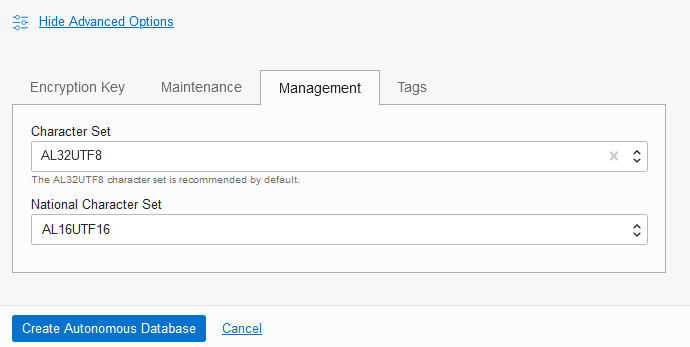
Description of the illustration adb_character_set.png
-
In the Character Set field, use the selector to choose a character set.
-
In the National Character Set field, use the selector to choose a national character set.
To make selecting a value easier, when you type in the text area this filters the list. For example, if you type JA you see only the options containing JA, including: JA16EUC, JA16EUCTILDE, JA16SJIS, JA16JA16SJISTILDE, and JA16VMS.
-
-
Click Create Autonomous AI Database to provision the Autonomous AI Database.
Notes for Character Set Selection
Provides notes and limitations for selecting a character set and a national character set on Autonomous AI Database.
-
When you provision an Autonomous AI Database instance you can only select a character set for Lakehouse, Transaction Processing, or APEX workload types.
The JSON Database workload type only supports the default character set and you cannot select a different character set.
-
Always Free Autonomous AI Database does not support character set selection.
-
You cannot select a different character set when you clone an instance. A cloned Autonomous AI Database instance has the same character set as the source database.
-
You cannot change the character set of an existing Autonomous AI Database instance.
-
APEX developer and administration pages are supported in English only when the database character set is different from the default (AL32UTF8).
Translation of user applications into other languages or setting an application's primary language to a value other than English is not supported. If you use APEX in a language other than English, you may experience issues such as illegible, garbage text. You can, however, use your APEX applications to process non-English user data, as long as the languages of the data are supported by the selected database character set.
If you need full globalization support in APEX, migrate your applications and data to AL32UTF8, the universal Unicode character set, which is the default and recommended character set for Autonomous AI Database.
When you choose a character set other than the default Unicode character set (AL32UTF8) on Autonomous AI Database, the APEX language selector only shows languages that are supported in that database character set. For example, if you choose the database character set WE8ISO8859P1 (ISO 8859-1 West European), the language selector does not show Japanese or Korean.
-
While you are provisioning an instance the Character Set selector on the Management tab lists the supported character set names. If you want to see a list of supported database character sets before you provision a database, refer to the following:
-
See Table A-4 in Recommended Database Character Sets
-
See Table A-6 in Other Character Sets
-