Audit Autonomous AI Database
Autonomous AI Database provides auditing that allows you to monitor Oracle AI Database activities.
About Auditing Autonomous AI Database
Autonomous AI Database provides auditing to track, monitor, and record database actions. Auditing can help you detect security risks and improve regulatory compliance for your database.
Audit Features on Autonomous AI Database
Autonomous AI Database includes extensive, sophisticated audit capabilities that allow you capture the audit information you need for your organization. Autonomous AI Database provides default auditing.
In addition, you can use either of the following to apply auditing policies:
-
Use Oracle Data Safe to apply auditing policies for database users, for administrative users, and to apply predefined auditing policies or to apply customized auditing policies. See Activity Auditing Overview for more information.
-
Configure Oracle AI Database Audit Policies. See Configuring Audit Policies for more information.
You can configure auditing to accomplish the following:
-
Enable accountability for actions. These include actions taken in a particular schema, table, or row, or affecting specific content.
-
Deter users, or others, such as intruders, from inappropriate actions based on their accountability.
-
Investigate suspicious activity. For example, if a user is logging into the database using the application's database credentials, then auditing connections to the database lets you determine that the login came from a user's workstation instead of from the application server.
-
Notify an auditor of the actions of an unauthorized user. For example, notify an auditor when an unauthorized user attempts to delete data from a table.
-
Monitor and gather data about specific database activities. For example, you can gather statistics about which tables are being updated, the number of failed logins, or how many concurrent users connect at peak times.
-
Detect problems with an authorization or access control implementation. For example, you can create audit policies that you expect will never generate an audit record because the data is protected in other ways. However, if these policies generate audit records, then you will know the other security controls are not properly implemented.
-
Address auditing requirements for compliance. Regulations such as the following have common auditing-related requirements:
-
European Union General Data Protection Regulation (GDPR)
-
Sarbanes-Oxley Act
-
Health Insurance Portability and Accountability Act (HIPAA)
-
International Convergence of Capital Measurement and Capital Standards: a Revised Framework (Basel II)
-
Japan Privacy Law
-
European Union Directive on Privacy and Electronic Communications
-
Audit Data on Autonomous AI Database
Autonomous AI Database protects audit data and writes its audit trail to the UNIFIED_AUDIT_TRAIL data dictionary view.
The underlying table storing audit data on Autonomous AI Database is AUDSYS.AUD$UNIFIED. This table is protected and does not allow users to perform DML/DDL operations or to purge the table (any attempt to perform these actions automatically produces an audit record). After an audit record is written, the only activity allowed is for the ADMIN user to perform a PURGE. The ADMIN has the AUDIT_ADMIN role that is required to run a PURGE. If you assign the AUDIT_ADMIN role to another user, then that user could also perform a PURGE.
Depending on the number and type of audit policies you use and the amount of activity, over time the audit trail can grow to use a large amount of storage. Autonomous AI Database provides the following ways to limit the storage required for audit data:
-
Each Autonomous AI Database instance runs an automated purge job once a day to remove all audit records older than fourteen (14) days.
-
Users with the AUDIT_ADMIN role can purge audit records manually using the
DBMS_AUDIT_MGMT.CLEAN_AUDIT_TRAILprocedure. See DBMS_AUDIT_MGMT for more information.
If you need a longer audit data retention period than 14 days, use Oracle Data Safe to retain audit data. See Extend Audit Record Retention with Oracle Data Safe on Autonomous AI Database for more information.
Autonomous AI Database audits and logs every operation carried out in your database by the Oracle Cloud Infrastructure Operations teams. See View Oracle Cloud Infrastructure Operations Actions for more information on how to audit Operations activities.
Default Audit Policies on Autonomous AI Database
Autonomous AI Database provides auditing to track, monitor, and record activities on your database.
By default, Autonomous AI Database applies audit policies to audit the following database activities:
-
All activity by Oracle Cloud Operations
-
All login failures to the database
-
All password changes
-
Attempts to create or alter procedures
-
Execution of certain procedures, including procedures in the packages:
UTL_HTTPorUTL_SMTPthat connect to the network
In addition, you can use either of the following to apply additional auditing policies:
-
Use Oracle Data Safe to apply auditing policies for database users, for administrative users, and to apply predefined auditing policies or to apply customized auditing policies. For more information, see:
-
Configure Oracle AI Database Audit Policies. See Configuring Audit Policies for more information.
Register Oracle Data Safe on Autonomous AI Database
Use Oracle Data Safe to apply auditing policies for database users, for administrative users, to apply predefined auditing policies or to extend the audit data record retention for your Autonomous AI Database instance.
Register your Autonomous AI Database instance with Oracle Data Safe as follows:
-
Access your Autonomous AI Database instance from the Oracle Cloud Infrastructure Console.
-
Open the Oracle Cloud Infrastructure Console by clicking the
 next to Oracle Cloud.
 -
From the Oracle Cloud Infrastructure left navigation menu click Oracle AI Database and then click Autonomous AI Database.
-
On the Autonomous AI Databases page select an Autonomous AI Database from the links under the Display Name column.
-
-
Register your Autonomous AI Database instance with Oracle Data Safe.
-
On the Autonomous AI Database Details page, under Data Safe, click Register.
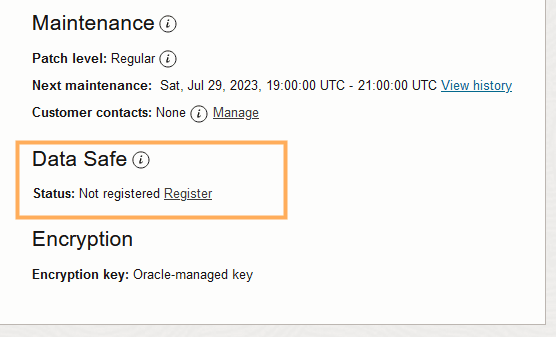
-
In the Register database with Data Safe dialog, click Confirm.
The Data Safe status shows: Registering. This step takes about 15 to 20 minutes.
-
After Oracle Data Safe is registered, the Data Safe status shows Registered and two links: View and Deregister.
Click View to show the Data Safe register database details page.
Click Deregister to disable Oracle Data Safe.
Extend Audit Record Retention with Oracle Data Safe on Autonomous AI Database
Use Oracle Data Safe to extend the audit data record retention to a specified number of months.
First register your Autonomous AI Database instance with Oracle Data Safe. See Register Oracle Data Safe on Autonomous AI Database for more information.
After your Autonomous AI Database instance is registered, you can specify the Data Safe retention period.
See Update Retention Periods for a Target Database for more information.
View and Manage Oracle Data Safe Audit Trails on Autonomous AI Database
Data Safe uses audit trails to define where to retrieve the audit data and to collect Autonomous AI Database audit records. During the registration process, Oracle Data Safe discovers the audit trails and creates an audit trail resource.
Oracle Data Safe lists resources on the Audit Trails page. To access the Audit Trails page, under Security Center in Data Safe click Activity Auditing, and then, on the Activity Auditing page under Related Resources click Audit Trails. You can discover new audit trails at any time and remove audit trail resources in Oracle Data Safe as needed.
First register your Autonomous AI Database instance with Oracle Data Safe. See Register Oracle Data Safe on Autonomous AI Database for more information.
When the Autonomous AI Database is stopped or restarted, the following happens:
-
The audit trail switches to a retrying state and Data Safe makes multiple attempts to reconnect for four (4) hours. The Audit Trail Collection State field shows: RETRYING.
In this case, if the Autonomous AI Database (target database) starts, the audit trail automatically resumes.
-
After four hours, the audit trail switches to a stopped state. The Audit Trail Collection State field shows: STOPPED_NEEDS_ATTN.
In this case, when the Autonomous AI Database (target database) starts and the audit trail collection state is STOPPED_NEEDS_ATTN, you can manually resume the audit trail.
You can also manually stop or delete the audit trail. Deleting the audit trail does not remove audit records that have already been collected. Those records remain in Data Safe until the retention period is reached.
See View and Manage Audit Trails for more information.
View and Manage Audit Policies with Oracle Data Safe on Autonomous AI Database
Use Oracle Data Safe to set audit policies for your Autonomous AI Database instance.
First register your Autonomous AI Database instance with Oracle Data Safe. See Register Oracle Data Safe on Autonomous AI Database for more information.
After your Autonomous AI Database instance is registered, access Oracle Data Safe to set audit policies.
See View and Manage Audit Policies for more information.
Generate Audit Reports with Data Safe on Autonomous AI Database
Data Safe includes out-of-box audit data reports, and you can create custom reports to suit your needs.
After you enable and register Oracle Data Safe, and you add a trail to collect audit data from your Autonomous AI Database instance, then you can use the reports to monitor activity for your database.
See View and Manage Audit Reports for more information.